
How to Log In to Your IRS Account in Minutes


 4 min. read
  Published on
The IRS allows taxpayers to access their federal tax information, check balances, make payments, and view tax records online. You can log in to IRS through the official IRS website using your ID.me account.
This guide explains how to log in, create an account, and fix common sign-in problems.
How to Log In to Your IRS Account?
Use the IRS website
You can access your IRS online account through the official website. Follow these steps:
- Visit IRS.gov/account.
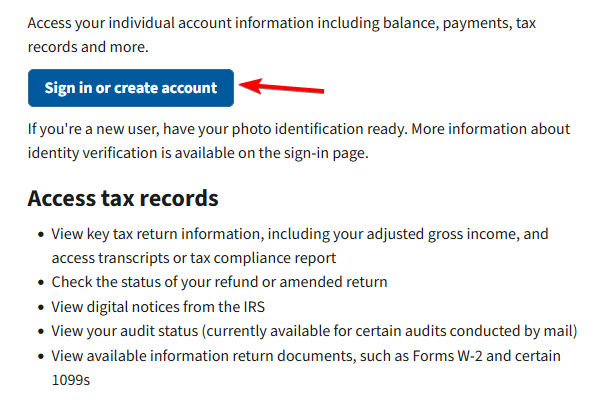
- Click Sign in or create account to continue.
- Enter the email address and password associated with your ID.me account.
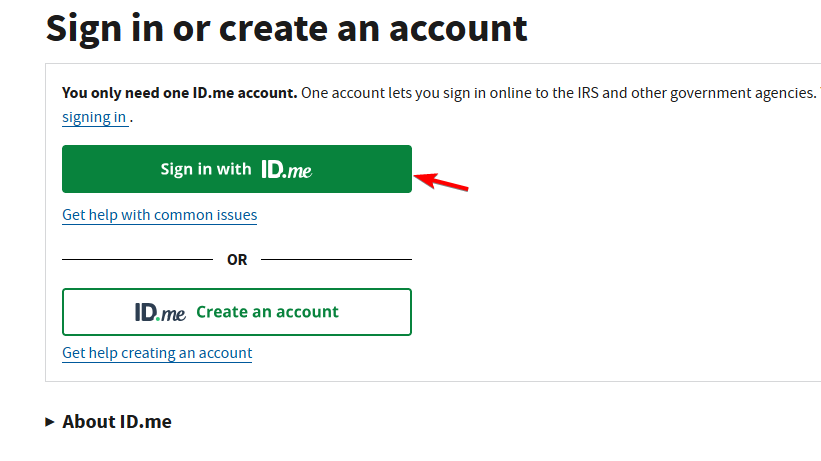
- Confirm your identity using your authentication app, security code, or another configured verification method.
- Once you sign in, you can review your tax balance, payment history, and other available account information.
If you already have a verified ID.me account, you can use your existing credentials without creating another account.
How to Access Your IRS Business Tax Account
Business owners and authorized representatives can use the IRS Business Tax Account to manage eligible business tax information.
- Visit the IRS Business Tax Account page.
- Click Sign in or create account.
- Sign in using your existing ID.me credentials or create an account.
- Complete any additional steps required to verify your authority to access the business.
- Open your business dashboard to review available tax information.
The IRS uses the same ID.me sign-in credentials for individual and business accounts, although business access requires additional authorization.
How to Fix IRS Login Problems
If you cannot sign in to your IRS account, the problem may involve your ID.me credentials, security verification, or browser.
- Reset your ID.me password – Select Forgot password? on the ID.me sign-in page and follow the email instructions to create a new password. See the ID.me password recovery guide.
- Check your verification method – Use another authentication method linked to your ID.me account if you cannot receive security codes.
- Recover your ID.me account – Follow the ID.me account recovery instructions if you no longer have access to your authentication methods.
- Refresh the IRS website – Reload the sign-in page and try logging in again.
- Clear browser cache and cookies – Remove stored browsing data that may interfere with your IRS login session.
- Try another browser – Use an updated version of Chrome, Edge, Firefox, or Safari.
- Check your internet connection – Make sure your connection is stable before attempting to sign in.
- Try again later – Temporary IRS server problems or maintenance may prevent account access.
- Contact IRS support – Visit the IRS online account FAQ for additional troubleshooting guidance.
The easiest way to complete the IRS login process is to visit IRS.gov/account and sign in with your verified ID.me credentials. Once inside, you can check your tax records, make payments, monitor refunds, and manage important account information without contacting the IRS by phone.
If you need help accessing other online services, you can also learn how to log in to QuickBooks Online, access BambooHR on PC and mobile, or sign in to your Federal Student Aid (FAFSA) account.
Frequently Asked Questions
What is the official IRS login website?
The official IRS online account website is IRS.gov/account. From this page, you can sign in or create an account using ID.me.
Can I log in to the IRS without ID.me?
You need an ID.me account to access the IRS Individual Online Account. However, certain IRS services, including guest tax payments and refund tracking, do not require an account login.
Why can’t I log in to my IRS account?
Incorrect ID.me credentials, authentication problems, incomplete identity verification, browser issues, or temporary IRS service interruptions can prevent login. Check your credentials and authentication method first.
Can I check my IRS refund without logging in?
Yes. You can use the Where’s My Refund? tool without signing in to your IRS online account. You will need your Social Security number or ITIN, filing status, and exact expected refund amount.
Is creating an IRS online account free?
Yes. Creating an IRS Individual Online Account and verifying your identity through ID.me is free.
Can I use my IRS account on my phone?
Yes. You can access your IRS account through a mobile browser or use the official IRS app, which supports ID.me sign-in for account features.

Read our disclosure page to find out how can you help Windows Report sustain the editorial team. Read more



Improve this guide



User forum
0 messages