
eBay Login Guide: How to Access Account & Fix Sign-In Issues


 8 min. read
  Updated on
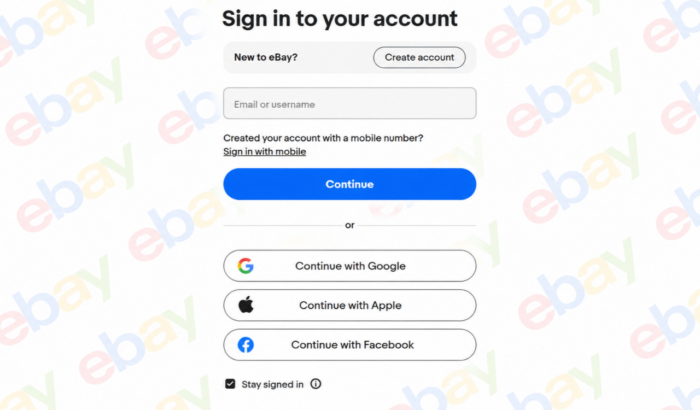
Logging into your eBay account lets you manage purchases, track orders, save favorite items, and keep tabs on your selling activity. Whether you’re using a computer or phone, accessing My eBay takes only a few steps. Here’s how to log in to eBay on your computer or phone, recover your account, and keep it secure.
How to sign into your eBay account
To access My eBay from a computer or mobile browser:
- Open eBay’s official sign-in page.
- Enter the email address or username connected to your account.
- Select Continue.
- Enter your password.
- Select Sign in.
Once you are signed in, open My eBay to manage your buying and selling activity, saved items, favorite sellers, searches, messages, and other account features.
Other ways to sign in to eBay
A traditional username and password are not your only options. Depending on how your account is configured, eBay may also let you sign in with:
- A linked Google account
- A linked Facebook account
- A linked Apple account
- A passkey stored on your device
Your Google, Facebook, or Apple account must already be linked to your eBay account for the corresponding sign-in option to work. eBay passkeys can use a device PIN, pattern, fingerprint, or another device-level authentication method instead of requiring you to type your eBay password.
How to access My eBay on a phone
Open the official eBay app and select the My eBay or account area. Follow the sign-in prompts using your email address, username, linked account, password, or passkey.
After signing in, My eBay provides access to features such as:
- Purchase and sales activity
- Saved and watched items
- Messages
- Account settings
- Seller tools, where applicable
Button names and menu positions can vary slightly between app versions and devices. Keeping the official app updated can help prevent avoidable compatibility and sign-in issues.
What to do when the eBay login is not working
Most login problems can be traced to incorrect credentials, stored browser information, a password issue, or the wrong sign-in method.
| Problem | Recommended action |
|---|---|
| Email or username is rejected | Check spelling and try the other identifier connected to the account |
| Password is rejected | Turn off Caps Lock and type the password manually |
| Old password keeps appearing | Delete the saved entry or temporarily disable browser autofill |
| You recently changed your password | Manually enter the new password instead of accepting the stored version |
| Google, Facebook, or Apple login fails | Try your eBay email address or username unless the external account is already linked |
| Passkey does not work | Follow the prompt to use your username and password instead |
| The page repeatedly reloads | Clear eBay-related browser cookies and cache, then restart the browser |
| You no longer remember the password | Use eBay’s official password-reset process |
eBay specifically recommends checking Caps Lock, looking for spelling errors, and manually entering recently changed credentials when a browser continues to remember old information.
How to reset an eBay password
Use only eBay’s official password-reset page. Do not provide your password or verification code to an independent website, email sender, text-message sender, or caller.
If you still know your current password but want to change it:
- Sign in to your eBay account.
- Open Sign in and security.
- Find Password and select Edit.
- Enter your current password.
- Enter the new password.
- Submit the change.
After changing the password, update the saved password in the eBay app and in any password manager or browser you use. eBay also recommends clearing cache and cookies when old stored credentials interfere with the new password.
Choose a safer password
Use a password that is:
- Unique to your eBay account
- Difficult to guess
- Not reused for your email, banking, or social-media accounts
- Stored in a trusted password manager when possible
A unique password limits the damage if another website experiences a security breach.
Protect your eBay account with a passkey
A passkey allows you to authenticate through your device instead of typing a traditional password. Depending on the device, authentication may use a fingerprint, face recognition, device pattern, or PIN.
You can generally manage eBay passkeys from:
Account → Sign in and security → Passkeys
If a passkey fails, eBay may prompt you to use your username and password instead. Passkey availability and behavior may differ across devices and regional eBay marketplaces.
Enable two-step verification
Two-step verification adds another identity check after your password. eBay currently supports verification through options including:
- An eBay app notification
- A code sent by text message
- A one-time code from an authenticator app
To configure it, open Sign in and security, find 2 Step Verification, and follow the on-screen instructions for your preferred method.
An authenticator app or app-based approval can be more resistant to certain phone-number attacks than relying entirely on text messages. Whichever method you choose, never disclose a one-time verification code to another person.
How to recognize a fake eBay login page
A fake login page may copy eBay’s branding and ask for your email address, password, payment information, or verification code.
Treat the page or message as suspicious when it:
- Arrives through an unexpected email or text message
- Creates artificial urgency about an account suspension
- Asks you to reply with personal or financial information
- Sends you to an unfamiliar or misspelled domain
- Requests a verification code that you did not initiate
- Claims to be from eBay but has no matching notice in your eBay Messages
eBay advises users to be suspicious of unusual requests for personal or financial information. For restriction or suspension notices, eBay recommends checking the Messages area of the account; if the supposed notice is not there, the email was not sent by eBay.
A safer habit is to close the message, independently open the official eBay website or app, and check your account there.
What to do if your eBay account may have been hacked
Possible warning signs include:
- A password, address, or contact detail you did not change
- Purchases, bids, or offers you do not recognize
- Listings you did not create
- Payment or shipping information that has been altered
- Security alerts for sign-ins you do not recognize
When you can still sign in:
- Change your eBay password immediately.
- Review your contact information.
- Check saved shipping addresses and payment details.
- Review active bids, offers, purchases, and listings.
- Secure the email account connected to eBay with a different password.
- Enable two-step verification or a passkey.
When you cannot sign in, use eBay’s official hacked-account or customer-service process. eBay advises affected users to change their password promptly, inspect their account information and activity, and contact support immediately when access has been lost.
How to create an eBay account
People without an account can register using an email address and password. eBay also supports account creation with Google, Facebook, or Apple in supported sign-up flows.
During registration, eBay may request contact information such as an address and telephone number. People registering to sell as a business may need to provide additional business and identity information.
Use the official registration page rather than creating credentials on a third-party website.
Summing Up
Summing Up
Logging into your eBay account should give you quick access to purchases, listings, payments, and account settings. If you run into trouble, learn how to fix the eBay 403 Forbidden error or resolve issues when eBay is not working properly in Firefox. For payment problems, see our guide on fixing eBay credit card payment issues. If you notice suspicious activity, follow these steps to secure a hacked eBay account and protect your personal information.
FAQs related to eBay login
1. Can I sign in to eBay with my email address?
Yes. eBay allows users to sign in with either the email address or username connected to the account.
2. Where can I find My eBay?
Sign in through the official website or app and open My eBay from the main account navigation. It contains your buying and selling activity, saved items, messages, and related account tools.
3. Why does eBay keep rejecting my password?
The browser may be inserting an old saved password, Caps Lock may be enabled, or the password may have been entered incorrectly. Type it manually before beginning a password reset.
4. Can I use Google or Apple to log in?
Yes, when the Google or Apple account has been connected to your eBay account. Facebook sign-in is also supported for linked accounts.
5. What should I do if my eBay passkey fails?
Follow the on-screen option to sign in with your username and password. After regaining access, review the passkey settings under Sign in and security.
6. How do I contact eBay when I cannot log in?
Open eBay’s official Help area and select the relevant account-access topic. The Contact eBay page directs users through the appropriate support route based on the problem.

Read our disclosure page to find out how can you help Windows Report sustain the editorial team. Read more



Improve this guide

User forum
0 messages