
How to Log In to BambooHR on PC and Mobile


 3 min. read
  Published on
BambooHR lets employees access their HR information, time off, documents, benefits, and other workplace tools. In this guide, we’re going to show you how to log in to BambooHR, so let’s get started.
How do I log in to BambooHR?
1. Log in from a web browser
Follow these steps:
- Go to the BambooHR Login page.
- Enter your company’s BambooHR domain.
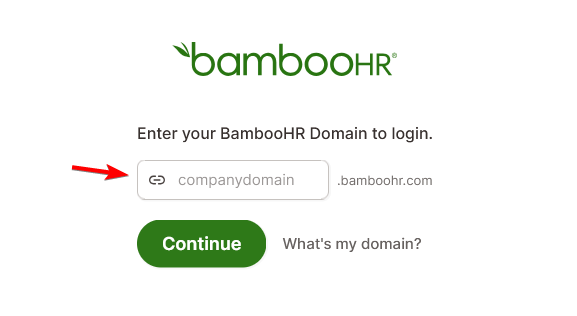
- Select Continue.
- Enter your email address or username and password when prompted.
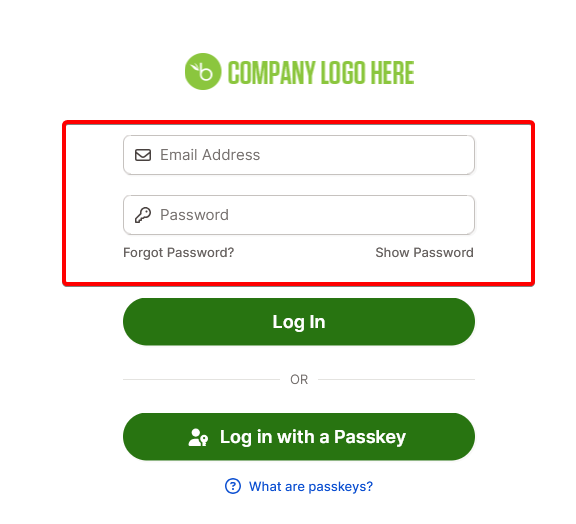
- Complete any additional verification required by your employer.
Your company domain is the part that appears before .bamboohr.com in your organization’s BambooHR address. For example, if your company’s address is companyname.bamboohr.com, your domain is companyname.
2. Log in directly through your company BambooHR page
You can also access BambooHR using the unique address provided by your employer.
- Open your company’s BambooHR URL.
- Enter your login credentials.
- Select Log In.
- Complete two-step verification if your company requires it.
Some organizations also allow employees to sign in using Microsoft, Google, SAML, or another single sign-on service instead of a BambooHR password.
3. Use the BambooHR mobile app
BambooHR also offers mobile apps for Android and iPhone.
- Download the BambooHR app from Google Play or the Apple App Store.
- Open the app.
- Enter your company email address.
- Follow the prompts to authenticate your account.
- Complete any required two-step verification.
The current mobile login process starts with your email address. BambooHR may then ask for your password, Google credentials, SAML login, or company domain, depending on how your employer configured the account.
What to do if your BambooHR login isn’t working
Login problems usually involve an incorrect company domain, password, or authentication method.
- Check your company domain – Enter only the part before .bamboohr.com.
- Reset your password – Use Forgot Password? or your company’s sign-in provider.
- Check two-step verification – Make sure you can access your required verification method.
- Contact your HR administrator – Ask HR to check your account access or login method.
As you can see, logging in to BambooHR is pretty simple. If you need a different HR tool, check out these onboarding software options.
You can also read our LinkedIn login guide and Zoom login guide.
FAQs
What is the official BambooHR login page?
The official login page is the BambooHR Login portal. Enter your company domain to continue to your organization’s sign-in page.
Can I log in to BambooHR without my company domain?
You may not need the domain if you already have your company’s direct BambooHR link. The mobile app also starts by asking for your email address.
Why can’t I log in to BambooHR?
Check your company domain, email address, password, and two-step verification. Your employer may also use Microsoft, Google, or another single sign-on provider.
Can I use BambooHR on my phone?
Yes. BambooHR offers mobile apps for Android and iOS, but you need an active BambooHR account provided by your employer.
Who should I contact if my BambooHR account is locked?
Contact your HR department or BambooHR administrator first. They can verify whether your account has access and confirm which login method your organization uses.

Read our disclosure page to find out how can you help Windows Report sustain the editorial team. Read more



Improve this guide



User forum
0 messages