
Procare Login: How to Access Your Parent or Staff Account


 3 min. read
 Published on

Procare allows parents and childcare staff to access their accounts, manage payments, view child activities, and communicate with childcare centers. Follow these steps to log in to Procare.
How do I log in to Procare?
1. Use the web page
You can access your Procare account directly from a web browser by following these steps.
- Open the Procare login page.
- Select Parent or Staff.
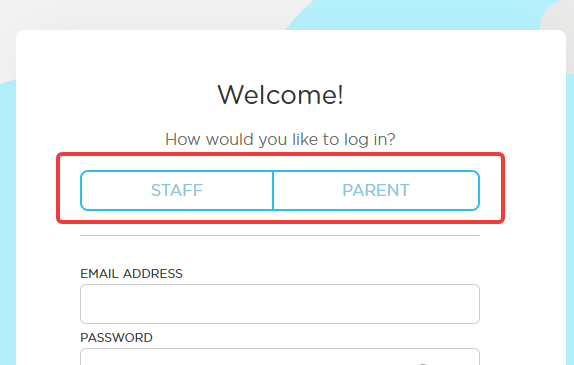
- Enter your registered email address.
- Type your password.
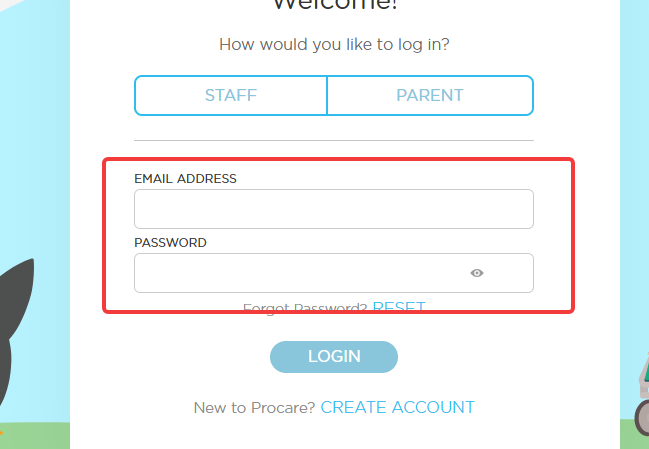
- Click Login to access your account.
- Complete any additional verification if prompted.
2. Use the mobile app
The Procare mobile app lets you access your account from your phone or tablet.
- Download the Procare Child Care app from the Google Play Store or Apple App Store.
- Open the app on your device.
- Select Parent or Staff.
- Enter your registered email address and password.
- Tap Login to access your account.
How to access the MyProcare parent portal
Parents can use the MyProcare portal to view childcare information and manage payments.
- Visit the MyProcare website.
- Enter the email address associated with your account.
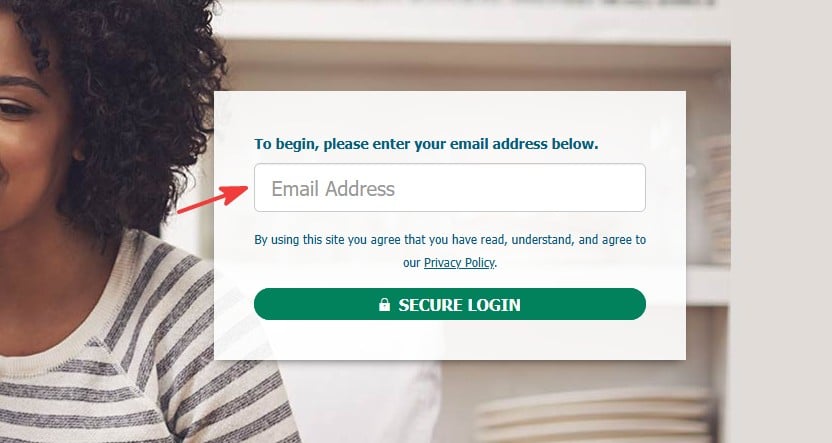
- Follow the on-screen instructions to sign in.
- Access your child’s information, account balance, and payment history.
How to fix Procare login issues
If you cannot access your account, try these solutions.
- Check your email address and password for typing errors.
- Make sure you selected the correct account type, Parent or Staff.
- Clear your browser’s cache and cookies.
- Update the Procare mobile app to the latest version.
- Use the password reset option if you forgot your credentials.
- Contact your childcare center if your parent account is locked.
Once you log in to Procare, you can manage childcare payments, check your child’s activities, and stay in touch with your childcare center. If you experience login problems, reset your password or contact your childcare provider for assistance.
If you also need help accessing education-related accounts, check our guides on Canvas student login, Aidvantage login for managing student loans, and Federal Student Aid (FAFSA) login for accessing financial aid information.
FAQ regarding Procare login
How do I log in to Procare?
Visit the Procare login page or open the mobile app, select Parent or Staff, and enter your registered email and password.
What should I do if I forget my Procare password?
Use the password reset option on the login page and follow the instructions sent to your registered email address.
Can I access Procare from my phone?
Yes, download the Procare Child Care app from the Apple App Store or Google Play Store and sign in with your account details.
Why can’t I access my Procare account?
Check your login details, select the correct account type, clear your browser cache, update the app, or contact your childcare center for help.

Read our disclosure page to find out how can you help Windows Report sustain the editorial team. Read more


Improve this guide




User forum
0 messages