
Fabletics Login: How to Sign In to Your Account


 2 min. read
 Published on

You can access your Fabletics account through the official website using your registered email address. Once you sign in, you can manage your VIP membership, check orders, and review account details.
How to log in to your Fabletics account
Use the official website
Follow these steps to access your account:
- Open the official Fabletics login page.
- Enter the email address associated with your account.
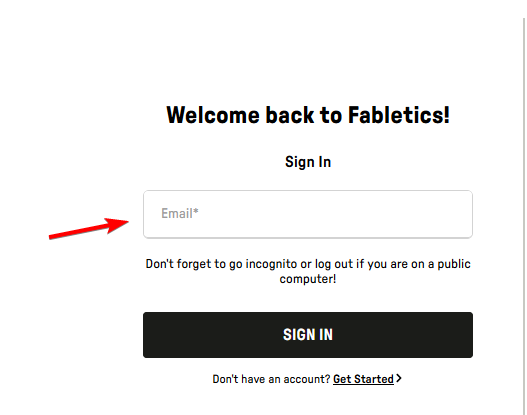
- Click Sign In.
- Follow the on-screen instructions to complete the login process.
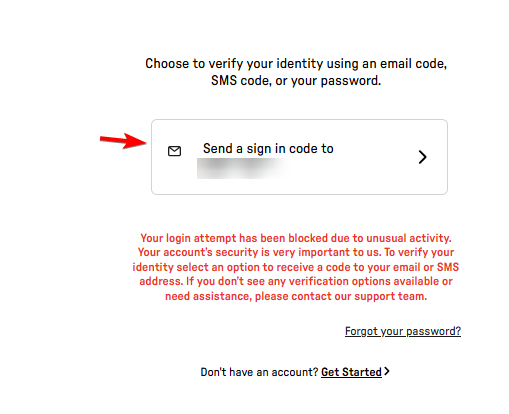
- Once you sign in, access your account settings, orders, and membership information.
How to fix Fabletics login problems
If you cannot access your account, try these solutions:
- Check your email address – Make sure you entered the correct email without typing errors.
- Reset your password – Use the Forgot Password option if your credentials do not work.
- Clear browser cookies – Delete stored Fabletics cookies and try signing in again.
- Use another browser – Open the login page in Chrome, Firefox, or Edge.
- Disable your VPN – Temporarily disconnect your VPN if the website fails to load.
- Contact support – Visit the Fabletics Help Center if the problem continues.
In conclusion, accessing your Fabletics account is straightforward when you use the official login page and your registered email address. If you use other shopping services, you can also learn how to log in to your eBay account, troubleshoot the Stop & Shop app not working, or fix Giant app login and performance issues.
Frequently asked questions
Can I log in to Fabletics without a VIP membership?
Yes. You can access an existing Fabletics account without needing an active VIP membership.
Why is my Fabletics login not working?
An incorrect email address, forgotten password, or browser issue may prevent access. Try resetting your password or switching browsers.
How do I check my Fabletics orders?
Sign in and open the Orders section of your account to review your purchase history and available order details.
How do I contact Fabletics customer service?
US customers can call 1-844-322-5384 or email [email protected]. Fabletics also offers live chat support.

Read our disclosure page to find out how can you help Windows Report sustain the editorial team. Read more


Improve this guide



User forum
0 messages