
Chrome Download Offline Installer - Quick Installation Guide


 3 min. read
  Updated on

Wondering how to get a Chrome download offline installer? Setting up Chrome can be challenging in areas with unstable internet connections.
Luckily, with the offline installer, you can save time and bandwidth, especially when installing the browser on multiple devices. I’ll demonstrate the process below, so let’s jump right in!
Table of contents
How To Download Chrome Offline Installer?
Download from the Official Google Chrome Website
Follow the below steps:
- Connect your PC to the internet to access the Chrome standalone setup page. The standalone setup tool is different from the regular online one, and it’s exactly what you need in this situation.

- Scroll down and tap “Other Platforms.”

- Select the appropriate version for your operating system (Windows, macOS, Android, iOS or Linux).

- After selecting your Operating System, tap “Accept and Install.” The download will start automatically.

5. The file will be saved on your PC in the Downloads section.
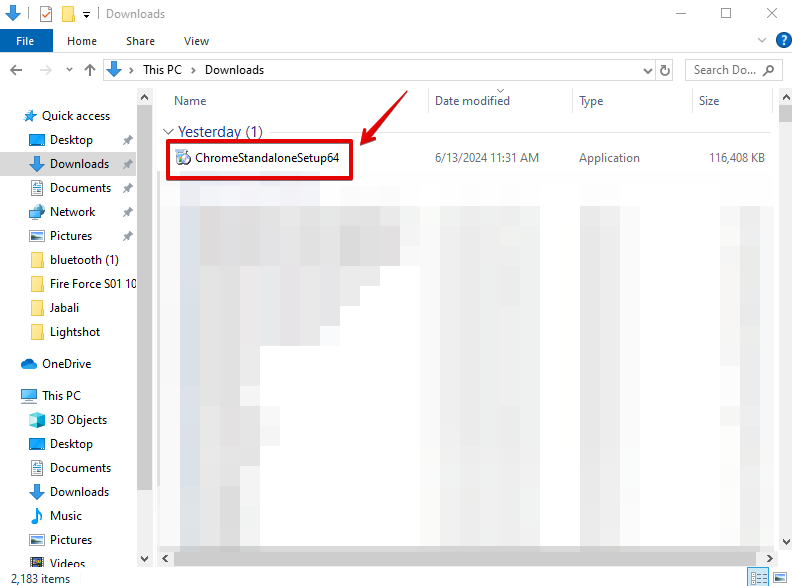
Once the download is complete, you can transfer the file to another PC to install Chrome without worrying about an internet connection. Double-tap the installer file and follow the on-screen instructions.
After installing the browser, you can create a handy shortcut using our guide on how to add Chrome to the desktop for faster access.
Download from Third-Party Websites

You can get the offline installer for Chrome from reputable third-party websites like Softlay. However, it’s always best to first attempt downloading from the official website. You’ll want to avoid security risks associated with unreliable third-party sources that may infect you with malware.
How to Download Chrome Online Installer
You can also go for the traditional route and get the regular, online installer via official or third-party sources. However, it requires an internet connection.
Use the Official Website
- Go to the official Google Chrome Website. Tap “Download Here.”

- Tap “Accept and install.” Wait for the download to complete.

- Go to your downloads on your PC to access the ChromeSetup file.

Double-click on the file and follow the onscreen instructions to complete the installation.
Use a Third-Party Website

You can also download the Chrome online installer through a reputable third-party website like uptodown. However, I advise you to use the official website before you try any other sources.
It always provides the most up-to-date version of Chrome, including the latest features, security patches, performance improvements, and crash fixes.
FAQs
The Chrome offline installer is a full standalone setup file that lets you install Google Chrome without an internet connection. It includes all required components in a single package.
Use it when installing Chrome on multiple PCs, setting up a system without internet access, or avoiding issues caused by network restrictions, proxies, or unstable connections.
You can download it from Google’s official Chrome download page by selecting the Download Chrome for another platform or Offline installer option. Always avoid third party sources to prevent malware risks.
Yes. After Chrome is installed, updates work normally through Google Update. The offline installer only affects the initial installation process.
By following these steps, you can easily get the Chrome download offline installer. Overall, you should prioritize downloading the app from the official website to get the latest version. Moreover, if you have any problems with uninstalling or opening the app, we’ve got you covered.

Read our disclosure page to find out how can you help Windows Report sustain the editorial team. Read more



Improve this guide
User forum
0 messages