
Error Invalid Cap 320 (0x140): Fix it in 5 Steps
To fix this issue, you need to adjust the policies in Active Directory


 2 min. read
  Published on

ERROR_INVALID_CAP is a developer error, and it often comes with 320 (0x140) The Central Access Policy obtained from Active Directory is invalid message. Today we’re going to take a closer look at this error and see how to fix it.
How can I fix ERROR_INVALID_CAP?
1. Validate Central Access Policies in Active Directory
- Navigate to Active Directory Administrative Center.
- Open Tools and select Active Directory Administrative Center.

- Next, go to Dynamic Access Control and then select Central Access Policies.

- Ensure that CAPs are properly defined and linked to the correct rules.
- Correct any missing or invalid policies.
2. Force the group policy update or verify directory replication
- Press the Windows key + S and type cmd. Select Run as administrator.
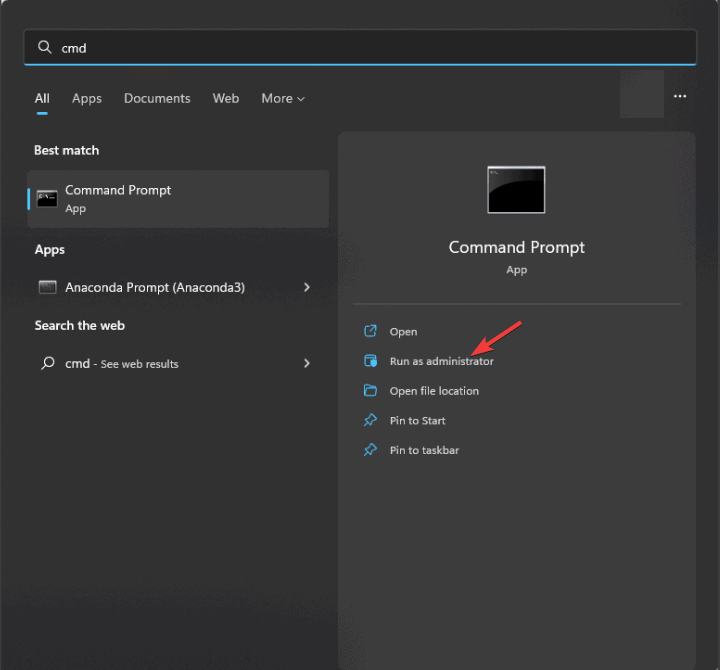
- Run the following command to force the Group Policy update:
gpupdate /force
- Check for replication issues with the following command:
repadmin /replsummary - If any replication issues are detected, you’ll need to manually troubleshoot them.
3. Remote Central Access Policy from the resource
- Right-click the affected file or folder.
- Select Properties and then go to the Security tab. Click on Advanced.
- Under the Central Policy Staging, remove the assigned CAP.
Do this if CAP is unnecessary or if it’s causing issues.
4. Disable Dynamic Access Control
- Open Group Policy Management Console.
- Head to Computer Configuration,select Policies, and then Administrative Templates.

- After that, select System and choose KDC.
- Disable any policies related to Dynamic Access Control or Kerberos client support for claims, compound authentication, and Kerberos armoring.
5. Check Event Viewer
- Press the Windows key + X and choose Event Viewer.

- Navigate to Windows Logs and then select Security or System.
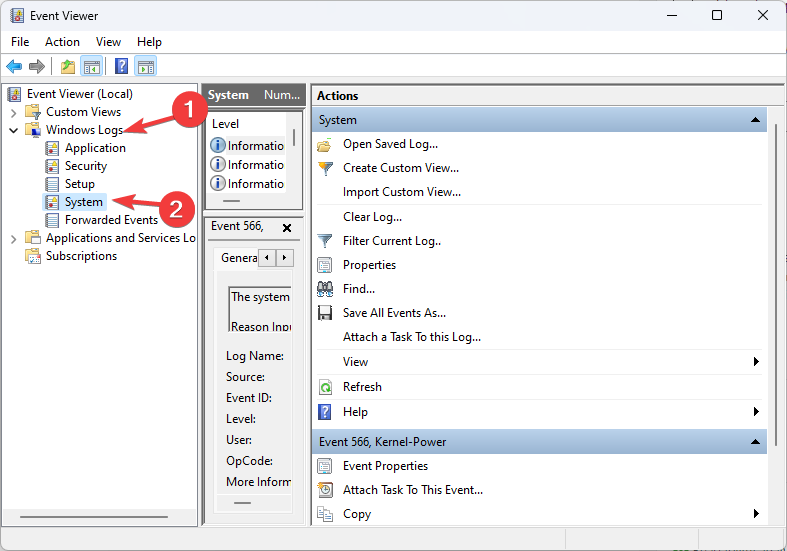
- Look for errors related to Central Access Policies or Active Directory.
- Use the information to research the issues further.
The ERROR_INVALID_CAP can be difficult to deal with, but unless you’re a developer you probably won’t ever encounter it. These aren’t the only issues, and you may encounter Error_Invalid_Token or Error_Invalid_Name.
Before you leave, you might be interested in our ERROR_INVALID_PARAMETER guide for more information.

Read our disclosure page to find out how can you help Windows Report sustain the editorial team. Read more



Improve this guide



User forum
0 messages