
eSignature feature for Microsoft 365 is now available worldwide
Worldwide availability excludes Indonesia and Turkey, though


 2 min. read
  Published on
Microsoft has officially rolled out eSignature for Microsoft 365 worldwide, expanding support for Word (Desktop) and SharePoint users everywhere, excluding Indonesia and Turkey. The feature was previously limited to select regions like the US, UK, EU, Canada, and Asia-Pacific.
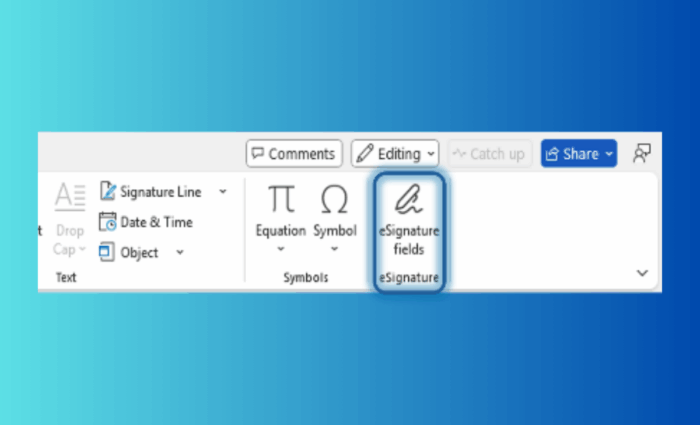
Thanks to worldwide availability, the service now makes requesting and managing signatures much easier across global tenants. Now, what’s interesting is that the integration isn’t limited to PDFs anymore. Word users on the Current Channel now see an “eSignature fields” option in the ribbon.

It allows them to add signature boxes directly into their documents. Once recipients are added, Word converts the file into a PDF, sends it for signing, and saves the signed copy right back into SharePoint. You can check the details in this video.

Microsoft has further introduced free-text fields, allowing signers to fill in details like job titles, IDs, or mailing addresses during the signing process. This eliminates the need for back-and-forth emails or extra forms.
Moving on, if you already use Adobe Acrobat Sign or DocuSign, the signed PDF is now automatically saved back to its original SharePoint library. Previously, it used to get pushed into a separate provider folder. This keeps all versions together, simplifying retrieval and ensuring documents remain within Microsoft 365.
In line with the rebrand, “SharePoint eSignature” will soon appear as “Microsoft 365 eSignature” across apps. Microsoft says the feature is part of its Pay-as-you-go services in the Admin Center, so admins should enable it to unlock the experience for their users.

Read our disclosure page to find out how can you help Windows Report sustain the editorial team. Read more



Improve this guide




User forum
0 messages