
Firefox 142 is Here with AI Link Previews and Tab Enhancements
The update is rolling out in batches


 3 min. read
  Published on

Firefox has rolled out its latest update, version 142, bringing several new features designed to enhance browsing efficiency and personalization.
Among the highlights is a new Link Previews feature, which allows users to long-click or right-click links to view summaries before opening them. This feature uses local AI processing on systems with sufficient memory and supported languages, giving users quick insights without leaving the current page.
Firefox 142 also upgrades tab management with improved tab groups, making it easier to organize and navigate multiple sessions. Meanwhile, the new tab page now offers smarter article recommendations to help users discover content relevant to their interests.
Security remains a priority, with the update including standard fixes for known vulnerabilities. Enterprise users can access detailed release notes for administrative oversight.
Here’s the full changelog:
New
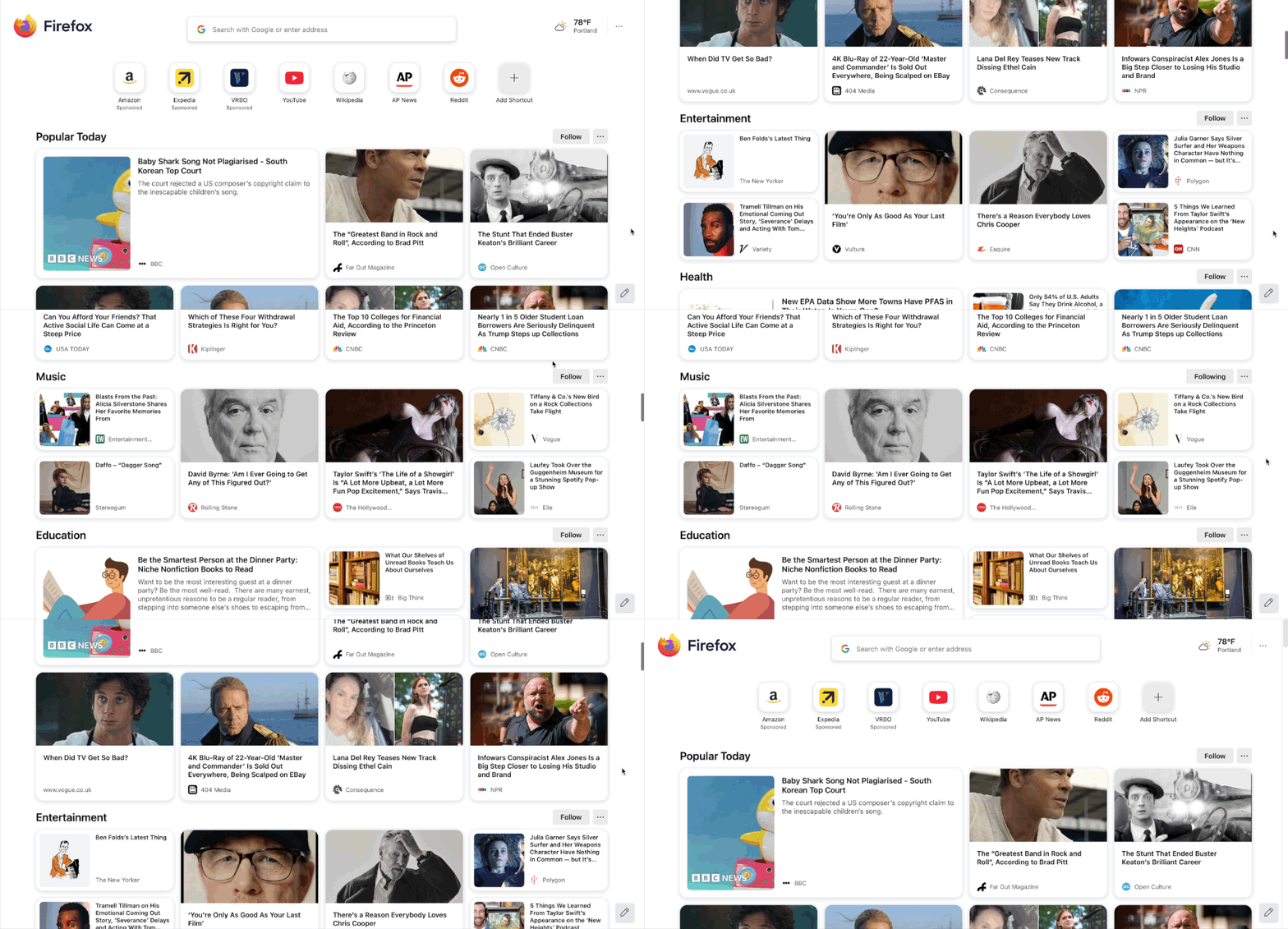
- For users in the United States, article recommendations on your New Tab page are now grouped into topic sections like Sports, Food, and Entertainment to make stories more organized and easier to scan. You can also follow topics you’re interested in and block ones you’d prefer not to see, giving you more control over what shows up when you open a new tab.
- You can now see what’s behind a link before visiting it with Link Previews. Long-press a link (or right-click and choose Preview Link). Previews can optionally include AI-generated key points, which are processed on your device to protect your privacy.
- Link Previews is gradually rolling out to ensure performance and quality and is now available in en-US, en-CA, en-GB, and en-AU for users with more than 3 GB of available RAM. This feature is part of a progressive rollout.
- On Windows, clicking a persistent notification when Firefox is closed or restarted will now properly open Firefox with the relevant webpage, instead of just opening the main page of the website.
- ETP Strict mode now supports a flexible exception list to fix broken site features caused by tracker blocking. Exceptions are split into baseline (core functionality) and convenience (extra features), letting users choose improved site compatibility without compromising key privacy protections.
- Keep an active tab visible in a collapsed tab group.
- Focus on just one tab in a group without the clutter. Your active tab stays in view, keeping things tidy even with the group collapsed.
- You can now remove extensions from the sidebar by right-clicking the extension icon and selecting Remove from Sidebar.
Fixed
- Improved the scroll speed in the bookmarks dialog to not go beyond the component area.
- Improved drag-and-drop support for blob images.
- Various security fixes.
Changed
- Improved search results from browsing history via the address bar, reducing the likelihood of duplicate results being shown.
- Improved Netmonitor so that Request Headers/Cookies/Params are displayed in the Network panel even if the request isn’t finished yet.
Mozilla has also expanded its built-in translation service, now supporting Chinese, Japanese, and Korean. This update further strengthens Firefox as a versatile browser for global users.
To install Firefox 142, users can navigate to Menu > Help > About Firefox, or download it from the official Firefox website.

Read our disclosure page to find out how can you help Windows Report sustain the editorial team. Read more



Improve this guide




User forum
0 messages