
Key Bank Login: How to Sign In on PC or Mobile


 3 min. read
 Published on

The Key Bank login portal lets you access your KeyBank account, check balances, transfer money, pay bills, and manage transactions. You can sign in through the official website or the KeyBank mobile app.
How to log in to KeyBank online banking
1. Use the official website
Follow these steps to access your KeyBank account:
- Visit the official KeyBank website.
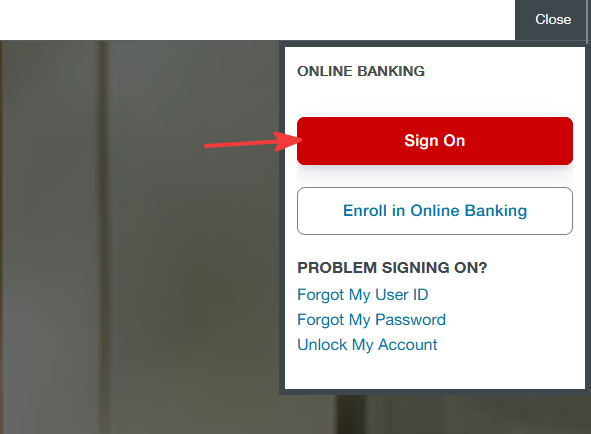
- Click Sign On in the upper-right corner.
- Enter your User ID and Password.
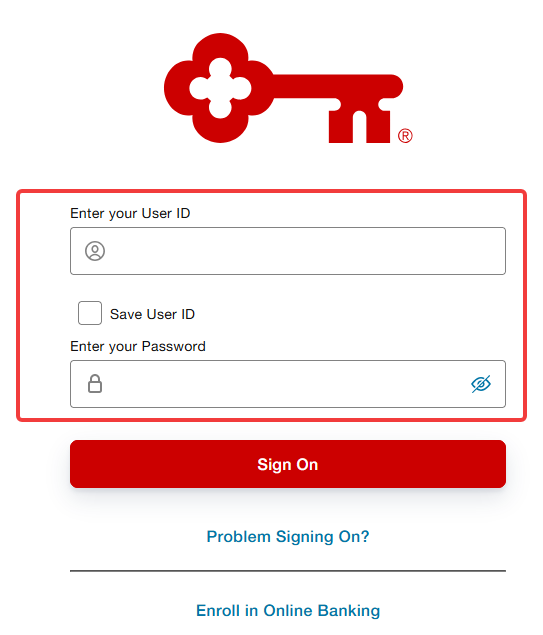
- Click Sign On to continue.
- Complete any additional security verification if prompted.
- Access your online banking dashboard.
2. Use the KeyBank mobile app
You can also access your account through the KeyBank mobile app.
- Download the KeyBank Mobile App from the Google Play Store or Apple App Store.
- Open the application on your device.
- Enter your User ID and Password.
- Tap Sign On.
- Complete any required identity verification.
You can also enable fingerprint or facial recognition for faster access on supported devices.
How to fix KeyBank login problems
If you cannot access your KeyBank account, try these solutions:
- Check your credentials – Make sure you enter the correct User ID and password.
- Reset your password – Use the password recovery option if you cannot remember your credentials.
- Clear browser data – Remove outdated cookies and cached files.
- Update your browser – Use the latest version of Chrome, Firefox, Edge, or Safari.
- Enable cookies and JavaScript – Make sure your browser allows these features.
- Unlock your account – Visit the KeyBank account recovery page if your account is locked.
The Key Bank login process allows you to manage your finances from a computer or smartphone. If you need assistance, visit the KeyBank customer support page. For help with other banking platforms, check our guides on Capital One Bank login, Citi login, and Bank of America login.
Frequently asked questions
How do I log in to my KeyBank account?
Visit KeyBank’s official website, click Sign On, enter your User ID and password, and complete any required security verification.
What should I do if I forget my KeyBank User ID?
Select the Forgot My User ID option on the login page and follow the identity verification instructions to recover your credentials.
Why is my KeyBank online banking account locked?
KeyBank may lock your account after multiple incorrect login attempts. You can unlock it through the official account recovery page or contact customer support.
Can I access KeyBank online banking from my phone?
Yes. You can log in through the KeyBank mobile app or use a supported mobile browser to access the official website.

Read our disclosure page to find out how can you help Windows Report sustain the editorial team. Read more


Improve this guide




User forum
0 messages