
Citi Login Guide: Sign In Fast on PC or Mobile


 4 min. read
  Published on

In this guide, we’ll show you how to log in to Citi from a browser or the Citi Mobile app, plus what to do if you forget your login details.
How do I log in to Citi?
1. Use the web browser
You can access your account directly through the official Citi website.
- Go to the official Citi website.
- Enter your User ID.
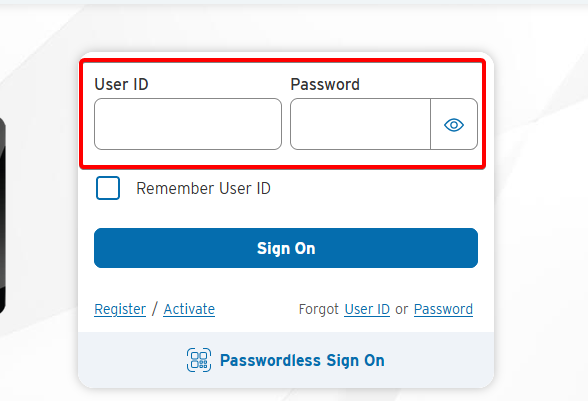
- Enter your password.
- Select Sign On.
- Complete any additional identity verification if Citi asks for it.
After signing in, you can access the Citi products connected to your online profile, including eligible banking and credit card accounts.
2. Use the mobile app
If you prefer managing your account from your phone, you can use the Citi Mobile app on a supported iPhone or Android device.
- Open the Citi Mobile app.
- Enter your User ID and password.
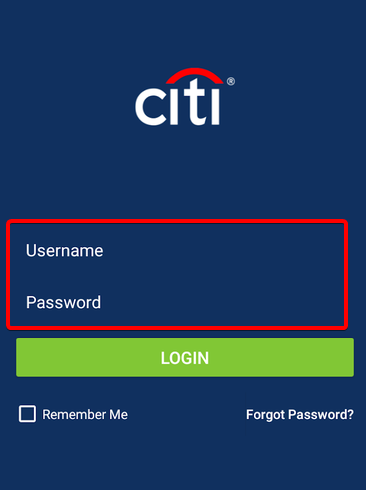
- Tap Sign On.
- Use your configured biometric authentication or PIN when available.
Citi also offers passwordless sign-on for eligible customers who have configured options such as Face ID, Touch ID, biometrics, or a six-digit PIN.
How to reset your Citi User ID or password
If your Citi login details no longer work or you can’t remember them, use the recovery option on Citi’s sign-in page.
- Open the Citi sign-in page.
- Select Forgot User ID or Password?
- Follow the prompts to identify your account.
- Complete the requested security verification.
- Recover your User ID or create a new password.
Citi currently provides the Forgot User ID or Password? option directly below the login fields.
How to register for Citi online access
You need to register before you can use Citi online banking if you haven’t created an online account yet.
Go to Citi registration and follow the registration process. Citi may ask for your debit card or bank account number, identity information, and an additional verification method before allowing you to create your User ID and password.
Once Citi verifies your information, create your login credentials and finish the enrollment process.
What to do if Citi login isn’t working
If you can’t access your Citi account, try these quick fixes:
- Check your credentials – Make sure you entered the correct User ID and password.
- Reset your password – Use the Forgot User ID or Password? option if you aren’t sure about your credentials.
- Try another browser – Browser extensions, cached data, or cookies can sometimes interfere with banking websites.
- Clear your browser data – Remove Citi-related cookies and cached files, then try signing in again.
- Try the Citi Mobile app – If the website isn’t working correctly, check whether you can access your account through the app.
- Check the website address – Only enter your banking credentials on an official Citi website. Avoid login links received through unexpected emails or messages.
If Citi shows a maintenance notice, some account information or features may remain unavailable until maintenance ends.
We hope you managed to complete your Citi login and access your account by following the steps above. If you use other banking services, you can also check our Bank of America login guide or Chase Bank login guide. If you’re having trouble with another banking app, our guide on what to do when the M&T Bank app is not working may also help.
FAQ
Why can’t I log in to my Citi account?
Check that your User ID and password are correct. You can also reset your credentials or try signing in from another browser.
How do I recover my Citi User ID?
Select Forgot User ID or Password? on the Citi login page and follow the identity verification steps to recover your User ID.
Can I log in to Citi from my phone?
Yes. You can sign in through the Citi Mobile app using your User ID and password or supported biometric authentication.
How do I change my Citi password?
Use the password recovery option on the Citi sign-in page if you forgot your password. If you can sign in, you can manage your security settings from your account.
Do I need a separate Citi login for my credit card?
In many cases, you can manage eligible Citi credit cards through the same Citi online profile. New cardholders may need to register their card first.

Read our disclosure page to find out how can you help Windows Report sustain the editorial team. Read more



Improve this guide




User forum
0 messages