
Microsoft expands Copilot Dashboard to managers
Team-focused Copilot dashboards arrive in Viva Insights


 2 min. read
  Published on
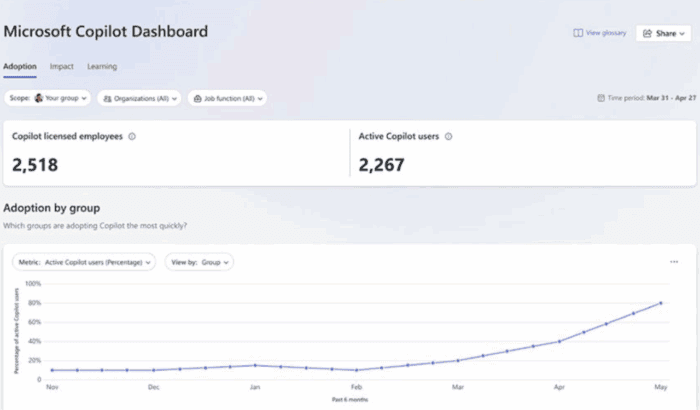
Microsoft has announced that it’ll expand its Copilot analytics reach with a major update to Viva Insights. Starting late September, managers will get their own team-focused Copilot Dashboard inside the Viva Insights web app. This will give them access to adoption, impact, and learning insights previously reserved for senior leaders and analysts.
Broader Copilot insights for managers
The new dashboard will be automatically personalized to each manager’s team, complete with a Reports page offering out-of-the-box Copilot analytics. This includes the Copilot for Sales adoption report, with more templates expected to roll out over time.

Unlike the current setup, managers won’t need to configure anything. That means insights will appear by default for teams of at least 10 members.
As part of the change, Microsoft is also keeping all manager insights under one umbrella. Existing capabilities in the Viva Insights Teams app, such as organizational behavior insights and Copilot chat insights, will no longer be supported. Managers will instead see a banner in Teams before the change. Following the update, all insights will live inside the Viva Insights web app.
Publishing made easier
If you’re an analyst, you’ll soon be able to publish your library of reports directly to managers. These reports cover Copilot usage, collaboration, meeting effectiveness, and more.

You’ll find them as cards in the Viva Insights web app. The feature will launch in public preview alongside the dashboard update, though Insight admins must enable publishing first.
Worth noting that any existing manager settings, such as group size thresholds or delegate access, will continue to apply. Managers just need a Viva Insights license or a Microsoft 365 Copilot license, with at least 50 licenses required per organization.
With this rollout, Microsoft is giving frontline managers the same level of actionable Copilot insights that senior leadership has enjoyed, but in a format tailored to their own teams.

Read our disclosure page to find out how can you help Windows Report sustain the editorial team. Read more



Improve this guide


User forum
0 messages