
Microsoft Finally Gives Mac Users the Screen Sharing They Deserve in Teams
A native macOS upgrade for seamless meetings


 2 min. read
  EEST
EEST
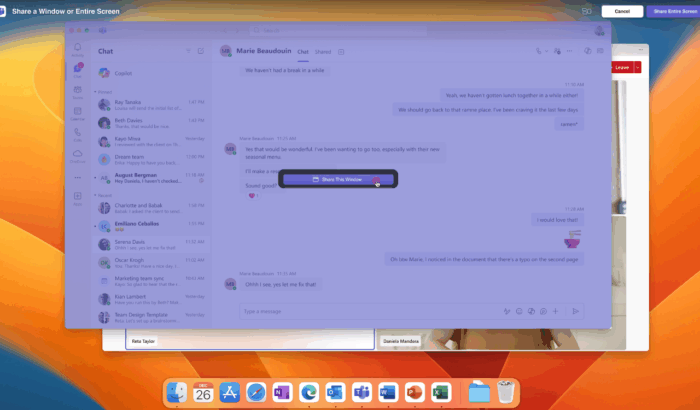
If you are a Mac user and Teams is a staple for you, Microsoft has some good news. The company is finally rolling out native macOS screen and window sharing inside Teams. This update taps directly into Apple’s sharing system, so everything looks and feels… well, like a native Mac feature.
In the announcement post, Microsoft says it wants to make sharing feel intuitive for long-time Mac users, new Teams adopters, and anyone who hates that awkward “wait, can you see my screen?” moment. So, the real question is how to enable the native screen sharing feature in macOS for Teams.
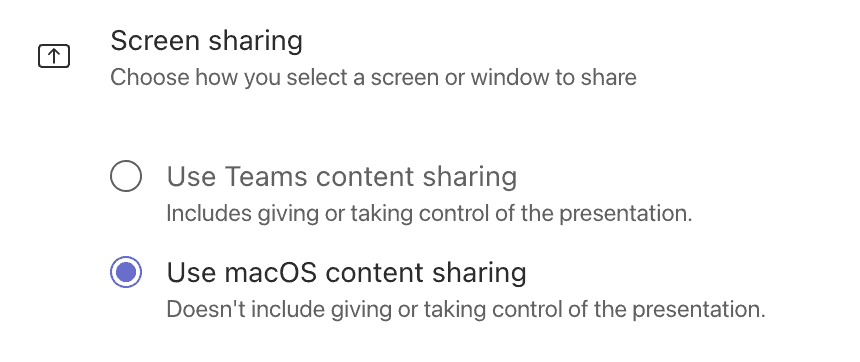
As Microsoft notes, you just need to open Teams on Mac, then go to its Settings >General and toggle on the “Use macOS content sharing” option. And, you should be good to go.
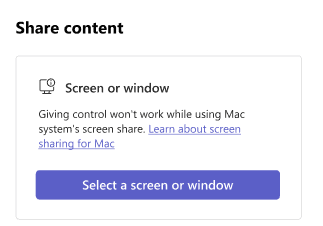
Once you’re inside a meeting, simply click on Share and choose your screen or window. From there, macOS takes over, and the experience looks native. That being said, there is one big caveat: you can’t give or take control when using the Mac native experience for screen sharing.
Not to forget, it’s an opt-in feature for members of the Teams Public Preview or Microsoft 365 Targeted release, and use the Teams client for Mac. Moreover, admins also have to allow preview features. So, depending on your IT department, you might be able to use this feature starting today or later on.
Are you switching this on immediately, or waiting for full remote control support to return? Let us know in the comments below.

Read our disclosure page to find out how can you help Windows Report sustain the editorial team. Read more



Improve this guide



User forum
0 messages