
Microsoft Releases Windows 11 Beta Build With Smarter Widgets and Screen Tint


 4 min. read
  Published on
Microsoft has released Windows 11 Insider Preview Build 26220.8680 to Beta Channel testers, introducing a wide range of improvements across Widgets, accessibility features, Magnifier, File Explorer, Windows Update, input experiences, and recovery management.
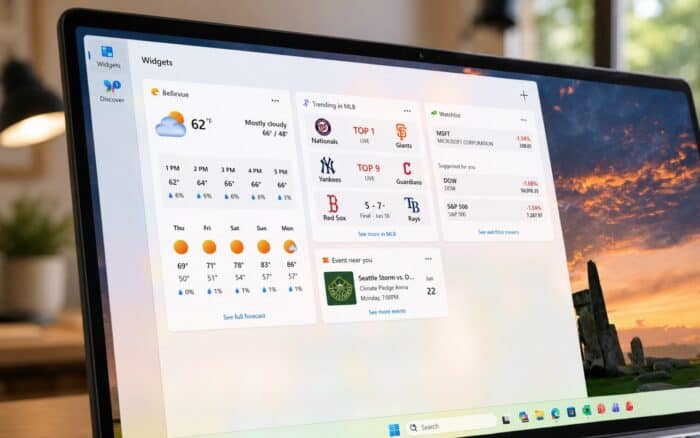
One of the biggest changes in this build focuses on making Widgets less distracting while improving performance and personalization. Microsoft says the updated experience aims to reduce unnecessary notifications and better adapt to how individual users interact with Widgets.
Widgets Become Quieter and More Personalized
Microsoft is making Widgets less intrusive by default. Open on hover and taskbar badging are now disabled by default, while first-time launches open directly to the main Widgets experience. Weather is also now the only default lock screen widget.
The company is limiting Widget alerts shown on the taskbar and changing badge colors to match the user’s Windows accent color, just like in build 26300.8493. New navigation bar badges can display missed alerts and automatically clear after viewing.
Microsoft says Widget behavior will now adapt to usage patterns, giving less active users a quieter experience while preserving settings for users who regularly engage with Widgets.
Microsoft has redesigned the Widgets settings page as a full-screen experience and optimized memory usage. Widgets now have a smaller memory footprint, can release memory faster when not in use, and adjust resource usage based on device capabilities.
On lower-memory systems, some pre-launch behaviors are limited to improve performance.
New Screen Tint Accessibility Feature
Microsoft has added a new accessibility feature called Screen Tint, which applies a color overlay across the display to help reduce eye strain and light sensitivity. Available under Settings > Accessibility > Vision, the feature includes six preset colors, custom color support, and adjustable intensity levels.
Microsoft says Screen Tint differs from Night Light, which reduces blue light before sleep. Screen Tint instead lowers overall screen intensity and can be used alongside Night Light. However, it cannot be enabled at the same time as Color Filters.
Magnifier Gets More Precise Controls
Microsoft has improved Magnifier by allowing users to enter an exact zoom percentage directly from the toolbar. The feature also now includes preset zoom levels ranging from 5% to 400%, making it easier to switch between commonly used magnification settings.
Emoji Panel Switches to GIPHY
Windows 11’s emoji panel now uses GIPHY as its GIF provider.
Microsoft says the change follows the deprecation of Tenor and ensures continued GIF support within the operating system.
New Remote Recovery Management Capabilities
Microsoft has added a new remote recovery management plug-in for Windows 11.
The plug-in extends Windows Recovery Environment (WinRE) management capabilities for Mobile Device Management (MDM) providers, giving administrators additional recovery options for managed devices.
File Explorer Receives Reliability and Performance Fixes
File Explorer receives several fixes in this build. The address bar now supports paths containing double backslashes and quotation marks, while performance has been improved when mounting large ISO files, preventing freezes during SmartScreen checks.
Microsoft also fixed several reliability issues, including duplicated OneDrive files appearing in Home Favorites, problems with text selection during file renaming, address bar suggestion dropdown behavior, and file name changes that only altered letter capitalization not updating correctly in local and cloud folders.
Windows Update Fixes Error 0x800f0843
Microsoft has resolved an issue that caused Windows Update error 0x800f0843 when installing the previous Beta Channel update.
The fix should allow affected users to successfully install new builds without encountering the error.
Microsoft Continues Refining Windows 11
Build 26220.8680 focuses heavily on quality-of-life improvements rather than major new features. The release introduces a quieter and more efficient Widgets experience, expands accessibility options with Screen Tint, improves Magnifier controls, strengthens File Explorer reliability, and fixes Windows Update installation issues.
The build also arrives as Microsoft continues expanding performance-focused improvements in Windows 11, including the recently introduced Low Latency Profile feature that aims to improve system responsiveness and application launch performance.

Read our disclosure page to find out how can you help Windows Report sustain the editorial team. Read more



Improve this guide
User forum
0 messages