
NotebookLM Adds Video Overviews to Help Explain Complex Topics Visually
New tools boost visual learning


 2 min. read
  Published on
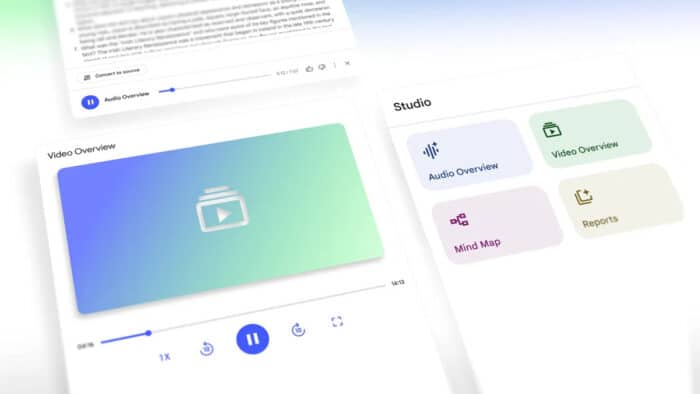
NotebookLM, Google’s AI-powered research tool, just got a major update aimed at making complex topics easier to digest. Google is now rolling out Video Overviews, a new visual companion to its existing Audio Overviews, designed to break down complex material using narrated slides and illustrations.
These AI-generated videos pull from your documents, creating visuals with quotes, data, diagrams, and other supporting content. It’s particularly useful when you’re trying to understand abstract concepts or step-by-step processes that don’t always click with just text or audio.
You can also guide the output with specific prompts, such as asking it to explain diagrams to a beginner or tailor the material for your team’s expertise. Video Overviews are now available in English, with more languages expected soon.
Studio panel gets a much-needed boost
Alongside this, NotebookLM’s Studio panel, the workspace where users generate content like mind maps and study guides, has been redesigned for better flexibility. There’s one big change; you’re no longer limited to a single output of each type per notebook. Now, you can create multiple mind maps, reports, or overviews and organize them all in one place.
There’s also a new layout with clear tiles for each format and a list of your created content right below. You can even multi-task, like playing an Audio Overview while reviewing a mind map. The update is rolling out now and should reach all users over the next few weeks.

Read our disclosure page to find out how can you help Windows Report sustain the editorial team. Read more



Improve this guide


User forum
0 messages