
Overclocking in OMEN Gaming Hub: How to Use it
Overclocking is available, but only on specific models


 2 min. read
  Published on
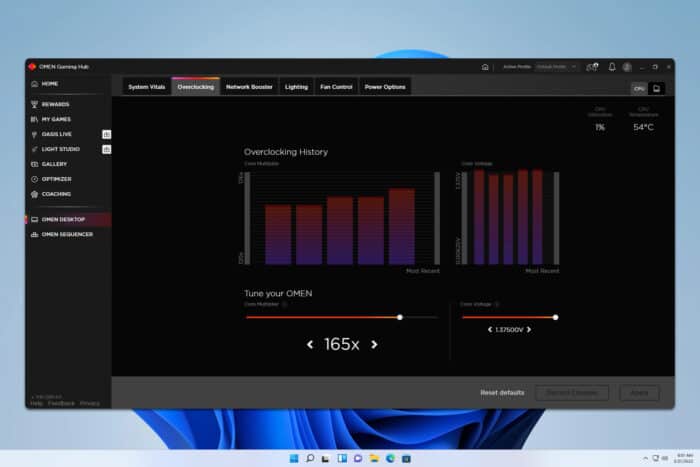
Overclocking can boost performance in games, and many want to know if overclocking is supported in OMEN Gaming Hub, so today we’re going to tell you everything you need to know about it.
How can I use overclocking in OMEN Gaming Hub?
Use the Overclock tab
- Open the OMEN Gaming Hub.
- Select your device from the left pane.

- Now navigate to the Overclocking tab.

- Adjust the Core Multiplier and Core Voltage as needed.

- Click on Apply to save changes.
How do I turn off overclocking on OMEN Gaming Hub?
- Head to the Overclocking tab as shown above.
- Click on Reset defaults.

- Save changes.
Does OMEN Gaming Hub support overclock?
Yes, OMEN Gaming Hub can overclock your CPU, however this feature is available only on specific models.
According to HP, the following models support this feature:
- OMEN 45L DT
- OMEN 40L DT
- OMEN 30L DT
- OMEN OBELISK DT
- OMEN X by HP DT
You should also know that not all models from above support overclocking, as overclocking is available only on specific configurations.
How do I overclock RAM on OMEN Gaming Hub?
Unfortunately, this option isn’t available in OMEN Gaming Hub.
Why is Overclocking missing in OMEN Gaming Hub?
This feature is only supported by 5 different models, so if you’re not using these models, there won’t be an overclocking option available for you. As said earlier, even if you use a supported model, overclocking will be available only if your hardware isn’t fully compatible.
In addition, you’ll also need OMEN Gaming Hub SDK if you want to use this feature.
As you can see, this feature while useful is available only on a handful of devices, so you might want to consider OMEN Gaming Hub alternatives instead.
If you want to stick with this software, don’t miss these best OMEN Gaming Hub settings for maximum performance.

Read our disclosure page to find out how can you help Windows Report sustain the editorial team. Read more



Improve this guide




User forum
0 messages