Windows 10 Baterry Saver Setting Gets Improved UI

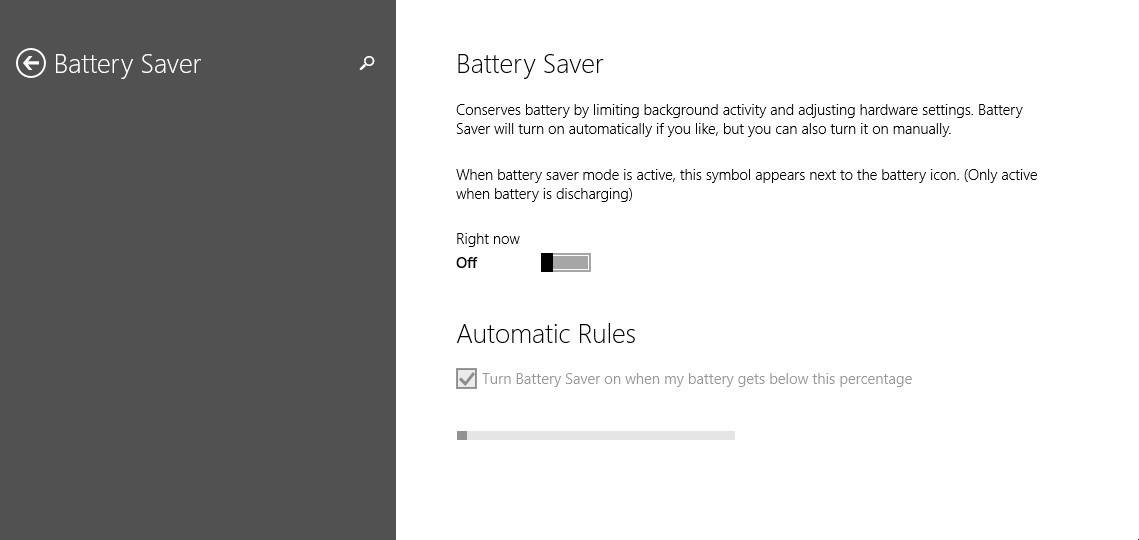
According to a recent leak, Microsoft has come with a new improvement for Windows 10. Battery Saver will help you to make better use of you battery so that you do not run out of battery on your device when you need it most.
Battery Saver Windows 10
This is not the first time we have heard about this feature, but in previous leaks it was revealed that it did not work properly. This time, Batter Saver has proven it can work as it was designed to. This feature allows users to limit the background activity so that battery life improves. According to a fresh update that was released

In other words, the functions of the operating system as well as the apps will be minimized. Most probably, the display will be dimmed as well since it uses more power than any other part of the computer.

Users can activate this feature manually or they can set it to turn on automatically once the battery charge has reached a certain percentage. All you have to do is go the Setting page, click on the option Automatic Rules and choose the percentage at which Battery Saver will turn on.For the moment, these are the two settings available on Windows 10 regarding Battery Saver. Maybe the next leaks will reveal more information.

Battery Saver is a feature that has been available on mobile devices for a long time, and the fact that Microsoft has decided to incorporate it in Windows 10 proves once again that the company has turned to its Windows Phone software to look for inspiration for Windows 10.

We are really curious to see how this feature will work out for early Windows 10 users, once the operating system gets officially released. It’s another feature borrowed from Windows Phone that will make the unified OS feel much, much more mobile.

READ ALSO: Beware: Fake Windows 10 Activators are Lurking Everywhere

Microsoft announces the sale of MixRadio to popular free messaging provider LINE

Microsoft announces the sale of MixRadio to popular free messaging provider LINE

Earlier today, Microsoft announced that it had sold its MixRadio service to the popular messaging company LINE. You may remember that Microsoft itself acquired MixRadio from Nokia as part of the deal to transfer the phone manufacturer’s Devices & Services division to Microsoft.

“We wanted MixRadio to continue to operate with a commitment to constant innovation and aspiration to deliver the best possible mobile-first experience to listeners. LINE share this vision and our passion for simple, personal and fun user experiences in every way.” – Jyrki Rosenberg, Head of MixRadio

With Xbox Music already up and running at Microsoft, it seems the software giant couldn’t find a place for MixRadio within its ranks. And with LINE, the fastest growing messaging service looking to expand its offerings, MixRadio finally found a place to call home.

Microsoft announces the sale of MixRadio to popular free messaging provider LINE

“As the world’s leading mobile messenger with 170 million monthly active users in 230 countries, LINE constantly seeks to expand its range of services to become an integral part of consumers’ daily lives. Acknowledging the fact that Music and Entertainment are essential aspects in life, LINE has chosen to acquire MixRadio…” – LINE PR

Both Microsoft and LINE confirmed that the team behind the MixRadio service will continue to be headquartered in Bristol, United Kingdom, and will continue to provide the service to Lumia customers, now as a third-party application. The acquisition is expected to be finalized early next year.

New transparent Modern UI icons found in latest build of Windows 10

Windows 10

Keen to avoid the mistakes of the past, Microsoft have been hard at work in their attempts to make Windows 10 not only the OS that will return them to complete market dominance, but remove any bitter flavours left behind by the previous incarnation of their operating system.

This is reflected in their attention to detail. Following a Windows 10 leak earlier in the week, there have been a number of new features for users to pore over as they update their machines. Among these is an update to the old icon pack, which has been replaced with a new set which better reflect the Modern style that the firm seek to imbue all of their products with. Shown below, the new icons are shown in bold white, whereas the older pack is in faded grey.

Modern Icons

Compared to the old icons, the new pack offers less colour-blocking with a prominently focus on transparency, somewhat similar to potential upcoming changes to the Xbox One user interface. Whether this might indicate a new focus on transparency throughout the modern UI as a whole is yet to be seen, however it could potentially be a sign of further things to come given that this feature was offered to Windows Phone users for the first time earlier in the year. The files containing the new icon pack was titled ‘MDL2 Asset’, which among other things may very well stand for ‘Modern Design Language 2’.

These icons are expected to be featured in the next build of Windows 10 to be released from Microsoft, whether they are representative of the design language as a whole is yet to be seen, however this is undoubtedly good news for those who pay attention to the smaller things.

Are you excited by the idea of transparency in Windows 10? Let us know in the comments below.

A period of obligation ends: Microsoft kills Browser Choice for European users

Internet Explorer

Microsoft has had something of a rocky relationship with EU regulators in the past. Amid concerns over anti-trust violations and other infringements of corporate law, Redmond has had a number of restrictions placed on the means by which it conducts itself in Europe, perhaps most significantly this was displayed in the case of the Windows browser dispute.

The issue involved Microsoft being the only internationally significant distributor of computer software in Europe. Their bundling of Internet Explorer as the default browser for new computers sold in Europe constituted an abuse of their monopoly over consumer software, and as such, the EU regulatory agencies and Microsoft worked together to find a solution. That was implemented in 2009 — called the ‘Browser Choice’. Upon starting their newly purchased Windows machines, users would find themselves prompted to choose among a dozen or so browsers to act as their default. Redmond agreed to adhere to this standard of practice for a period of five years, after which they would be under no obligation to continue.

Browser war

This period has now passed, and as was expected this practice has ceased. This is a welcome change both for users and Microsoft, for though the idea was tidy in theory, it was messy in practice. The decision barely made a dent in European browser usage, moreover the market has changed massively since 2009, and previous big beasts such as Firefox now find themselves at the mercy of the likes of Google (the new EC whipping boys), being as the market now has a semblance of balance between at least two major players.

Now with Google in the limelight over search engine monopoly concerns, the road ahead now seems safe for Redmond, at least with regards to the EU. What is for sure is that, in future, Microsoft will tread just a little more lightly when walking on European soil.

Are you pleased to see the end of the Browser Choice? Let us know in the comments below.

Microsoft: Over 1.5 million Windows Insiders are testing Windows 10, roughly 450,000 are ‘highly active’

Microsoft: Over 1.5 million Windows Insiders are testing Windows 10, roughly 450,000 are 'highly activea

On October 1st, Microsoft launched the Windows Insider Program, allowing eager testers a chance to provide feedback on Microsoft’s new Windows 10 operating system. Up until this point, the builds of Windows 10 that have been offered were designed for enterprises in mind, however, anyone interested in helping Microsoft with feedback for the next version of Windows has been welcomed to participate.

In an official blog post today, Microsoft has revealed that more than 1.5 million registered users are participating in the Windows Insider Program, as of December 2014. Roughly 450,000 of those testers are considered “highly active” — meaning they are using the latest build of Windows 10 every day “putting it through its paces.”

Touting the initial success of the Windows Insider Program, Microsoft’s Gabriel Aul also stated that Windows Insiders are using Windows 10 preview builds “more actively” than beta testers from any previous version of Windows. This fact is visualized in the chart below.

Microsoft: Over 1.5 million Windows Insiders are testing Windows 10, roughly 450,000 are 'highly activea

Microsoft is set to talk about Windows 10 on January 21st, in an event hosted at the Redmond campus. A newer build of Windows 10 is expected to hit in the next few weeks — focusing on the consumer side of things.

Windows App Studio begins accepting TouchDevelop code in a recent update

Windows App Studio begins accepting TouchDevelop code in a recent update

Developing apps for the Microsoft ecosystem is extremely easy to do, because Microsoft has a huge range of tool to use. These tools range from Windows App Studio which provides templates and an easy to use interface for simple apps, to Visual Studio which is used by massive companies to develop the software we use every day. One of the tools Microsoft has created is called TouchDevelop and now it is being slowly integrated into Windows App Studio.

TouchDevelop is a tool where users can quickly make apps using simple apps on almost any device. These apps are coded with a unique UI which links together blocks of code the user pick to create the program without typing every character. Tools like TouchDevelop can act as an on-ramp to more advanced programing methods and tools like Visual Studio. By adding the ability for elements of TouchDevelop to be integrated into the Windows App Studio, Microsoft has made it easier than ever to begin making apps for Windows. 

TouchDevelop can be used on almost any device

Windows App Studio will have the ability to import chunks of TouchDevelop code to make the universal apps more fully featured. TouchDevelop can be used to create games or tools, while Windows App Studio mostly focuses on create content display apps for websites and content streams. It seems Microsoft is taking the first steps toward simplifying their novice developer tools into a more streamlined solution.

Making apps which access more of a particular device’s features enable the apps to be more powerful and engaging. Better universal apps means a stronger ecosystem for Microsoft with Windows 10. The Windows app story has always been criticized for having too few of the essential apps, but what if Microsoft enabled all of their users to create apps. Then their app store could be full of unique and regionally relevant apps for any purpose. Local restaurants, resorts, businesses, stores, and more could create their own apps for Windows in a day and showcase their products and services.

Microsoft trying to put white space to use in order to reach more people in India

Microsoft is trying to put white space to use to reach more people in India

White space is the part of the radio spectrum which has been designated to sit empty between different channels of used space. The intent of leaving empty space in the radio spectrum is to ensure that signals do not interfere with each other. Recently government agencies around the world have been opening the white space up to tech companies to use. This is possible because technology is sophisticated enough that different devices can delineate between the different signals.

In India Microsoft is trying to put that white space to use by connecting users to the web with the empty space. Implementing this plan would require special equipment on the end of the consumer, but Microsoft said they are prepared to give any devices or antenna need to people who want to connect. Putting the white space to use is a common focus of tech companies and has gained the attention of Google and Facebook as well. In the long term it makes sense for these web and software companies to spend the money now in order to connect with potential customers down the road.

Microsoft promises an FBL_AWESOME new year with Windows 10

Microsoft promises an FBL_AWESOME new year with Windows 10

Microsoft has today opened up a little more on their future plans with Windows 10, as well as unveiled a few details about how the Windows Insider Program has helped shaped Windows 10 over the last few months. According to Microsoft, the Insider Program has gained lots of momentum, with over 1.5 million registered participants and over 450 thousands ‘highly active’ users.

Not only that, but the team working on Windows 10 has made a heap load of fixes and changes based on your feedback alone. Over 1,300 bugs have been mended thanks to the continuous feedback you keep giving via the Windows Feedback app. A pat on the back for everyone indeed.

Furthermore, Microsoft has announced that they’ve got an exciting build to share in January. It’ll be part of the FBL_AWESOME branch and include a ton of UX changes and new features:

I’m itching to tell you more about stuff that’s coming. You’ll see some big things, lots of small improvements, and I hope there will be something for each of you to point to and know your influence was felt and appreciated by us. I’m confident that the next build we release will be an exciting one and will show how Windows 10 is evolving with your input.

Stay tuned as we are only a few weeks away from yet another official Windows 10 build to play with — unless of course another build manages to leak.

Windows 10 Technical Preview (build 9879) gets two hotfixes to address Explorer.exe crashes

Windows 10 Technical Preview (Build 9879) gets two hotfixes to address Explorer.exe crashes

Microsoft is set to roll out a new Windows 10 build in January, likely the January Technical Preview geared towards consumers, but that is not stopping Microsoft’s hard-at-work Windows team from rolling out two hotfixes that addresses a bug with Windows 10 Technical Preview build 9879. 

The two hotfixes have rolled out just recently and are available via Windows Update. Many Windows Technical Preview users who are running build 9879 have been experiencing frequent Explorer.exe crashes and Microsoft has taken time to fix these issues going into the new year.

This problem only affects a handful of testers (roughly 12% of those who are testing Windows 10 build 9879). The two issues deal with “the logic for low-space detection” which happens to get inverted and compressed automatically as a background operation and a second issue dealing with the file system causing the “installer to think that the temp files failed to extract correctly” resulting in the installer failing because it thinks it cannot complete.

Microsoft’s Gabriel Aul, the man who has been at the forefront of Windows 10 Technical Preview, has shown a very positive attitude towards feedback given by eager testers which is quite evident especially from the way he responds on Twitter. Microsoft has done well (so far) having this man front and center with the company’s new Windows 10 operating system and the Windows Insider Program.

Microsoft opens up registration for Windows Hardware Engineering Conference (WinHEC)

Registration for Windows Hardware Engineering Conference (WinHEC) is now open. Originally announced in Shenzhen in March, the WinHEC Summit is an important venture for Microsoft. The last WinHEC occurred in 2008 and it will be great to see what comes out of the WinHEC Summit in Shenzhen. It will be interesting to see how Microsoft connects with and learns from the various OEMs, ODMs, and other partners throughout the Asian community to see how different groups work together to make Windows devices as great as they have become in the last few years.

Microsoft Executive Vice President of the Operating Systems Group, Terry Myerson will be doing the keynote address on March 18th. WinHEC Shenzhen is a summit designed for executives, engineering managers, engineers, and technical product managers at OEMs, ODMs, IHVs, and IDHs who work with or want to work with Windows software and technologies.

Most of the agenda for the summit will focus on hands-on training and technical training sessions using a multitude of Windows hardware and software. From Windows PCs, tablets, and smartphones, attendees will have a good look on what Microsoft has been working on through the past few years. There will also be an opportunity to speak directly with Microsoft engineers and experts to get more insight on what Microsoft continues to work on to expand and grow its technology in ever-expanding new ways. 

More details to come so stay tuned!

Partners can now take Microsoft certification exams online via Pearson VUE

Partners can now take Microsoft certification exams online

After announcing its intentions earlier this year, Microsoft has today confirmed to partners that its certification exams can now be taken online, and that the online exams are available to more than 20 countries outside the United States. This makes it a lot easier for partners to take the certification exams without having to travel to testing facilities.

“We all have different ways of learning and test-taking. Some people prefer lectures, while others enjoy hands-on labs. Some prefer a traditional classroom environment, while others wish to study (and test) from their comfortable home or office. We recognize there are differences in style, and also logistical concerns – some people simply cannot take time out of a busy week to travel for a class or test.” – Burke Fewel, Director of Partner Capability Development Management, Microsoft.

Partners can now take Microsoft certification exams online

Microsoft has chosen Pearson VUE as its exam delivery provider which requires participants have a webcam connected during the exam so that the exam moderator can visually sweep the room to determine if any unauthorized materials are available. Right now, participants can choose from 50 exams available to take online, with more to be added in the future.

In order for participants to prepare for the exams, the software giant is also making the Microsoft Labs Online service available to all Silber and Gold level Microsoft partners. This enables them to purchase digital courseware, provide technical readiness for employees and help them study for competency exams among other offerings.

If you have further questions, you can check out the frequently asked questions over at the source link below.

Stream games and apps to Windows? New OS Group team hiring to do just that

Stream games and apps to Windows?  New OS Group team hiring to do just that

As Microsoft reinvents itself for the “mobile first, cloud first” world, services are going to play a key role.  They already do now, of course, and the company is pushing Office 365, OneDrive, Skype, and Xbox Live as cornerstones of its vision for the future.  But there are other services to come, and one of those may well be “Arcadia”, a code name uncovered by Mary Jo Foley related to a new “streaming” team within the OS Group at Microsoft, the ones responsible for Windows, Windows Phone, OneDrive, and more.

Microsoft has a number of problems that could be solved by a service that could stream games and apps to Windows devices.  Allowing Xbox One and Xbox 360 game owners to play against each other might be one, and another might be a way to get Android games and apps running on Windows powered devices, without the overhead of an Android emulator.  Running Android from a Windows device (such as a Windows Phone 10 powered smartphone) isn’t as easy as it might seem, and the idea of streaming Android apps is apparently tabled, at least for now, according to Foley’s sources. Microsoft hasn’t given up on the idea of getting Android apps onto Windows devices, however, as the “app gap” remains Windows Phone’s biggest stumbling block in competing in the mobile space.

Halo Arcadia

While the company continues to work on new services, including the “Arcadia” streaming service, Mary Jo doesn’t believe we’ll be seeing it at January’s Consumer Preview event, or anytime soon for that matter.  That Microsoft is still in the hiring process seems to bear that out, but the notion of being able to stream games and/or apps to your Windows devices looks to be on the way.

Others join Microsoft case against handing over user data to government agencies

Microsoft

Microsoft recently became the first large company to speak out for its users privacy concerns, following a recent ruling by a US court ordering Redmond to hand over user data that was being stored in a data center based in Ireland. Microsoft contended that aside from being a violation of Ireland’s sovereignty, the order was deemed to be a violation of the user’s rights, and as such they voluntarily entered contempt for failing to carry out the court’s orders.

Now, in their appeal against the court’s ruling, they have acquired a number of powerful new allies. Among these stalwart additions to the cause can be found Apple, Google, Amazon, AT&T, The Guardian, The Washington Post and HP. That so many have joined the action is indicative of many things, the first certainly being the culture that pervades throughout Western society at the moment, where privacy is a major concern to the extent that companies such as Blackphone are manufacturing their own devices and operating system aimed exclusively at protecting user data.

The figures

The second reason is far more palpable however, at least for the firms in question. As more and more enterprise customers choose to move their dealings to the cloud, terabytes of sensitive information is being handed to strangers, as such trust is a major concern. The firms who seek to make a profit hosting enterprise data must be seen as against government or indeed any other potentially hostile intrusion, for if not their customers may simply take their business elsewhere. As shown above, all involved have a direct relationship with the outcome of this case, as such they wholeheartedly wish to see a ruling in their favor.

What the fallout of this situation will be is yet to be seen, as is its conclusion. What is for sure however is that, however this case ends up being decided, the precedent set will have a massive implication for privacy related issues throughout the USA for a number of years yet.

Do you support Microsoft in their case? Let us know in the comments below.

Windows 10: Microsoft hints at Aero Glass’ return, but only if you vote for it

Windows 10One of the most noticeable changes introduced with Windows Vista was the translucent Aero Glass theme. It introduced a level of depth that XP only provided in the form of dropdown shadows. Aero then greatly improved in Windows 7, offering even more shiny transparency across the desktop user interface.

Microsoft moved away from the Aero theme with the launch of Windows 8 and its flat, Modern UI designed language, previously known as “Metro”, but with the software giant’s renewed focus on customer feedback with Windows 10, there is a good chance of Aero making a comeback, provided enough people vote for it that is.

WinBeta recently unveiled that internally, Microsoft was talking about bringing Aero back in Windows 10, so it looks like your votes do matter. But as Aul said, make sure you keep voting, the Redmond giant will only bring it back if there is high-enough demand for it!

If you would like to see Aero come back to Windows, Microsoft’s Gabriel Aul suggests you head over to the Windows Feedback app in the Windows Technical Preview, and ‘Me too’/vote for one of the many requests to bring back the theme. You’ll find most of the requests in the Personalization category.

How does Minecraft stack up when played on different devices to the original desktop game?

How does Minecraft stack up when played on different devices to the original desktop game

Gaming on phones has become a massive use of smartphones these days, and the games are getting more and more sophisticated. As we reported last week, Minecraft pocket edition has finally landed on Windows Phone, but how does it play on the range of hardware available to users? From the massive 1520 to the extremely affordable 520, Windows Phones come in all shapes and sizes. Minecraft was developed to support devices with only 512MB of RAM.

After shelling out $6.99, Minecraft installs without a hiccup on more than one device if they are all on the same Microsoft account. The game runs smoothly and menus and navigation are fast. The options are stripped down from the full game, but similar to the game on other mobile platforms. Generating a new world is fast even on the 520, and gameplay starts right away with no tutorials or how-to guides.

The small default controls

After playing for a few minutes with the default settings, I quickly decided to review the control options and try to make some changes. On every phone the directional pad to navigate around felt too small, luckily there is a way to make it bigger and easier to use. The other annoying control was having to reach and tap directly on the block I wanted to interact with, but luckily there was a setting which could change that. When the option for split controls is turned on the game acts more like there are two joysticks, one for direction and jumping, one for looking and interacting. This setting also enables interaction with block at the crosshairs in the center of the screen by tapping near the right corner instead of reaching to each block.

Bigger more natural controls

When the settings were figured out the game was much easier to play and it felt much more natural to a long time Minecraft classic player. Playing on different screen sizes wasn’t that big of a difference, other than the fact that thumbs will take up more of the screen on small phones. The Lumia 1520 was a great device to play on because the screen was so large and it was easy to use the directional d-pad without taking up too much of the screen. Using a Lumia 1020 was completely acceptable and still fun, but I felt myself wishing the screen was  a bit bigger.

When comparing pocket edition to the classic version it is obvious there are a lot of features missing. Redstone circuits are not in the game at all, which could render the game useless for players who mainly focus on redstone contraptions. The nether is also missing from the pocket edition which also means no potions, or terrifying nether gameplay. Farming does exist, and animal breeding which makes creating a long term base plans more feasible. However Minecraft PE does have a couple of blocks which are unique like the stonecutter which is used to craft blocks like steps, slabs, and polished granite. The crafting UI doesn’t require users to memorize recipes, instead the game will list all possible recipes given the users inventory, and this makes crafting on a touch screen easy and fast.

The stonecutter block not found in the classic version

Performance was excellent on all the devices, even the Lumia 520. This was the biggest surprise about the game because the full version can be a serious resource hog. Generating worlds, running around, and interacting with mobs all happens very smoothly. However like all apps on Windows Phone, resuming Minecraft PE will take a few seconds to resume after another app is switch then back, but when it does resume the game picks up right where it left off.

While playing Minecraft on a phone is a blast, it can be much more difficult to fully control with a touch screen. Multiple times I found myself wishing I could run and jump or be more accurate when trying to avoid zombies or creepers. Killing hostile mobs was difficult because fumbling with controls was enough to die several times while trying to flee. This is a point where Windows Phone needs external control support to keep advanced games interested in the platform.

Minecraft Pocket Edition has been on Android and iOS for some time now, so the lack of Xbox Live support on the Windows Phone app was not a surprise. In fact the game offers no achievements of any kind, which are in the desktop game and could easily be tied into Xbox Live. Nonetheless Mojang (which is now owned by Microsoft) has released a very popular game which runs very well and is a lot of fun to play. Personally I would like to see Xbox Live integration but this is hardly a deal breaker.

Multiplayer world picker

With Minecraft a big part of the game involves playing with others. On the desktop game it is easy and simple to play with friends over a LAN, and with Minecraft PE it is easy to play with friends. To do all users need to do is be on the same WiFi and the game should pop up in the list of available worlds. If there is no WiFi available then one users just needs to turn on internet sharing to create a WiFi hotspot which the other players can connect to. The world is saved on the phone of the player who started the world, so users who join and play on it won’t have access if the owner of the world is not near by.

Multiplayer chat across Local WiFi

Finally, considering the price Minecraft Pocket Edition is $6.99, by most accounts this is an expensive app. The app is not available as a modern app on Windows, which means $6.99 is only buying a phone app because today the app is not universal, but concerning recent news of Windows Phone apps running on the desktop in Windows 10, this would be a welcome addition. The bottom line when considering buying this game is whether you will have time to be sucked into the world of Minecraft, and if that is you then this app is a resounding buy. Although, if you are not a fan of Minecraft or free open world RPGs then this version will not change your mind.


Example of the world size in the PE version

Microsoft top executives talk about company’s increasing emphasis on productivity and how that benefits consumers

Microsoft top executives talk about company's increasing emphasis on productivity and how that benefits consumers

Under the realm of Satya Nadella, Microsoft has been aggressively trying to comply with his “productivity and productivity” strategy. But what does “productivity and productivity” really mean? And how do other executives taking it? To answer that and several more questions, Microsoft’s Chief Experiences Officer Julie Larson-Green and the company’s “chief storyteller” Steve Clayton recently sat down with NBC for an interview.

First off, what does productivity mean? Does it depend on the kind of devices we use? According to Larson-Green, that’s not really the case. “We’re defining it as people-centric. It’s not so much about the tools I need, it’s about what I’m trying to achieve. And overall, we’re not really defining the world in enterprise and consumer anymore. People are people. They do work at home, they do home stuff at work. That’s just life.” she said.

“To some people it means getting stuff done. To me it means being creative about how we work in this world where we have infinite devices, but we have this finite thing called time. How do we help people do less, rather than more. That’s being productive.”, said Clayton.

How has that vision changed company’s thinking while looking at customers? According to Larson-Green, the company now gives more emphasis on human reasons. “I have a 14-year-old son and 22-year-old daughter, and they expect things to rewind, to be constantly connected and updated, to be searchable. They talk to their friends through Snapchat, texts, FaceTime, Xbox. My daughter thinks of email as mainly for communications from the university, that it’s only for serious stuff once in a while. That is so unlike me, and it’s hard to break out of your own bubble.

“I watch my son play “Halo” on Xbox Live, and that’s the best meeting. People talking and working together in real time to achieve a mission — it’s the dream. How can we learn from something like that in the business world? I think you’ll see our email service moving that way.” she added.

You can read the interview in its entirety from the via link below.

New update for Microsoft Sway Preview adds new features and delivers improvements

Sway Preview

Having seen a positive reaction from users over the past few months, Microsoft is updating their Office Sway Preview with new features and usability enhancements that promise to refine the user experience even further.

Among the new features included will be an undo/redo feature, bullets and numbering, and editing text on the canvas, all of which will allow users to tell their stories a little more easily and with extra added flair. Included too are new improvements which allow users to reorder sections more easily, the ability to import PDFs, and enhancements to the color picker.

Sway for iPhone has also now been made available to users in Australia. The new build is an update from the previous versions made available to users in New Zealand, who will have to update if they wish to activate the new features.

With over 175,000 requests to join, Sway has been a success, and with these new improvements this is sure to continue.

Are you a user of Sway? Let us know in the comments below.

Microsoft lawyer to take on US government over user privacy concerns

Microsoft

When running a large multinational tech corporation, there are a few things that are essential to the core of your operations. Among these, perhaps the most integral is the issue of trust. For Microsoft, as its revenue stream relies ever more on the growth of its cloud services to the public, and particularly to the enterprise market worldwide, cultivating an aura both of respectability and dependability is vital to the continuing health of their efforts in this direction.

This is contrasted with national level government however, which has enemies that seek to exploit its weaknesses and so develops means to acquire information that may not necessarily fall within the legal abilities afforded to public companies in order to defend themselves.  Amid a culture of fear, propagated by terror groups abroad and brought home by the media, governments harvest their citizens’ private data, ostensibly to protect them but in reality not always having such pure ambitions.

Nadella

Companies like Microsoft, Facebook, Google and the like thrive on the goodwill of their customers, it is only through appearing to be anything other than inflexible and corporate that they manage to continue to increase their business, both on a consumer and enterprise level. As such, the revelations that have come over the past few years, regarding unprecedented state surveillance, but moreover of the complicity of certain companies in the harvesting of this data from their users, are anathema to our tech giants. As such, they have begun to fight back.

Microsoft is one of the first to fire a shot in the opposite direction, and should it find its mark, things could prove to become a little safer for users. Brad Smith, general counsel and executive vice president for legal and corporate affairs for Redmond, is the man who is taking the shot, it is of little surprise that he recognizes the gravity and size of the task in front of him.

The issue he is fighting for is simple: based on a server in Ireland, Microsoft have stored a number of emails regarding a larger narcotics investigation. Earlier in the year, a US court reached the decision that Microsoft had to hand the data over to aid in the investigation, Redmond refused and voluntarily entered contempt of court. Brad Smith is appealing against the findings of the court, arguing that sovereign incursions into other nations’ territory, whether for data or otherwise, is an unacceptable intrusion into the lives of users and against international law.

Brad Smith

This is the first time that a US company has fought against a domestic warrant for data held overseas, in this it is highly significant, especially as it follows the Snowden leaks, which laid bare the inner dealings of government agencies as they attempted to collect data indiscriminately. Should he fail in his task, the precedent set by the case will prove to be highly detrimental to any future such efforts, but should he succeed, a milestone will have been placed on the road leading to greater clarity in government dealing, and a little less opacity for the rest of the world to deal with.

As mentioned, Microsoft of course have a large degree of self interest in the outcome of this case, given that they harbor, large amounts of sensitive information taken from clients the world over, yet they are the first to challenge government in the courts rather than simply rolling over or complaining. With the issue of privacy continuing to dominate public debate, as technology changes and we give ever more of our lives away to strangers on the web, it is good to see someone taking a stand, hopefully he will inspire many more to come.

Are you pleased to see someone taking a stand for privacy? Let us know in the comments below.

Weekend Recap: 12 Days of Deals, Candy Crush on Windows Phone, and much more

Weekend Recap December 7 -13, a week of Deals, Leaks, and Updates

The Microsoft Store started the week off right with the first of its 12 Days of Deals on Monday, just in time for Christmas. The deals continued all week, and we made it all the way til Wednesday before the whole 12 day list leaked.  There were other deals, too, including a sweet deal on a Surface Pro 3. 

A number of apps were updated, including a big update to the Facebook Windows Phone beta app, and updates to the Twitch app and the arrival of a Showtime Anytime app for Xbox One, and a visual refresh for Foursquare for Windows 8.1.  The MSN Suite of apps made their way to iOS and Android, the HERE suite was updated and HERE Maps arrived on Android, and Skype Qik for Windows Phone got some update love, too.  Oh, and Candy Crush finally arrived on Windows Phone!

Windows 10: The next chapter

In conference and event news, we got a glimpse of the speaker list for “Ignite”, the Tech-Ed successor coming to Chicago in early June, and Microsoft made it official with the announcement of a press event for Windows 10 consumer preview, slated for January 21st in Redmond.  The event will last most of the day and will be live webcast, so mark your calendars and get the popcorn ready, this should be good.

But we didn’t make you wait all the way to January, this week was full of news on what’s next for Windows 10. We even got some Windows Phone 10 news with some new information about “MixView” , the evolution apparently of Nokia’s 3D UI that was to be included in the ill-fated “McLaren” phone.

But we’re not stopping there, it looks like we’re in for another big week including developing news about Windows 10 and the leak of build 9901, so stay tuned to WinBeta for all the latest!

Windows 10 build 9901 will make it difficult for you to upgrade to new builds

Windows 10

Thanks to the recent leak of Windows 10 build 9901, a number of consumer-orientated features have been revealed. Cortana, improved apps and many more things are amongst the many changes, however if you do plan on installing this leaked build, keep in mind that you’ll have to jump through some hoops to upgrade to the next Windows Technical Preview build.

According to Gabe Aul on Twitter, updating to new builds on build 9901 is broken, meaning to upgrade you’ll have to do it manually via an ISO or clean install fully. This could be a problem however, as Microsoft may not even release ISOs with their next preview drop.

@ZacB_; Yes, but not punitively. There is a bug in 9901 that breaks flighting, you’ll need to upgrade through ISO.

— Gabriel Aul (@GabeAul) December 14, 2014

So, if you’re planning to download 9901, make sure you keep that in mind. Windows Insiders who wish to give feedback on the update process may want to hold off on 9901.

Windows 10 news recap: Leaks, leaks, and more leaks!

Windows 10

Another week of Windows 10 is behind us. This week, we learned that Microsoft is planning to unveil new ways in which the company plans to monetize Windows 10 in the new year. Kevin Turner (Microsoft COO) took time to answer some questions, and spoke about monetizing Windows and “monetizing the lifetime of the customer.”

Also this week, it was revealed that Microsoft is looking at ways to improve touch targeting within Windows 10. In other words, Microsoft wants to ensure that Windows 10 features the right size and spacing for mouse or touch. When asked if Microsoft was looking at concept designs for File Explorer, Aul tweeted that he does definitely look at them and loves seeing ‘cool high fidelity mockups by Windows fans.’

Windows Insiders received somewhat of a problematic update this week too, which caused problems for a number of users. The update was supposed to fix a number of Explorer.exe crashes, however it appears that over 12% of users who tried to install the update was met with an error.

This week, a new rumor claimed that “Mixview”, the exploding live tile UI which was supposed to arrive with the now canceled Lumia McLaren device would arrive alongside Windows 10 for phones. The UI is rumored to allow more information to ‘explode’ from a live tile by simply hovering over the tile.

Microsoft also sent out invites for an event in January, in which the company plans to unveil the “next chapter” of Windows 10.  The event is rumored to unveil Windows 10 running on tablets and phones, as well as even more improvements to the desktop. Features like Continuum and possibly Cortana are on schedule to make an appearance.

Furthermore, another Windows 10 build leaked, which includes the Remind Me app which is yet to be seen in a public build. The build wihch leaked is fairly old, being compiled way before the first Windows Technical Preview. The leak is zh-CN, and in x64. The Remind Me app is a companion to Cortana, which is not present in this leak.

Up next, Phil Spencer clarified what he’d be talking about during the January Windows 10 event. Spencer will be speaking about gaming on Windows 10, which could mean a number of different things. Perhaps Microsoft is planning to bring Xbox One games to PC? Only time will tell.

It was also revealed this week that Microsoft is planning to improve the File Explorer within Windows 10. It’s currently unclear what these improvements will be, but we’re hoping to see a brand new user-interface, something that hopefully matches Office 2015.

And finally, build 9901 leaked which includes a number of consumer preview features. An updated Cortana, improved Taskbar UI, new Modern UI apps and more are all on the list of new features.

So there you have it, another awesome week of Windows 10 news. As January approaches, you can expect to hear even more about new features coming to Windows 10 in the new year, so stay tuned for that.

First Look at an early version of the Windows 10 Consumer Preview (video)

Windows 10

Microsoft is yet to announce any consumer features which will be available in Windows 10, but thanks to a leak earlier today, we’ve got our hands on what appears to  be an early build of what Microsoft is planning to reveal to consumers in January. The new build includes Cortana, an updated UI and many improved apps. So let’s dig in.

Cortana is one of many features which appears to be on schedule for a reveal in January. In this build, her UI is far more polished than what she was when we exclusively unveiled her running on the desktop a few weeks ago. Not only that, but the taskbar has started to get an update.

Furthermore, apps throughout the operating system are being updated too. A whole number of apps have been given a complete UI overhaul, and we expect many more apps to join in on the facelift soon. This is our first proper look at the direction in which the Modern UI is going, and it’s definitely a positive one.

We’ve embedded our video below for your viewing pleasure. Let us know what you think of this early consumer preview build below! Of course, as per usual, everything seen in the video does not represent the final product.

Windows 10: New leaked screenshots reveal updated Cortana UI on the desktop

Windows 10

WinBeta recently brought you an exclusive first look at Cortana running on an internal build of Windows 10. Within our build, most of her functionality was in place, however her UI was not. Well, screenshots of recent internal builds have leaked onto the web, revealing Cortana’s updated UI.

The new UI looks a lot more polished and a lot more like Windows Phone. Her options are now accessible directly from the app, unlike the build we tested which opened the Settings app. Of course, considering Cortana is still in development the UI is still being tweaked and played with, which means what you see in the screenshots are not final.

We’ve embedded the screenshots below for your viewing pleasure. With Cortana showing up in more builds now, all signs are pointing towards her unveiling during the Windows 10 January event being held in Redmond. Still no word on when she’ll hit public builds however, hopefully it’ll be soon.

Cortana

Cortana

We’ve also embedded our hands on video of Cortana (with her older UI) below:

Windows 10: New leaked screenshots reveal brand new UI for Settings; death of Control Panel?

Windows 10

New screenshots from recent internal builds of Windows 10 have revealed that the Settings app has received a huge make over, along with the title bar which now has a dedicated full screen button. The screenshots also reveal that elements within the Control Panel are slowly going away, with features being stripped in place of messages which tell users to use the new Settings app.

From the screenshots, it’s clear that Microsoft has started with the user-interface updates, something that we claimed would begin to happen this month. WinBeta understands that a lot more than just the Settings app within Windows 10 is set to get a face lift, including File Explorer which was mentioned by Gabe Aul recently.

The fact that elements within the Control Panel are being removed with messages telling users to use the Settings app may mean that Microsoft is planning to remove the Control Panel completely. This is something that has been rumored for sometime now, and it looks like it may be true.

Windows 10

Windows 10

Windows 10

We’ve embedded the screenshots above for your viewing pleasure. What are your thoughts on new UI changes? Leave them in the comments section below! As with all leaked screenshots, take them with a grain of salt.

Windows 10: Microsoft promises updated File Explorer user experience (UX)

Windows 10: Microsoft promises updated File Explorer user experience (UX)

File Explorer, which used to be known as Windows Explorer, is Microsoft’s file manager functionality that comes with the Windows operating system. With Microsoft’s upcoming Windows 10 release, the Redmond giant is looking to improve the user experience of File Explorer.

In a tweet by Microsoft’s Gabriel Aul, the company is still working on the File Explorer user experience and plans to reveal “more goodness” at some point during the first part of next year. Microsoft is slated to release a ‘January Technical Preview’ next month, focused on consumers. No specific details were revealed.

Just recently, Aul emphasized in a tweet that Microsoft was in fact placing focus on touch targeting with Windows 10. In other words, Microsoft wants to ensure that Windows 10 features the right size and spacing for user interface elements, regardless if a consumer is using a mouse or touch input. 

When asked if Microsoft was looking at concept designs for File Explorer, Aul tweeted that he does definitely look at them and loves seeing ‘cool high fidelity mockups by Windows fans.’ Who knows, perhaps a particular concept you have seen on the internet might end up being the idea behind the new File Explorer user experience.

Thanks for the tip, Foze!

Ford abandons Microsoft for its new Sync 3 in-car infotainment system

Ford abandons Microsoft for its new Sync 3 in-car infotainment system

Ford’s Sync in-car infotainment system was announced in 2007 as part of a partnership between the automaker and Microsoft. Built on the software giant’s Windows Embedded Automotive operating system, Sync has since become available to customers on both Ford and Lincoln vehicles, but with Ford’s new Sync 3, Microsoft and its software are no longer involved.

The new system is built on QNX, a BlackBerry-owned operating system, and is designed to operate very much like a smartphone. Although Sync 3 is designed to be used hands-free, it does improve on the touchscreen experience greatly by replacing the previous resistive touchscreens with capacitive ones. Touch input is now much more responsive, and it also makes use of multi-touch gestures like pinch-to-zoom.

“SYNC 3 – Ford’s new communications and entertainment system – features faster performance, more conversational voice recognition, a more intuitive smartphone-like touch screen and easier-to-understand graphical interface to help Ford customers connect and control their smartphone on the road” – Ford

Ford abandons Microsoft for its new Sync 3 in-car infotainment system

The new Sync also includes some rather intelligent features. For example, the AppLink feature allows the system to tap into Bluetooth-connected smartphones and scan its application list for use with voice. Compatible apps such as Spotify, Pandora, SiriusXM Radio, and iHeartRadio among others will show up on the in-car display for easy access and control. Sync 3 will also automatically dial 911 via a user’s smartphone in the event of a serious accident.

Ford has confirmed though that the current Microsoft-based Sync systems have yet to be discontinued and will receive updates in the future. But for how long into the future the company has not mentioned.

“Microsoft has worked with us very closely improving the experience of MyFord Touch. We continue to work together.” – Don Butler, head of the Connected Vehicles Unit, Ford.

Current vehicles with older versions of Sync will not be able to upgrade to the new system without buying a completely new Ford with Sync 3. Ford plans to include Sync 3 in its entire Ford and Lincoln lineup by the end of 2016 and this all starts in 2015.

Don’t Miss These Great PC Games Deals for This Holiday [2014]

Black Friday and Cyber Monday shopping bonanzas have ended, but this doesn’t mean all deals have come to an end. If you’re looking for some yummy PC games deals for this holiday, then we’ve got you covered! So, without further ado, let’s have a look at them!
pc games deals holiday
I don’t know about you, but besides Steam and other similar services, Amazon has always been my favorite place to shop for discounted PC games. And just as Christmas approaches, there are some sweet discounts and price cuts that don’t need to go unnoticed.

That’s why we’ve included in the widget from below some of the best deals we could spot on Amazon. However, you need to pay attention to the fact that most of them are time limited, so you will need to hurry up if you spot a great deal.

Also, the prices that you are seeing are already discounted, but just click on the image to see just how big the discount is. We’ve tried to round-up the biggest and juiciest discounts that we have found. Here’s the list of games that we will be continuously updating, along with the widget showcasing them all:

  • Fallout: New Vegas Ultimate Edition 
  • Fallout 3: Game of The Year Edition
  • The Elder Scrolls V: Skyrim Legendary Edition 
  • Elder Scrolls V: Skyrim
  • Wolfenstein: The New Order
  • Dishonored: Game of the Year Edition
  • LEGO: Marvel
  • The Evil Within
  • Plants vs. Zombies Garden Warfare
  • Need for Speed Most Wanted 
  • FIFA 15
  • Sleeping Dogs: Definitive Edition
  • The Sims 4 Limited Edition
  • Zoo Tycoon 2: Ultimate Collection
  • Diablo III
  • Assassin’s Creed IV Black Flag
  • Call of Duty: Black Ops II
  • Battlefield 4
  • Age Of Empires Collector’s Edition

That’s all for now, but we will be updating this on the go as we get more sweet deals. If you know some yourself, just leave a comment below and we’ll be sure to add them to the continuously updated list!

READ ALSO: Top 10 Keyboards to Buy for Windows 8.1, Windows 10

Microsoft finally offers an option to disable SSL 3.0 on Internet Explorer 11

Microsoft finally offers an option to disable SSL 3.0 on IE 11, to disable it by default on February 10 2015

Microsoft announced today that it is offering Internet Explorer 11 users an option to disable the SSL 3.0 protocol. Microsoft had previously announced that it would be disabling the vulnerable SSL 3.0 by default in its flagship browser Internet Explorer by December, but it seems to be taking some extra time. The company says that it will disable SSL 3.0 by default on February 10th, 2015. 

For those of you who are unaware, in October Google revealed a major security flaw in the widely used SSL 3.0 (Sockets Layer). The vulnerability dubbed PODDLE (Padding Oracle On Downgraded Legacy Encryption) allowed decryption of encrypted connections to websites. The age old vulnerability affected Internet Explorer, as well as other popular browsers including Firefox and Chrome. The SSL 3.0 already has been succeeded by Transport Layer Security, however the former is still prevalent and is is still required for compatibility by several old browsers including Internet Explorer 6. The SSL 3.0 omits validation of certain pieces of data that accompany each message. This is an exploit attackers use to decipher the entire data byte by byte.

Microsoft’s move to offer an option to disable SSL 3.0 protocol comes weeks after both Mozilla and Google implemented the said feature on their respective browsers. Chrome removed the fallback to SSL 3.0 with Chrome version 39, and Mozilla offered the same feature with the Firefox version 34 which it released earlier this month. Today’s update is also applicable to the enterprise customers, who can now configure the settings manually by adjusting Group Policy. But the normal users will have to wait until February 10, or run a “Fix It” patch.

Windows 10 build 9879: How to fix the OneNote, Mail, and Reader app errors

Windows 10

Users of the Windows 10 Preview have reported that the OneNote, Mail and Reader apps not updating on the latest build 9879 of Windows 10. However, a fix has been found for each separate app.

For OneNote, users are advised to firstly start Admin powershell. Following this, in powershell, prompt (without quotation marks)

“get-appxpackage *microsoft.office.onenote* | remove-appxpackage”.

Following this, prompt “remove-appxprovisionedpackage –Online –PackageName Microsoft.Office.OneNote_2014.919.2035.737_neutral_~_8wekyb3d8bbwe”.

Having done this, restart the store, search for the OneNote app, install it and the problem will most likely have been resolved.

For Mail, again start Admin powershell. Then prompt

“get-appxpackage *microsoft.windowscommunicationsapps* | remove-appxpackage”.

Then prompt “remove-appxprovisionedpackage –Online –PackageName microsoft.windowscommunicationsapps_17.5.9879.20671_x64__8wekyb3d8bbwe”.

If an error message pops up at this point, just ignore it. Following this, repeat the same steps from before, restart the store, search for the app and then install it. If the app fails to install the first time, cancel the installation and then try again, this time it should work.

Lastly, for Reader, start the Admin powershell, then prompt

“get-appxpackage *Microsoft.Reader* | remove-appxpackage”.

Then prompt “remove-appxprovisionedpackage –Online –PackageName Microsoft.Reader_6.4.9841.0_x64__8wekyb3d8bbwe”

Again if an error message appears, just ignore it. After doing this, restart the store, search for the app and install it, if the installation fails then do the same as before, cancel the installation and try again.

Hopefully this should resolve the update issues present, however users are encouraged to continue feedback to Microsoft in order to ensure further improvements.

Thanks for the tip Foze!
 

Has this solved your issues? Let us know in the comments below.

Surface Hub app now lets you disable the Windows button on your Surface Pro 3

Surface Hub app now lets you turn off the Windows button on your Surface Pro 3

Microsoft has rolled out an update to the Surface Hub app for Windows 8.1, adding a few new improvements and capabilities for those of you who own a Surface Pro 3. You can now disable the Windows button on your Surface Pro 3, making it easier than ever to utilize the pen for drawing or writing and not having to worry about accidentally triggering the Windows button.

Microsoft first released this app back in October and the initially release only included Surface Pen related settings. Now, you can finally disable the Windows button, for those of you who find the button placement to interfere with your drawing or writing. Disabling the button doesn’t remove the option to access the Windows key on your keyboard, CTRL+ESC, or the Charms bar. 

You can snag the updated app via the download link below.

Thanks for the tip, anon!

Microsoft Explores New Windows Monetization Methods, Could Introduce Subscription

Since the first version of Windows, Microsoft has offered the operating system on a initial fee purchase. But under new management, it seems that this strategy could shift into new monetization methods, a subscription-based model being the most probable one.
windows subcription
At the recent Credit Suisse Technology Conference from last week, Chief Operating Officer Kevin Turner was speaking to investors about the fact that Microsoft is interested in exploring new monetization methods for its Windows line of products. The company might adopt a new pricing model for the upcoming operating system, as it looks to shift away from the one-time initial purchase to an ongoing-revenue basis.

Turner said the following, when asked by Phil Winslow whether they ‘are going to start losing money on Windows‘:

We’ve got to monetize it differently. And there are services involved. There are additional opportunities for us to bring additional services to the product and do it in a creative way. And through the course of the summer and spring we’ll be announcing what that business model looks like. At the same time it’s wonderful to see these nine-inch and below devices explode, because that was an area, candidly, I was blocked out and I had no share of what was getting built. So it’s a very fascinating transition for us.

So, as we can see it from Microsoft’s COO itself, we will find out through the course of the summer and spring what that new Windows business model will look like. This could mean that Nadella and his team has already decided which path to take.

There have been previous rumors that have already pointed toward the creation of Windows subscriptions, and Turner’s intervention also points at some kind of subscription system for the world’s most popular operating system. However, at this moment, we can only speculate regarding the price and the frequency of upgrade cycles.

But what’s almost sure is that Windows 10, which is already promoted by Microsoft as ‘one Cloud OS’, will be the first to fall under this new pricing scheme. Microsoft also needs to lure in hundreds of millions of Windows 7 and Windows XP users who didn’t perceive Windows 8 and 8.1 as good enough to make the jump.

Microsoft has already taken another ‘shocker’ decision, when it has decided to make its Microsoft Office products available for free to mobile users on iOS and Android, as well. Free seems to be a good and new strategy for the company, as it has offered Windows for free on phones and small screen tablets, and there’s also a Bing edition for everything else.

For three decades now, Microsoft has sold operating system licenses to both end users and OEMs through one-time fees or as part of yearly subscriptions like Office 365. But consumer technology is evolving rapidly these days, and it’s becoming more affordable. So if Microsoft wants to stay ahead of the game, this new pricing scheme should focus on the consumers, first of all.

READ ALSO: Top 10 Keyboards to Buy for Windows 8.1, Windows 10

Weekend Recap: Cortana in Europe, Xbox One vs PS4, new Windows Phone 8.1 Dev Preview build, and more

Weekend Recap: Cortana in Europe, Xbox One vs PS4, new Windows Phone 8.1 Dev Preview build, and more

This week has been quite interesting in the world of Microsoft. We’ve covered a lot over the past week and chances are you most likely missed an important piece of news. Let’s take a look back in a feature we call “Weekend Recap,” highlighting the popular stories from the past week.

Last week, word leaked out that Microsoft was set to buy mobile email startup Acompli. Microsoft eventually made the announcement official. The deal, said to be “north of $200 million”, will bring Acompli’s set of iOS and Android mobile email apps to the Redmond company. These apps work with Google and Microsoft’s email services.

As the years pass, more and more legacy features in Office are being discontinued. Following Clippy’s footsteps, Clip Art sees a similar fate as Microsoft has replaced those old-school goofy images with Bing-powered image results.

Weekend Recap: Cortana in Europe, Xbox One vs PS4, new Windows Phone 8.1 Dev Preview build, and more

Earlier this week, former Windows Phone manufacturer Huawei said ‘nobody made money’ with Windows Phone. Quite a bold statement indeed on their part. Speaking of Windows Phone, Windows Phone 8.1 Developer Preview update (build 8.10.14219) rolled out to developers this past week, enabling Cortana in Europe. VLC Beta was also finally made available to Beta testers on Windows Phone.

There is no denying that Microsoft’s Xbox console and Sony’s PlayStation console have been bitter rivals for years now. With the PS4 beating the Xbox One in sales thus far since launch, except for the fact that the Xbox One was popular during Black Friday, Microsoft’s Xbox boss Phil Spencer has taken it to Twitter to wish PlayStation a happy 20th birthday — a classy move on his part.

Microsoft’s 12 Days of Deals for 2014 is about to start on December 8th and if this promotion is anything like it was last year, expect to see some fantastic deals on various products. Last year, Microsoft offered the Dell Venue 8 Pro for $99, which was an amazing price at the time.

Unfortunately, earlier this week, a technical glitch on Microsoft’s end caused many Xbox Live Indie Games developers to go unpaid. The glitch has only affected indie games on the Xbox 360, as Xbox One developers enrolled in the ID@Xbox program have all received their third-quarter payments on time. 

Weekend Recap: Cortana in Europe, Xbox One vs PS4, new Windows Phone 8.1 Dev Preview build, and more

Top story of the week

Unveiled as a US-only feature for Microsoft’s mobile operating system Windows Phone 8.1 earlier this year, the digital voice assistant Cortana has learned many more languages since. A few months ago, Microsoft made the service available in the United Kingdom, China, and India, and earlier this week the company added a few more languages to the mix. 

The company announced on Friday that Cortana will now work in France, Italy, Germany, and Spain. The service, for now, is only available to the Windows Phone Developer Preview program users, but will soon make its way to the stable build as well. 

Stay tuned for another week of exciting Microsoft news!

Windows 10 rumors: January Technical Preview (JTP) to feature Continuum and Cortana

Windows 10 rumors: January Technical Preview (JTP) to feature Continuum and Cortana

As most of you are well aware by now, Microsoft is expected to roll out another build of Windows 10 in January of next year. In fact, reported recently that Microsoft will likely release a Consumer Preview build by the end of January.

Now a new report from Mary Jo Foley, who is very credible in the field of Microsoft news, claims that Microsoft plans to roll out the “January Technical Preview (JTP)” in January, along with support for Continuum (watch our hands on demo of an early version) and Cortana. Microsoft will then roll out the February Technical Preview (FTP) and March Technical Preview (MTP), and so forth.

“The coming JTP is expected to include support for Continuum, a feature that will allow users with two-in-one devices to more easily transition modes when connecting and disconnecting keyboards. It also may be the first build where Microsoft turns on Cortana integration in Windows 10,” Mary Jo Foley explains. She pretty much confirms what WinBeta also revealed back in November.

Windows 10 rumors: January Technical Preview (JTP) to feature Continuum and Cortana

While we sit here eagerly awaiting the Consumer Preview build to land in January, Microsoft may not even refer to it that way. “But the next update to the Technical Preview will be known as the January Technical Preview (JTP), rather than the consumer preview, sources say. It will be followed by a February Tech Preview, a March Tech Preview, etc.,” Foley adds.

Microsoft is also expected to unveil Windows 10 for smartphones, likely around January 20th or January 21st during a private press event in Redmond, Washington. Windows 10 for smartphones is rumored to feature support for ARM based processors on smartphones and tablets, as well as smaller, lower-end smartphones powered by Intel processors. Again, she pretty much confirms what WinBeta also revealed back in November regarding Windows 10 for smartphones.

Microsoft is also expected to show off progress with Windows 10 and you can also expect to hear about the next version of Windows Server during that time too. 2015 is going to be an exciting year for Windows 10, and we are definitely looking forward to it.

Keep an eye on WinBeta for the latest Windows 10 news as it breaks.

Microsoft releases a beta version of Bing Pulse to gauge the sentiment of crowds

Microsoft releases a beta version of Bing Pulse to gauge the sentiment of crowds

Bing is Microsoft’s brand for search and some cloud services, but that doesn’t stop them from applying the Bing branding to anything dealing with advertising or polling. Microsoft has a tool called Bing Pulse which can be used for television program audience polling. The technology enables the producer to pose questions to the audience and have them respond via their devices’ web browser.

Microsoft has created a new version of Bing Pulse, which is currently in beta form and can be tested for free. The technology isn’t tied to television though, it could be used to poll audiences at an event, or viewers of a program. Essentially the speaker at an event could pose a question to the attendees and then display the feedback on screens during the event. Bing Pulse enables companies or organizations to gain near-real time data on current topics of discussion. Using this information, producers or speakers could shift the direction of a discussion or debate.

Branding this technology Bing is a bit odd, because it has little to do with web search. Microsoft has probably felt that they have no other brand which represents polling an audience so they settled with Bing. There was some question of the longevity of the Bing brand since the Windows and Windows Phone apps went to MSN. Now it seems Microsoft is refining Bing to mean search and advertising, with a few odd balls like most of their other brands.

Fixed: Safely Remove Hardware and Eject Media Icon Doesn’t Appear or You Cannot Eject Media in Windows 8.1

There are some annoying problems related to the functionality of the USB 3.0 ports in Windows 8.1 But with the help of frequent updates and patches, Microsoft has always tried to fix this. We now take into account a small, but important update that has been recently deployed.
remove hardware problems windows 8.1
As part of the recent November update, Microsoft has rolled out update file KB 2993843, which contains some important fixed for those who are suffering from these problems. This update fixes the following problems:

  • The Safely Remove Hardware and Eject Media icon does not appear
  • The Safely Remove Hardware and Eject Media icon appears but the eject hardware option does not appear

This happens when you have USB 3.0 ports on a computer that is running Windows 8.1, Windows RT 8.1, or Windows Server 2012 R2 or when you connect a SuperSpeed USB 3.0 hub and an SD card reader to the computer through one of the USB 3.0 ports.

There hasn’t been provided a hotfix for download, so you just need to make sure that you have performed the most recent Windows Update check. It’s the best way to stay update with the most recent Windows version and make sure that you get fixes for annoying bugs and other problems.

READ ALSO: How to Fix Slow USB 3.0 Problems in Windows 8.1

Here are a few ways in which Microsoft solutions help educators connect with special needs students

Here are a few ways in which Microsoft solutions help educators connect with special needs students

Today (Dec 2) being Special Education Day in the United States, Microsoft has taken the opportunity to talk about some of the ways in which the company’s hardware and software solutions are helping educators offer education to special needs students.

Robin Lowell, for example, is a distance learning teacher who teaches mathematics to visually impaired and blind students across large distances. How does she do that you ask? She accomplishes this remarkable feat by utilizing Microsoft Lync and Yammer. Check out the video below to see how students connect to Lowell who teaches from home, 180 miles away from the school the students go to.

Microsoft hardware and software solutions are also used for similar purposes in other countries. In Japan, for example, Michio Inaba is a deaf teacher who teaches at Ikuno School for the deaf in Osaka. He makes use of Microsoft’s Surface hybrid PC’s and OneNote to make the most out of his students abilities. See his video below.

For students, there are several special education apps already available in the Windows Store for them to download. Such apps include Tap to Talk, an app for non-verbal children and adults that transforms a Windows device into an augmentative and alternative communication device. Visolve is another one that can apply color transformations to images, designed to assist people with color blindness.

The flexibility that Windows 8 provides, particularly in hybrid PC’s like the Microsoft Surface, is a huge benefit to students as they can easily switch between interacting with the device using mouse, keyboard, touch or pen, whichever works best for them.

Additionally, there are a few apps for Windows 8 that help educators assess the learning progression of their students, which is of course important for all students. Apps such as Record Voice & Pen that as its name suggests records voice and pen input so students can show and record their understanding of concepts that a teacher can later assess. Skitch Touch is another such app, you can watch how it works in the video below.

These are just a few examples of how Microsoft solutions are helping educators, students and people with disabilities overcome some of the challenges that they face. To read more, you can check out our coverage here and here.