
How to Log In to Target Solutions on Your PC


 4 min. read
  Published on

Target Solutions gives firefighters, EMS professionals, law enforcement personnel, and local government employees access to online training and compliance tools. Logging in to the platform is pretty simple, and in this guide we’ll show you how to properly log in to Target Solutions.
How do I log in to Target Solutions?
1. Log in with your TargetSolutions account
Use these steps if your organization provided you with a regular TargetSolutions username and password.
- Open the TargetSolutions login page.
- Enter your Username.
- Type your Password.
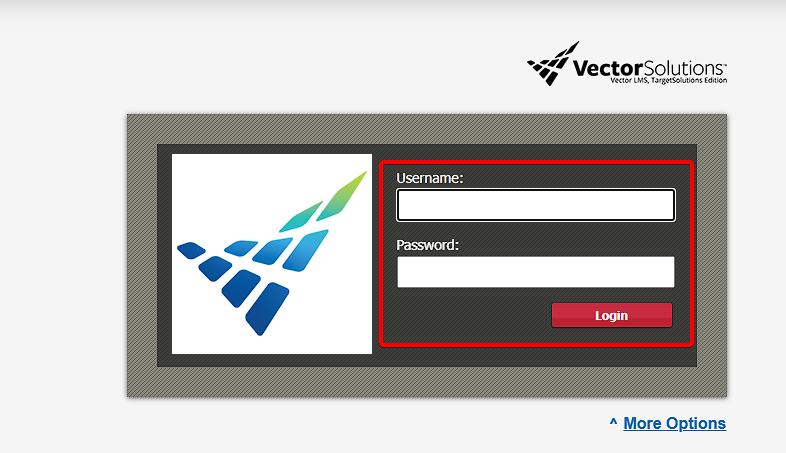
- Enter your SitePath if your organization requires one.
- Click Login to access your account.
The current login page supports a username, password, and optional SitePath. It also provides separate options for agency-based authentication.
After signing in, you should see the training, assignments, credentials, and other resources available through your organization.
2. Log in through Vector Solutions
You can also reach TargetSolutions through the main Vector Solutions website.
- Open the Vector Solutions login page.
- Find Vector LMS – TargetSolutions Edition.
- Select Login.
- Enter your TargetSolutions credentials.
- Complete any additional authentication required by your organization.
Vector Solutions lists TargetSolutions as Vector LMS – TargetSolutions Edition, which serves first responders and local government organizations.
You may still see the TargetSolutions name throughout the login process even though Vector Solutions owns and operates the platform.
3. Use the Target Solutions agency login
To use this option, do the following:
- Open the TargetSolutions login page.
- Select Login with Your Agency.
- Follow your department or organization’s login instructions.
- Enter your organizational account credentials when prompted.
- Complete multi-factor authentication if your organization requires it.
TargetSolutions specifically provides this option for organizations that use systems such as Active Directory or another internal authentication page.
If your employer uses agency authentication, entering a regular TargetSolutions username and password may not work.
Why does TargetSolutions say Vector Solutions?
TargetSolutions became part of Vector Solutions and now operates under the Vector brand. The company refers to the platform as Vector LMS TargetSolutions Edition.
The change does not mean you reached the wrong website if you see Vector Solutions branding after searching for TargetSolutions.
Existing customers can still access the service through the TargetSolutions application login page.
The Target Solutions login remains available even though the service now operates as Vector LMS TargetSolutions Edition. Start with the regular TargetSolutions login page, or choose Login with Your Agency if your organization uses its own authentication system.
If you still cannot access your account, verify your credentials and SitePath before contacting your organization’s administrator or Vector Solutions support.
If you’re dealing with similar account or access issues, we also have a guide for fixing the Navy Federal Credit Union app when it’s not working, along with instructions on how to log in to Army email and a separate guide for accessing Army email with CAC or Army 365 on Windows.
FAQs
Is TargetSolutions now Vector Solutions?
Yes. TargetSolutions joined Vector Solutions, and the platform now uses the name Vector LMS TargetSolutions Edition. Existing TargetSolutions services remain available under the Vector Solutions brand.
Where is the Target Solutions login page?
You can sign in through the official TargetSolutions application at app.targetsolutions.com or use the Vector Solutions product login page and choose Vector LMS – TargetSolutions Edition.
Why can’t I log in to TargetSolutions?
Check your username, password, SitePath, and login method. Your organization may require you to use Login with Your Agency instead of the standard username and password form.
What is Login with Your Agency?
It lets employees authenticate through their organization’s own system, such as Active Directory or another internal login service.
Who can reset my TargetSolutions account?
Your organization’s TargetSolutions administrator or training administrator can usually help with account credentials, SitePath information, and organization-specific login problems.

Read our disclosure page to find out how can you help Windows Report sustain the editorial team. Read more



Improve this guide


User forum
0 messages