
Tiny11 Builder Gets Major Redesign and Windows 11 26H2 Support


 2 min. read
  Published on
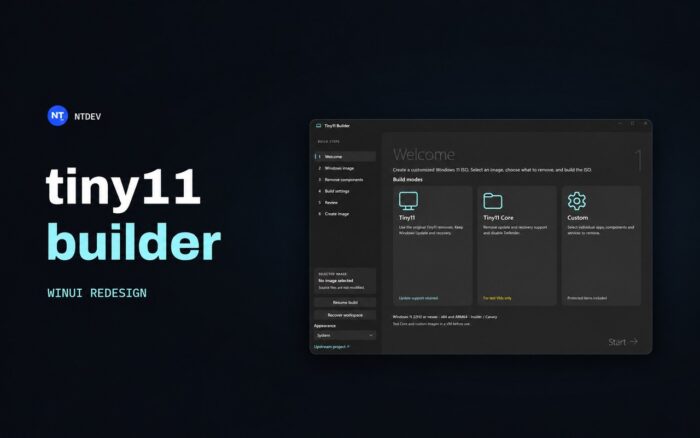
Developer NTDEV has released a redesigned version of Tiny11 Builder, bringing a modern interface, new customization options, and support for Windows 11 26H2.
The release follows an earlier teaser suggesting Tiny11 would soon support Windows 11 26H2.
The updated tool uses Microsoft’s WinUI 3 framework, replacing the older interface with a more modern design. It also fixes compatibility issues that prevented previous versions from properly recognizing Windows 11 26H2.
Tiny11 Builder now offers more control over Windows 11 installations
The biggest addition is a new Custom mode, which lets users decide exactly which Windows apps, services, features, and components they want to keep or remove.
Previously, Tiny11 Builder focused primarily on removing unnecessary Windows components through predefined configurations. The redesigned version gives users more flexibility when creating lightweight Windows installation images.
The update introduces several improvements:
- Windows 11 26H2 support: Fixes compatibility problems that caused older image-building tools to reject Windows 11 26H2.
- Custom mode: Lets users select individual apps, services, features, and Windows components for removal.
- Regular Tiny11 mode: Removes unnecessary applications while preserving Windows Update, Microsoft Defender, and recovery functionality.
- Turbo mode: Accelerates the process of building customized Windows installation images.
- Resume support: Allows users to continue interrupted builds from certain processing stages.
- Windows 10 compatibility: Supports building customized images on Windows 10 PCs with compatible deployment tools.
- Legacy installer: Automatically switches to the older Windows installer for Core builds and certain component removals.
These changes make Tiny11 Builder more flexible for users who want a stripped-down Windows 11 installation without manually removing unwanted components after installation.
Tiny11 Builder is available now, but customization comes with risks
The redesigned Tiny11 Builder is available on GitHub, although NTDEV warns that removing certain protected Windows components can cause compatibility problems or affect system stability.
Users should test their customized Windows installation images in a virtual machine before installing them on their primary PC, particularly when removing system services or core components.
Tiny11 Builder isn’t the only option for users interested in optimizing Windows 11. Recent tests also showed that Windows 11 26H2 RAM usage can drop to just 2.5GB with Rufus.
With Windows 11 26H2 compatibility and more granular customization controls, Tiny11 Builder gives users another way to create lightweight Windows installations.
Via Neowin

Read our disclosure page to find out how can you help Windows Report sustain the editorial team. Read more



Improve this guide




User forum
0 messages