
Windows 11 Beta Build Gets File Explorer Fixes and a Magnifier Refresh


 3 min. read
  Published on

Windows 11 Insider Beta Preview Build 26220.9343 is now available with File Explorer improvements, Emoji 17.0 support, Camera Roll Backup changes, and an updated Magnifier design.
Microsoft released Windows 11 Insider Beta Preview Build 26220.9343 with several changes across Windows 11. The update also includes the modernized AutoPlay experience and new recovery options introduced for Beta Channel users.
File Explorer gets several usability fixes
The latest Windows 11 Insider Beta Preview improves File Explorer’s address bar, file renaming, navigation, and Home page behavior.
The address bar now supports file paths containing double backslashes and quotation marks. Microsoft also improved the reliability of the address bar suggestion dropdown, which should now consistently close after users select an item.
Microsoft fixed an issue that could repeatedly select text while users renamed files or folders. Filename changes that only alter capitalization should also appear immediately across both local and cloud storage.
Keyboard navigation now works better in File Explorer context menus that appear inside flyouts. File Explorer Home will also remember whether users expanded or collapsed its individual sections.
Camera Roll Backup gets more visibility in Settings
Microsoft added new Camera Roll Backup entry points to the Settings Home and Accounts pages.
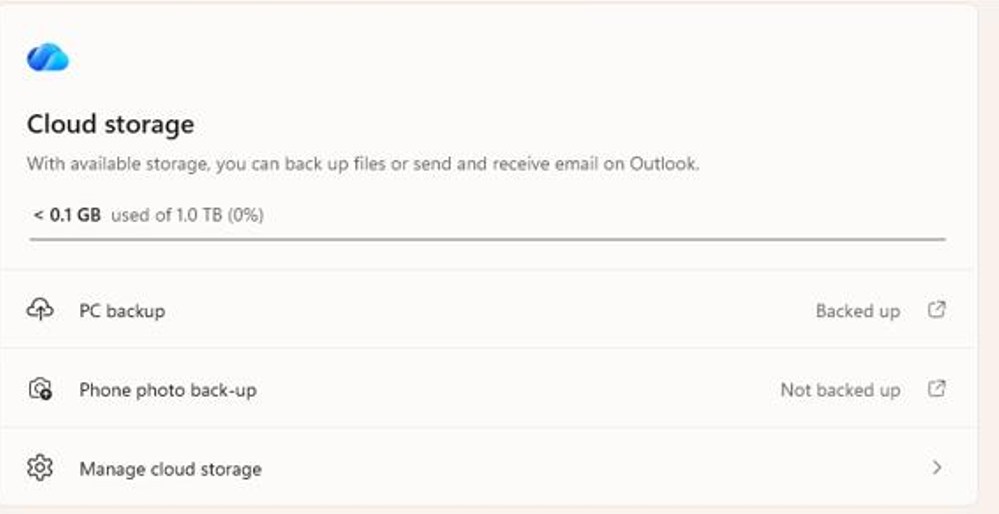
Camera Roll Backup lets Windows users automatically back up photos and videos from their phones to OneDrive. The additional Settings shortcuts should make the feature easier to discover and configure.
Magnifier gets refreshed Windows 11 icons
Microsoft also updated the Magnifier toolbar with icons that better match the Windows 11 design language.
The company adjusted spacing and padding throughout the toolbar to give it a cleaner appearance.
The underlying Magnifier features remain unchanged, including zoom controls, display views, keyboard shortcuts, and Read Aloud.
Windows 11 adds Emoji 17.0 support
The Beta update introduces support for Emoji 17.0.
New additions include the distorted face, fight cloud, and hairy creature emoji. Microsoft also refreshed the appearance of several existing emoji to improve visual consistency across platforms.
Users should see the new characters in Windows applications that support the updated emoji set.
Ebrima font adds two African writing systems
Microsoft expanded the Ebrima font with support for Garay and Beria Erfe.
Garay joined the Unicode standard with Unicode 16.0, while Beria Erfe arrived with Unicode 17.0. Microsoft says Ebrima is its first font to support both writing systems.
The company also refined Adlam glyphs so they better match current Unicode standards.
Microsoft temporarily removes modernized Print Management
Microsoft has temporarily removed its modernized Print Management experience from Windows Insider builds.
The company says the redesigned interface needs additional refinement based on Insider feedback.
Existing Print Management tools remain available, so the removal does not affect the current management options already included with Windows 11. Microsoft plans to bring the redesigned experience back in a future Insider build.
Microsoft is investigating two known issues
The Beta build still has a couple of known problems.
Microsoft is investigating an issue that prevents mouse cursor customization from working correctly. Another bug can cause desktop background customization settings to disappear after users reboot their PCs.
These problems remain under investigation and do not have fixes yet.
Outside the Windows Insider Program, Microsoft has also released the September 2026 Patch Tuesday security updates for supported Windows 11 systems.

Read our disclosure page to find out how can you help Windows Report sustain the editorial team. Read more



Improve this guide

User forum
0 messages