
Windows 11 Beta Update KB5077201 Brings Emoji 16.0 and Camera Improvements


 2 min. read
  Published on
Microsoft continues to iterate on Windows 11, following recent Beta Channel updates like KB5074177 and KB5074169. Today, the company rolled out a new Insider build with a handful of refinements and feature tweaks aimed at improving day-to-day usability.
What’s new in KB5077201 in the Beta Channel?
Microsoft has released Windows 11 Insider Preview Build 26220.7755 (KB5077201) to the Beta Channel. As usual, the changes roll out gradually and only reach Insiders who have enabled the toggle to receive the latest updates as soon as they are available.
Emoji 16.0 returns to Windows Insiders
One of the more visible changes in this build is the return of Emoji 16.0, which is now being rolled back out to Windows Insiders.
Emoji 16.0 introduces a small, curated set of new emojis, with one addition representing each major emoji category. Newly added emojis include:
- Face with Bags Under Eyes
- Fingerprint
- Root Vegetable
- Leafless Tree
- Harp
- Shovel
- Splatter
Users can access these new emojis through the standard emoji panel, just like existing emoji sets.

New camera pan and tilt controls
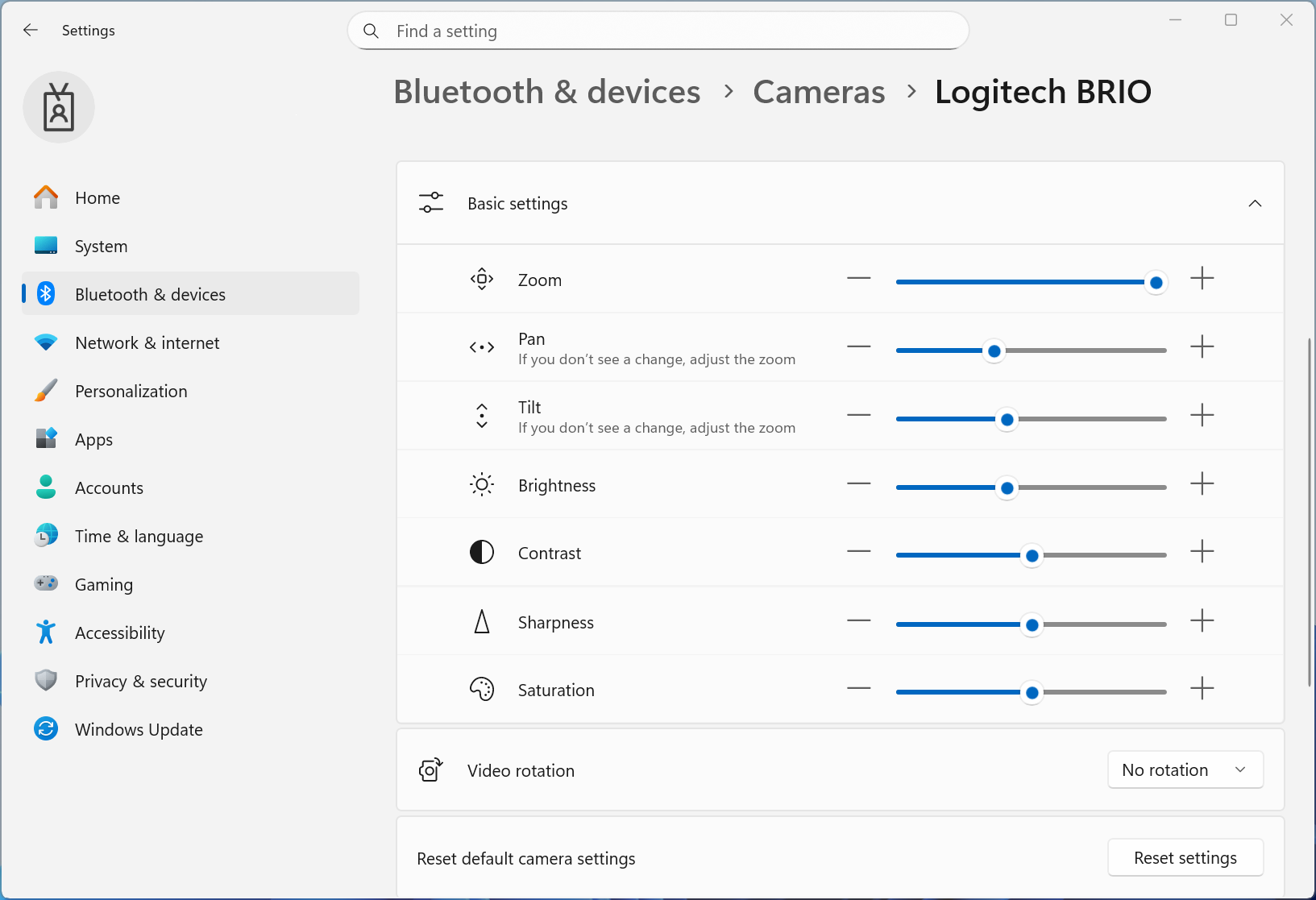
Windows 11 now adds direct pan and tilt controls for supported cameras. These controls appear in Settings > Devices & drivers > Cameras, inside the selected camera’s basic settings.
This change should make it easier for users to fine-tune camera positioning without relying on third-party software, provided the camera hardware supports these features.
General improvements
Microsoft also included several under-the-hood improvements in this build. These changes focus on stability, performance, and visual polish across the system:
- Improved visual experience and performance in several system scenarios
- Better taskbar auto-hide behavior at the bottom of the screen
- Reduced desktop icon flashing and related performance slowdowns
- Improved performance when Windows Security credential pop-ups appear
While Build 26220.7755 is a relatively minor update, many Insiders will hope it avoids the kind of issues seen in previous releases that required emergency patches shortly after launch.

Read our disclosure page to find out how can you help Windows Report sustain the editorial team. Read more



Improve this guide




User forum
0 messages