
Windows 11 Canary Build 29570 Brings Xbox Mode & Updates Context Menu, Touchpad & More


 2 min. read
  Published on

Windows 11’s Canary channel Insiders on the optional 29500 build series are getting a new build today that bumps their system to Build 29570.1000. This update comes alongside Beta and Dev channel builds that bring improvements across Settings, Fie Explorer, and more.
Notably, this update includes platform changes in moving to a new active development build. Alongside, it brings a mix of gaming, system, and UI changes across Windows 11. First up, the update adds Xbox mode, now available across PCs, laptops, and tablets. Inspired by the Xbox experience, it delivers a full-screen, controller-first interface that puts games front and center while cutting background distractions. You can launch it through the Xbox app, Game Bar settings, or by pressing Win + F11.
Moving on, Microsoft is adding support for a dynamic app removal list under the “Remove Default Microsoft Store packages” policy. This allows enterprise admins remove additional MSIX and APPX apps using Group Policy, although it’s not yet supported in Intune and needs manual validation.
File Explorer’s context menu is also getting a small visual update. When you right-click on .exe, .bat, or .cmd files, the “Open” option will now match the icon of the default app, making things look more consistent. Here’s a snapshot of the change you can expect post installing Canary Build 29570.1000:
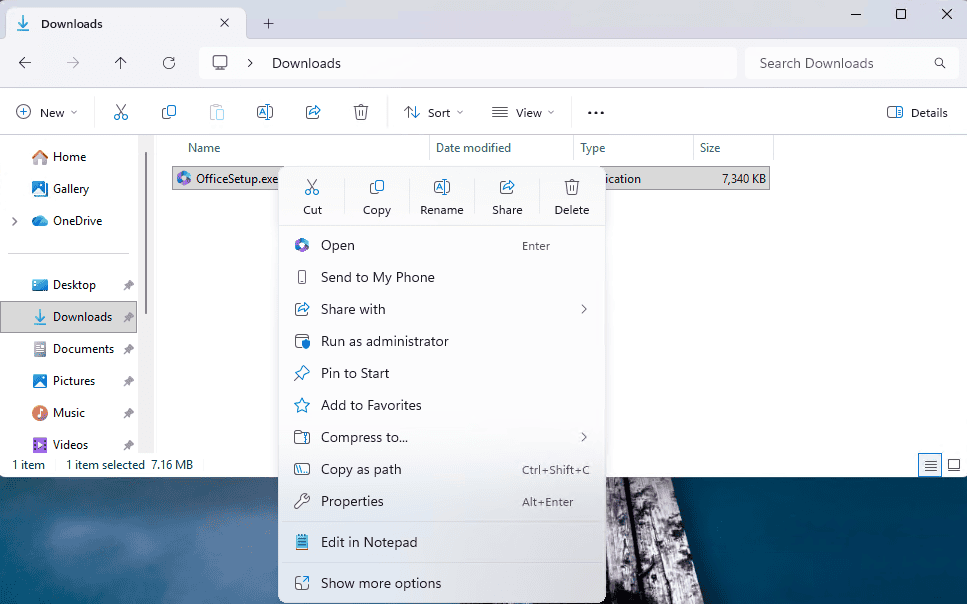
Next up, there’s a new touchpad setting under Bluetooth & Devices that lets you adjust the size of the right-click zone. You can choose between default, small, medium, or large, depending on your device. If your manufacturer already offers custom settings, Windows will preserve that as a “Custom” option.
The update also expands lock screen widgets beyond earlier limited regions. You can now add, remove, and rearrange widgets like Weather, Sports, Traffic, and more, as long as they support small sizing. Last but not least, pen input is getting a minor refinement. Moreover, there’s a new option that allows the pen tail button behave the same way as the Copilot key, making shortcuts more flexible across devices.

Read our disclosure page to find out how can you help Windows Report sustain the editorial team. Read more



Improve this guide




User forum
0 messages