
Windows 11 Canary Preview Build 27938 Adds AI Actions in File Explorer
Quick edits without leaving the right-click menu


 1 min. read
  Published on
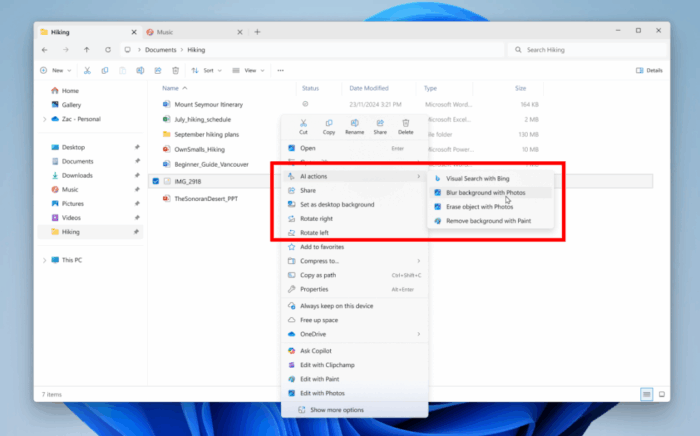
Microsoft is giving File Explorer a new layer of intelligence. In the latest Windows 11 Insider Canary Preview Build (27938), a new AI actions option now appears in the right-click menu for images.
The feature allows users to quickly edit files without opening Paint or Photos. Available tools include Bing Visual Search for finding similar items online, a blur background option for photos, an erase objects tool to remove distractions, and a remove background feature for clean cutouts.
Currently, the actions support JPEG and PNG files. Microsoft calls these “showfloor demos,” meaning they’re early previews that may not reflect the final product. The company is encouraging testers to share feedback through the Feedback Hub before a wider rollout.
The addition continues Microsoft’s push to weave AI into daily Windows features, from Copilot integration to built-in editing shortcuts. File Explorer is one of the most used parts of Windows, and this experiment shows how AI could become part of routine file management. Moreover, the company has also rolled out clock with bigger seconds in notification system.

Read our disclosure page to find out how can you help Windows Report sustain the editorial team. Read more



Improve this guide



User forum
0 messages