
Windows 11 Insider Experimental (Future Platforms) Build Gets Cloud Rebuild and Remote Lock


 3 min. read
 Published on
Microsoft has released Windows 11 Insider Experimental (Future Platforms) Preview Build 29708.1001, introducing Cloud rebuild, Remote Lock, and changes to Windows Hello PIN requirements.
The update also brings File Explorer improvements, Unicode 17.0 support, taskbar fixes, and system stability improvements. Microsoft is rolling out these changes gradually, so some Insiders may not see them immediately.
Windows Hello gets simpler PIN requirements
Microsoft is simplifying the Windows Hello PIN setup process for personal Microsoft accounts and work accounts.
For personal accounts, Windows Hello now defaults to a six-digit minimum PIN length, although users can still choose a four-digit PIN. Microsoft is also removing mandatory complexity requirements, including restrictions involving number sequences, letters, and special characters.
Work accounts receive an updated PIN setup experience, but organizations will retain their existing security requirements and policies.
Microsoft introduces Remote Lock for managed Windows 11 devices
Microsoft is introducing Remote Lock, a security feature that allows IT administrators to remotely lock lost, stolen, or compromised Windows devices through Microsoft Intune.
When an administrator activates Remote Lock, Windows signs out all active user sessions, hides sign-in options, and displays a Device Locked screen. The feature preserves user data, BitLocker protection, and device enrollment.
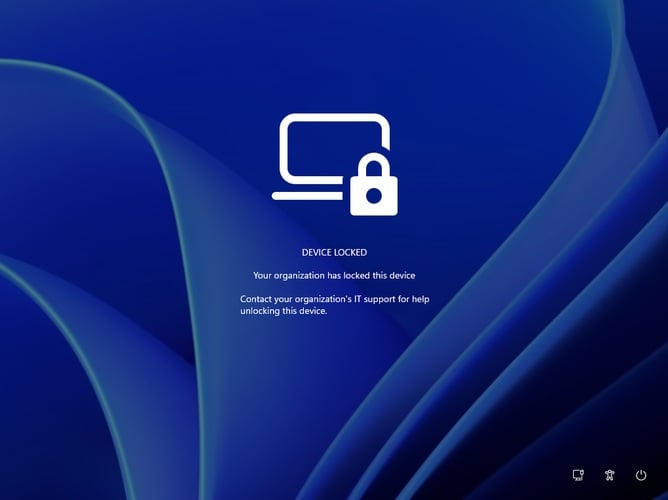
Organizations can also customize the lock screen to explain why the device was locked and provide IT support contact information.
Only an administrator can remotely unlock the device and restore user access.
Cloud rebuild lets users reinstall Windows 11 without USB media
Microsoft is also introducing Cloud rebuild, a new recovery option that allows users to completely reinstall Windows 11, even when the operating system cannot boot.
Unlike the existing Reset this PC feature, Cloud rebuild downloads Windows installation files and device drivers directly from Windows Update. Users do not need USB installation media or a custom recovery image.
Users can access the feature through Windows Recovery Environment by navigating to Troubleshoot > Recovery and uninstall > Cloud rebuild. Microsoft also provides access through Settings > System > Recovery.
The process requires an internet connection. Before reinstalling Windows, users must review the Windows version, edition, and language and confirm a warning about potential data loss.
File Explorer, taskbar, and system stability improvements
The update adds support for tags and additional metadata in WebP images through File Explorer, making it easier to manage image information.
Microsoft has also fixed an issue that caused interactions with taskbar app preview windows to become progressively slower.
Unicode 17.0 text-shaping support introduces 4,803 additional characters, including four newly encoded scripts: Beria Erfe, Sidetic, Tai Yo, and Tolong Siki.
Another fix addresses green screen crashes associated with the DRIVER_IRQL_NOT_LESS_OR_EQUAL error, improving overall system reliability.
Microsoft continues testing new Windows 11 features
Build 29708.1001 follows several other recent Windows 11 Insider releases.
Microsoft recently introduced a modern Run dialog and BitLocker improvements in the Experimental 26H1 channel. The company also updated the Windows 11 Insider Beta channel to let standard users configure BitLocker preboot PINs.
Cloud rebuild also appeared in Windows 11 Insider Preview update KB5132265, alongside customizable context menus and accessibility changes.
Another recent release, KB5132057, delivered additional Windows 11 improvements and fixes.
Microsoft has not announced when the features in Build 29708.1001 will reach stable Windows 11 releases.

Read our disclosure page to find out how can you help Windows Report sustain the editorial team. Read more


Improve this guide

User forum
0 messages