
Windows 11 KB5065797 Adds Smarter Click to Do with Image Object Select & Unit Conversion
Smarter context tools arrive for Copilot+ PCs


 2 min. read
  Published on
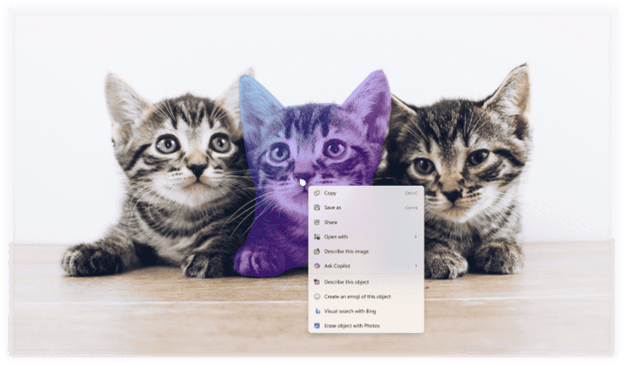
Microsoft has rolled out Windows 11 Insider Preview Build 26220.6772 (KB5065797) in the Dev Channel, and the highlight this week is a major upgrade to Click to Do on Copilot+ PCs.
The feature now includes Image Object Select, which lets you hover over images to highlight and copy individual objects instantly. Once selected, these can be pasted into other apps or used to start a Copilot chat for creative editing or analysis.
It’s a small but meaningful addition that helps speed up workflows for designers, students, and anyone working with visuals.
Another new addition is Unit Conversion, which enables Windows 11 to recognize and convert measurements right from the screen.
Post-update, hovering over a number like “2 km” reveals instant conversions to miles and feet, and selecting it brings up a context menu with more options. It supports multiple categories, including length, area, weight, temperature, and speed.

Microsoft says these changes make Copilot+ PCs even more contextually aware and productive. However, Click to Do’s new features are still unavailable in China and the EEA for now.
Moreover, the similar update has also refined File Explorer’s dark mode and fixes taskbar bugs in Windows 11 24H2 (Beta). That’s not all; you’ll also find support for external fingerprint sensors support in Windows Hello Enhanced Sign-in Security (ESS) for better security.

Read our disclosure page to find out how can you help Windows Report sustain the editorial team. Read more



Improve this guide




User forum
0 messages