
Windows 11 KB5065797 Refines File Explorer Dark Mode & Fixes Taskbar Bugs
UI refinements and stability improvements arrive for Insiders


 1 min. read
  Published on
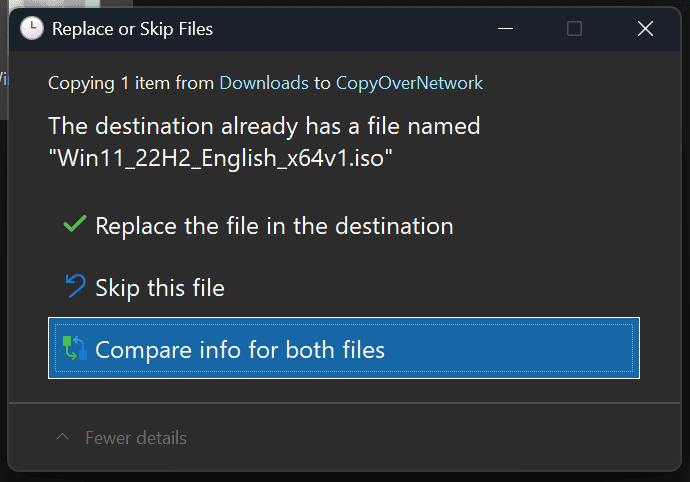
The Windows 11 Dev Channel build 26220.6772 (KB5065797) brings multiple improvements and reliability fixes focused on File Explorer, Taskbar, and overall system stability.
Microsoft has improved the dark mode experience in File Explorer, ensuring dialogs for copying, moving, deleting, and confirming actions now appear consistently styled. Progress bars, chart views, and error pop-ups are all harmonized under a single theme for a cleaner visual flow.


The update also resolves several Taskbar and System Tray issues. Microsoft fixed a bug where the tray peeked above the screen even when auto-hide was enabled, and another where clicking on a preview didn’t bring an app to the foreground.
Besides UI improvements, the company addressed a long-standing network adapter issue that displayed incorrect link speeds in Settings. On arm64 devices, Hyper-V virtual devices using TPM should now start normally.
Microsoft also patched a problem causing external webcams to fail when using Windows Studio Effects, as well as playback issues affecting Blu-ray and digital TV apps.
Moreover, Microsoft has also updated the aforementioned changes for users in the Beta channel of Windows 11 version 24H2. Moreover, the update also adds smart image object select in Click to Do and user folder renaming option during OOBE.

Read our disclosure page to find out how can you help Windows Report sustain the editorial team. Read more



Improve this guide




User forum
0 messages