
How to Log In to Wix on Desktop and Mobile


 4 min. read
  Published on

Wix lets you access your website dashboard, editor, billing settings, domains, and other account tools. You can log in to Wix with your email and password or use Google, Facebook, Apple, SSO, or a configured passkey.
How do I log in to Wix?
1. Log in with your email and password
Follow these steps to access your Wix account:
- Go to Wix.com.
- Click Log In in the upper-right corner.

- Enter the email address associated with your Wix account.
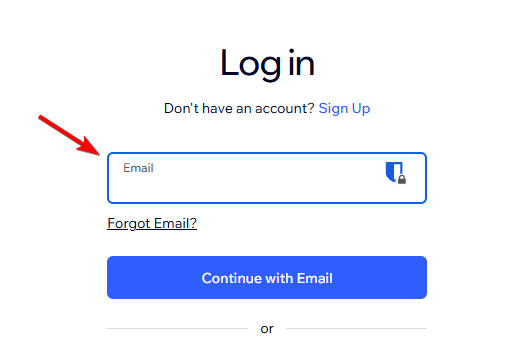
- Click Continue with Email.
- Enter your password.
- Click Log In to open your account.
After signing in, you can select your website and access its dashboard or editor.
2. Log in to Wix with Google, Facebook, or Apple
Wix also supports social sign-in options, which can make logging in faster if you connected one of these accounts.
- Open the Wix login page.
- Select Google, Facebook, or Apple.
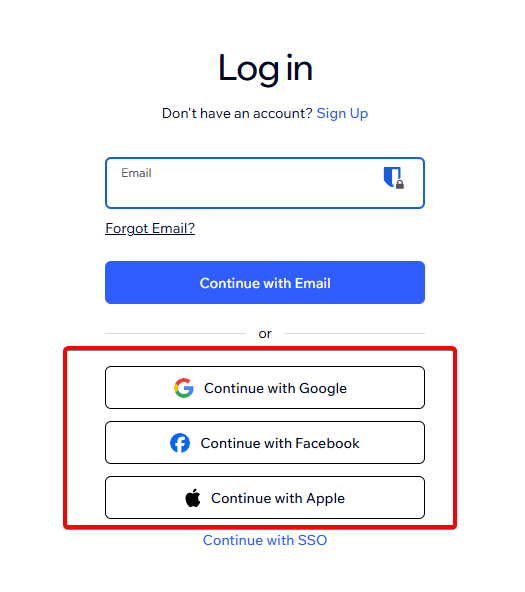
- Choose the account connected to Wix.
- Complete any verification requested by the provider.
- Wait for Wix to redirect you to your account.
Make sure you select the same social account you originally connected to Wix. You can manage your Google, Facebook, and Apple login connections from Wix Account Settings.
3. Log in to Wix with SSO
Some organizations let employees or collaborators access Wix through Single Sign-On.
- Open the Wix login page.
- Choose the SSO login option.
- Enter the requested website or organization information.
- Follow your organization’s sign-in instructions.
If you expect to have SSO access but cannot sign in, contact your organization’s administrator.
4. How to log in to Wix on mobile
Website owners can manage their sites from the Wix app on supported mobile devices. Wix also offers the Studio app for users working with Wix Studio sites.
To access your account:
- Open the Wix app on your phone.
- Choose the option to log in.
- Enter your Wix account credentials or use your connected login method.
- Complete two-step verification if Wix requests it.
- Select the website you want to manage.
Once signed in, you can manage many site and business features directly from your phone.
What to do if Wix login is not working
If you cannot log in to Wix, try these solutions:
- Reset your password – Open the Wix login page, click Forgot Password?, and follow the instructions in the reset email. Check your spam folder if you don’t receive it.
- Check your email address – Make sure you use the email associated with your Wix account. Use Wix’s account email locator if you cannot remember it.
- Fix Google login issues – Allow pop-ups and cookies, disable conflicting browser extensions, and make sure you select the correct Google account.
- Try another login method – Use your email and password or another sign-in method already connected to your Wix account.
- Recover your account – If you no longer have access to your email, use your recovery phone number or Wix’s account recovery process to verify ownership.
Logging in to Wix is straightforward, whether you use email, a social account, or SSO. For a smoother experience when accessing and editing your website, check out our guide to the best browsers for Wix.
If you also manage other online accounts, our DocuSign login guide and CVS login guide explain how to sign in and access their services on the web or mobile.
FAQs
Can I log in to Wix with Google?
Yes. Wix supports Google login as long as the Google account connects to your Wix account. You can also use Facebook or Apple.
What should I do if I forgot my Wix password?
Open the Wix login page, enter your email address, select Forgot Password?, and request a password reset email.
Why can’t I find my website after logging in?
You may have signed in to a different Wix account. Check the email address you used and try any other email accounts that you may have associated with Wix.
Can I have more than one Wix account?
Yes. Wix allows you to create multiple accounts, but each account needs a different email address.
Can I log in to Wix without a password?
Yes. Depending on your account configuration, you can use Google, Facebook, Apple, or a passkey instead of entering your Wix password.

Read our disclosure page to find out how can you help Windows Report sustain the editorial team. Read more



Improve this guide




User forum
0 messages