
Word, Excel, and PowerPoint on iPhone Just Got a “Modernized” Commenting Experience
Microsoft further plans to add filters, a drafting sheet, and more


 2 min. read
  Published on
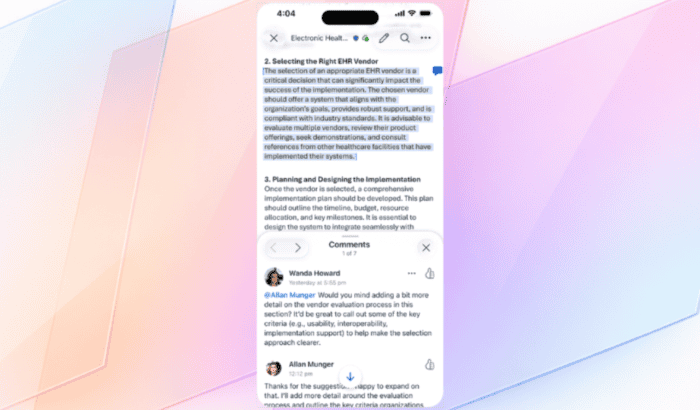
Microsoft today announced that it is rolling out a refreshed commenting experience for Word, Excel, and PowerPoint on iPhone. The update makes threads easier to read, locate, and act on, helping users stay on top of feedback while on the move.
Commenting experience just got better in Word, Excel, and PowerPoint on iPhone
The new Comments pane features a streamlined design and clearer layout. Users can quickly see which comments need attention, respond without hunting through threads, and keep collaboration flowing. In Word and PowerPoint, comments are accessible via the bottom task bar, while all three apps allow tapping a comment icon or the Review tab.

This isn’t the full feature set yet. Microsoft further plans to add filters, a drafting sheet, and ways to comment from empty states in the coming months. The new comments experience is rolling out in Word, Excel, and PowerPoint for iOS users via version 2.106 (Build 26022013). However, it’s unclear when all iPhone users will see the update.
Microsoft appears to be bridging the gap between desktop and mobile Office, keeping the iPhone experience closer to what users are used to on larger devices. More cross-device feature could be coming soon. Speaking of Office apps on Apple devices, you can now generate richer alt text in Word and PowerPoint for Mac.

Read our disclosure page to find out how can you help Windows Report sustain the editorial team. Read more



Improve this guide




User forum
0 messages