
How to Sign In to Windows Live Mail on Windows 11


 2 min. read
  Published on

If you are still using Windows Live Mail, signing in can be confusing on newer systems. Here’s how to log in and manage your emails safely.
How to sign in to Windows Live Mail?
Sign in directly to Windows Live Mail
- Open Windows Live Mail from your Start menu or desktop.
- Enter your Windows Live ID (Hotmail, Outlook, or MSN email) and password.
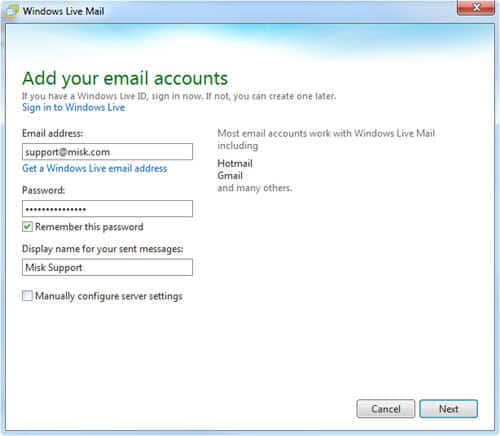
- Click Sign in to access your inbox.
If you face issues, follow this Windows Live Mail on Windows 10 guide to troubleshoot compatibility problems.
Although Microsoft discontinued Windows Live Mail, you can still access your emails if you connect the app to Outlook. Many users prefer to move Windows Live Mail data to Outlook since it offers better support, integration, and security across devices.
If your account is linked to Hotmail, you can continue signing in with your existing credentials. The process works the same as with other Microsoft addresses, and your messages will sync automatically once you set up the account. You can also improve your email experience by adjusting junk mail filters. Windows Live Mail allows you to change spam settings and block unwanted senders to keep your inbox clean.
While Windows Live Mail is no longer updated, you can still log in, manage spam filters, and connect your account with Outlook. For a more reliable long-term solution, consider migrating to Outlook to keep all your messages and contacts accessible in one place.
FAQs
Yes, you can still log in if the app is installed, but Microsoft no longer updates it.
Check your internet connection, re-enter your credentials, or consider using Outlook instead.
Yes, you can sign in with Hotmail, Outlook, or MSN accounts and sync your emails.
You can adjust the junk filter level and block specific senders from the spam settings menu.
It still works, but since Microsoft ended support, using Outlook offers better security and reliability.

Read our disclosure page to find out how can you help Windows Report sustain the editorial team. Read more



Improve this guide



User forum
0 messages