OpenAI has started pushing Codex further into everyday browser work, and this time it is landing right inside Google Chrome on macOS and Windows. It is a quiet but meaningful change, especially for those who already spend most of their time working inside tabs rather than standalone tools.
Codex steps into Chrome workflows
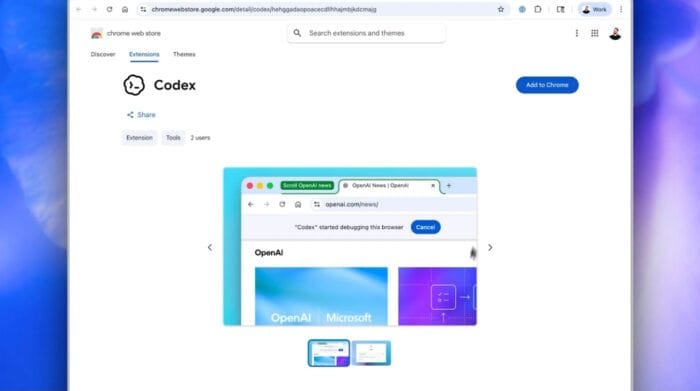
As OpenAI puts, Codex is no longer limited to separate environments. It now runs inside Chrome, where it can interact with websites, logged-in sessions, and multi-tab workflows in a more natural way. The update also allows it to work in parallel across tabs in the background without taking over the browser.
To get started, you need to install a Chrome plugin through the Codex app. Once enabled, it starts handling repetitive browser tasks such as structured navigation, long form data entry, and page-heavy workflows that usually take time and focus.
What stands out here is how it behaves under the hood. Codex does not just automate clicks. It writes and executes code to complete tasks, which makes it more adaptable when workflows become complex or inconsistent across different sites. Codex can switch to plugins when they are enough, use Chrome when a logged-in session is required, or combine both approaches when things get more layered.
That quietly changes how browser-based automation feels. Instead of one fixed method, it adjusts depending on what the task demands in real time, especially for multi-step actions across different platforms. Speaking of broader use cases, Codex is now moving closer to real work scenarios. It can help with debugging browser flows, checking dashboards, pulling research data, and even updating CRM systems, all within the same browser environment most users already rely on daily.
For now, the rollout is available through the Codex macOS and Windows app in most regions, except in the EU and UK. However, OpenAI has announced thar wider availability is expected to follow down the line.
Rishaj Upadhyay

News Editor
Rishaj is a tech writer who has been writing professionally for over four years, with a passion for Android, Windows, and all things tech. He initially joined Windows Report as a tech journalist and is now taking over as a news editor. When he's not breaking the keyboard, you can find him cooking, or listening to music/podcasts.
Readers help support Windows Report. We may get a commission if you buy through our links.

Read our disclosure page to find out how can you help Windows Report sustain the editorial team. Read more


 2 min. read
  Published on






User forum
0 messages