
Microsoft Tests New Copilot Docking Mode in Windows 11
Copilot can now stay docked beside apps in Windows 11


 3 min. read
  Published on
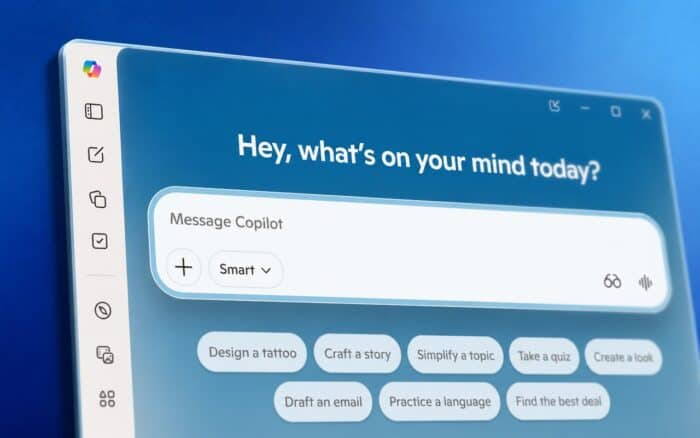
Microsoft is testing a new docking experience for Copilot in Windows 11, as Windows Latest writes. The feature changes how Copilot behaves on the desktop by letting users pin it to either side of the screen instead of keeping it as a floating app window.
When docked, Copilot no longer floats above other apps. Windows 11 automatically resizes and shifts open windows to make room for the assistant. The feature was recently spotted in testing builds and appears to be part of Microsoft’s effort to make Copilot feel more integrated into the operating system again.
Copilot can now dock beside apps
Copilot still opens as a regular app by default, but Microsoft has added a new drop-down menu inside the title bar. Hovering over the menu reveals several layout options for the assistant.
Users can continue using Copilot as a standard window or switch to picture-in-picture mode. Microsoft is also testing the ability to dock Copilot to the left or right side of the screen.
Once docked, Copilot stays pinned to the desktop while Windows automatically adjusts the remaining workspace. Apps like File Explorer resize and shift instead of being covered by the assistant window.
Microsoft revisits the old sidebar concept
The feature feels similar to the original Windows 11 Copilot sidebar Microsoft introduced before moving Copilot into a standalone app.
That earlier version allowed Copilot to sit alongside apps instead of behaving like a separate floating window. Microsoft later removed the sidebar and replaced it with the current standalone experience.
The new implementation gives users more flexibility than before. Users can dock Copilot, keep it as a normal app window, or switch to a smaller always-on-top layout depending on how they work.
Copilot changes continue across Windows
The docking feature arrives during a busy period for Copilot changes across Microsoft products.
Microsoft is reportedly preparing to let users remap the dedicated Copilot keyboard key. The company is also rolling back the floating Copilot button in Office apps after some users criticized the feature.
At the same time, a former Microsoft executive recently claimed Copilot adoption remains lower than expected despite Microsoft heavily promoting AI features across Windows and Microsoft 365.
The new docking mode could make Copilot more practical for multitasking because it becomes part of the desktop layout instead of sitting above applications.
It also suggests Microsoft may once again push toward deeper Windows integration for Copilot after previously separating the assistant into its own app.

Read our disclosure page to find out how can you help Windows Report sustain the editorial team. Read more



Improve this guide


User forum
0 messages