
Visual Studio Code Adds More Autonomous AI Workflows and Cross-Device Agent Sessions


 3 min. read
  Published on
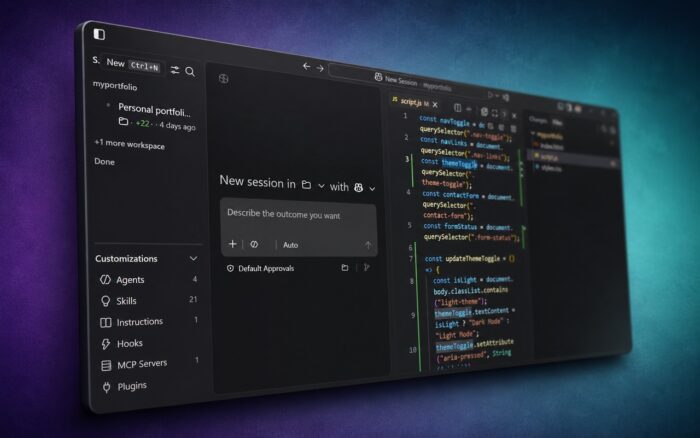
Microsoft has released Visual Studio Code 1.124, bringing a range of improvements focused on AI-powered coding workflows. The update introduces smarter agent automation, a new Agents window, background agent requests, and several enhancements to the integrated browser experience.
The release builds on the changes introduced in Visual Studio Code 1.123 and continues Microsoft’s push toward more autonomous AI-assisted development.
Autopilot Gets Smarter
One of the biggest changes in VS Code 1.124 is that Autopilot is now enabled by default.
Autopilot is a chat permission level that allows AI agents to work more independently without requiring approval for every individual action. Microsoft says the feature now does a better job of recognizing when a task has been completed, reducing unnecessary follow-up actions and interruptions.
The company has also introduced Advanced Autopilot, a new capability designed to improve how agents determine whether they should continue working or stop.
Instead of relying solely on the primary model, Advanced Autopilot uses a smaller utility model that analyzes the conversation and evaluates whether the requested task is truly finished. Microsoft says this should help agents deliver more complete results while reducing the need for users to manually supervise long-running workflows.
New Agents Window Improves Session Management
VS Code 1.124 introduces a dedicated Agents window that makes it easier to manage AI agent activity.
The Agents window lets users explore, review, and continue agent sessions across projects and machines.
Microsoft has also improved navigation between agent sessions. Users can now search through sessions, quickly jump between conversations, and navigate using keyboard shortcuts.
Another quality-of-life improvement allows the Agents window to be reopened or refreshed without losing its layout, making it easier to pick up work where it was left off.
Background Agent Requests Arrive
Developers can now submit agent requests in the background.
Previously, users often had to wait for one agent session to finish loading before starting another request. With VS Code 1.124, multiple agent workflows can be queued and managed more efficiently, helping developers stay productive while AI tasks run in parallel.
Integrated Browser Receives Upgrades
Microsoft has also expanded the capabilities of the integrated browser.
The browser now maintains a history of visited pages and displays suggestions while users type URLs. History can be accessed and managed using the Ctrl+H shortcut directly inside browser tabs.
Customization options have also improved. Users can now right-click the toolbar area next to the URL field and tailor the browser interface to their preferences.
In addition, Microsoft says agent-driven text entry inside the browser has become faster and more responsive.
New Enterprise Controls for Copilot Plugins
For organizations using GitHub Copilot and AI-powered development tools, VS Code 1.124 introduces experimental enterprise-managed Copilot plugin policies.
These policies allow administrators to centrally manage available chat plugins, plugin marketplaces, and developer access to AI integrations, giving enterprises greater control over security, compliance, and governance when deploying AI-assisted coding tools at scale.
Update Availability
Visual Studio Code 1.124 is available now. Existing users should receive the update automatically or through the application’s built-in update mechanism.
The release comes as security concerns around the VS Code ecosystem continue to attract attention. Recently, a malicious VS Code extension reportedly exposed access to private GitHub repositories, while Microsoft also restored 73 GitHub repositories following disruptions linked to the Miasma supply-chain incident.

Read our disclosure page to find out how can you help Windows Report sustain the editorial team. Read more



Improve this guide



User forum
0 messages