
Latest Windows 11 Beta Build Improves File Explorer, Windows Recovery, Taskbar & Search
The Build 26220.9202 is out for Windows 11 Insiders in the Beta channel


 2 min. read
  Published on
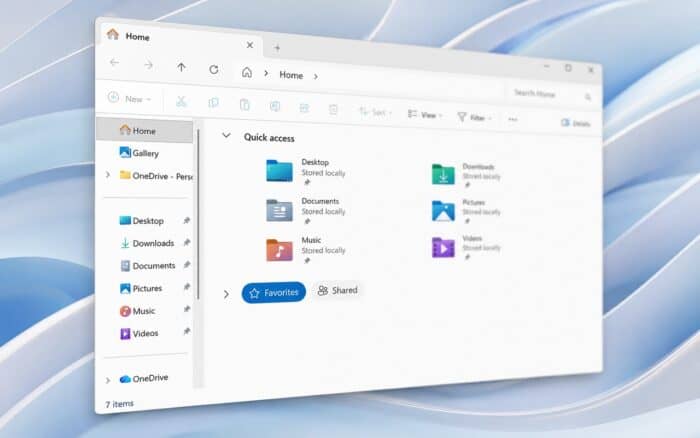
In addition to detailing improvements made to File Explorer and its context menu, Microsoft has also released a bunch of builds. Windows 11 Insiders in the Beta channel are getting Build 26220.9202, which makes File Explorer faster, while Windows Recovery gains a useful networking upgrade. The latest build further removes WMIC, updates Search, and addresses reliability problems affecting Settings, Taskbar, Japanese input, and Arm64 PCs.
File Explorer gets faster while Windows Recovery gains smarter Wi-Fi support
File Explorer Home should now launch faster and feel more responsive. Microsoft has also added touch scrolling to the Recommended section, making its file carousel easier to navigate.
The update fixes another File Explorer issue from the previous build. File previews could previously display an unexpected thick band across the middle.
Windows Recovery Environment is getting a more significant networking change. WinRE can now reuse eligible Wi-Fi profiles saved in the main Windows installation.
That includes supported certificate-based Wi-Fi networks. Devices can therefore connect automatically during recovery workflows without separately configuring wireless credentials. Not to forget, administrators can disable the capability if required.
Windows 11 also removes WMIC and cleans up several smaller problems
Microsoft has removed Windows Management Instrumentation Command-line, known as WMIC, in this release. The change continues Microsoft’s broader removal of the deprecated component.
Search is receiving a small visual upgrade, with the search box becoming four pixels taller. Meanwhile, Microsoft is removing the Drag Tray experience from this build after Insider feedback.
The company says it is exploring improvements before introducing a potential replacement. Settings also receives a crash fix involving the Date & Time page.
Taskbar reliability has improved for system tray loading on non-touch PCs. Japanese IME typing should also be more reliable after fixes for potential hangs and deadlocks.
Finally, Microsoft fixed an xtajit64.dll crash affecting certain apps on Arm64 PCs. These changes make Build 26220.9202 a broader reliability update rather than a single-feature release.
If you’re on the 26H1 version of Windows, you should know that the company has released Build 28020.2731, which removes the same legacy features. For users looking to try new features, there’s Experimental Build 26340.9212 that brings a customizable context menu.

Read our disclosure page to find out how can you help Windows Report sustain the editorial team. Read more



Improve this guide


User forum
0 messages