
Windows 11 Beta Build Adds a New Way to Open Apps Maximized


 2 min. read
  Published on
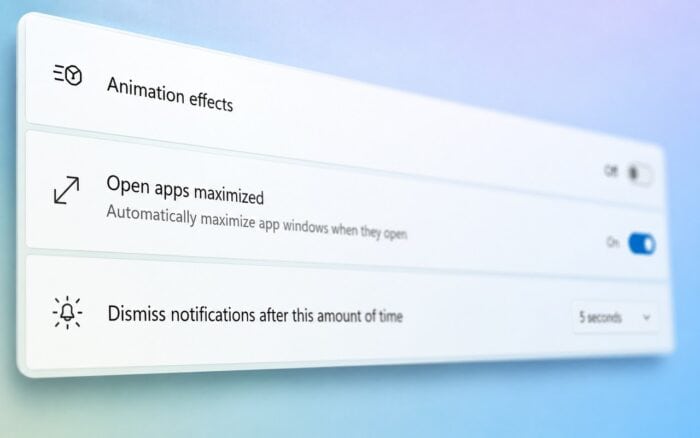
Windows 11 Beta Build 26220.9223 is now available to Insiders, adding a new accessibility option that can automatically open apps maximized.
Microsoft announced Windows 11 Insider Beta Preview Build 26220.9223 on August 21. The update also improves Microsoft Store support for elevated WinUI 3 apps.
Windows 11 can automatically open apps maximized
The biggest addition is the new Open apps maximized setting.
Once enabled, Windows automatically maximizes supported app windows when users open them. This removes the need to manually maximize individual windows after launching an app.
Microsoft says the option could help several types of users, including screen reader users, people who use magnification tools, users working in tablet mode, and anyone who prefers apps to fill the screen automatically.
Users can enable the feature from the Accessibility section of the Windows 11 Settings app.
The option could also make Windows more convenient on smaller displays or devices where users frequently work with one maximized app at a time.
Microsoft Store adds support for elevated WinUI 3 apps
Build 26220.9223 also includes an improvement for Microsoft Store developers.
Microsoft Store now supports in-app purchases inside packaged WinUI 3 applications that require elevation.
This means developers who create elevated WinUI 3 apps can use Microsoft’s integrated commerce platform to sell features or content directly inside their applications.
The change expands Microsoft Store purchasing support to another category of Windows apps while keeping transactions inside Microsoft’s existing commerce system.
Microsoft has also recently added a Classic Outlook theme to New Outlook and fixed a maximum-severity flaw in Microsoft Entra ID.

Read our disclosure page to find out how can you help Windows Report sustain the editorial team. Read more



Improve this guide



User forum
0 messages