
Windows 11 Could Soon Open Apps Maximized Automatically


 2 min. read
  Published on
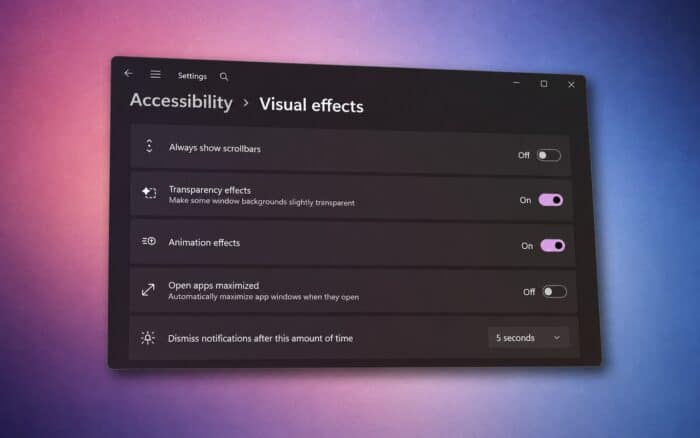
Windows 11 could soon automatically open apps maximized, removing the need to resize windows manually every time they launch.
Microsoft appears to be testing a new setting that forces app windows to open maximized by default. PhantomOfEarth spotted the option in recent Windows 11 preview builds.
Windows 11 gets an automatic maximize setting
The new option appears under the Accessibility section of Windows Settings and reads: “Automatically open app windows maximized when they open”
Users can toggle the feature on or off. When enabled, Windows 11 would automatically maximize supported app windows as they launch.
Currently, many Windows apps initially open in windowed mode. Users often need to click the maximize button manually unless Windows or the app remembers the previous window size.
The new setting could make that process much simpler, especially for people who prefer working with one app filling the entire display.
Handhelds and TV-connected PCs could benefit most
The feature could prove particularly useful on Windows handheld gaming devices and smaller tablets, where limited screen space makes maximized apps easier to navigate.
It could also help users running Windows 11 PCs connected to large TVs. Automatically maximizing applications would reduce the need to precisely manage windows from a couch or other position far from the display.
Microsoft has been making several other Windows 11 interface improvements as well. The company is improving File Explorer performance and adding a customizable context menu.
Microsoft has also started testing more Taskbar customization. The movable Taskbar recently appeared in KB5120998, bringing back functionality Windows users have requested for years.
The automatic maximize option remains part of Windows 11 preview testing, so Microsoft could still change or remove it before a wider rollout.
Via Windows Central

Read our disclosure page to find out how can you help Windows Report sustain the editorial team. Read more



Improve this guide



User forum
0 messages