
CinePlus App Not Working? Try These Fixes for Crashes, Streaming & Connection Issues


 4 min. read
  Published on

If CinePlus is not working for you, don’t assume your device is broken. Users have reported various issues on a wide range of devices, but there are ways to fix it. In this guide, we’ll walk you through different ways to fix CinePlus app when it won’t work and help you understand why you encounter such issues.
What can I do if CinePlus app is not working?
CinePlus problems are not always caused by the same thing. Some users cannot open the app, while others reach the library but find no playable sources. That points toward a possible service-side problem in some cases. However, local connection issues, damaged cache, outdated builds, and unavailable sources can produce similar symptoms.
How to fix CinePlus app when it will not open?
Follow the given step-by-step method when CinePlus crashes immediately, freezes during startup, or returns you to the home screen.
- Open your device settings and find Apps.
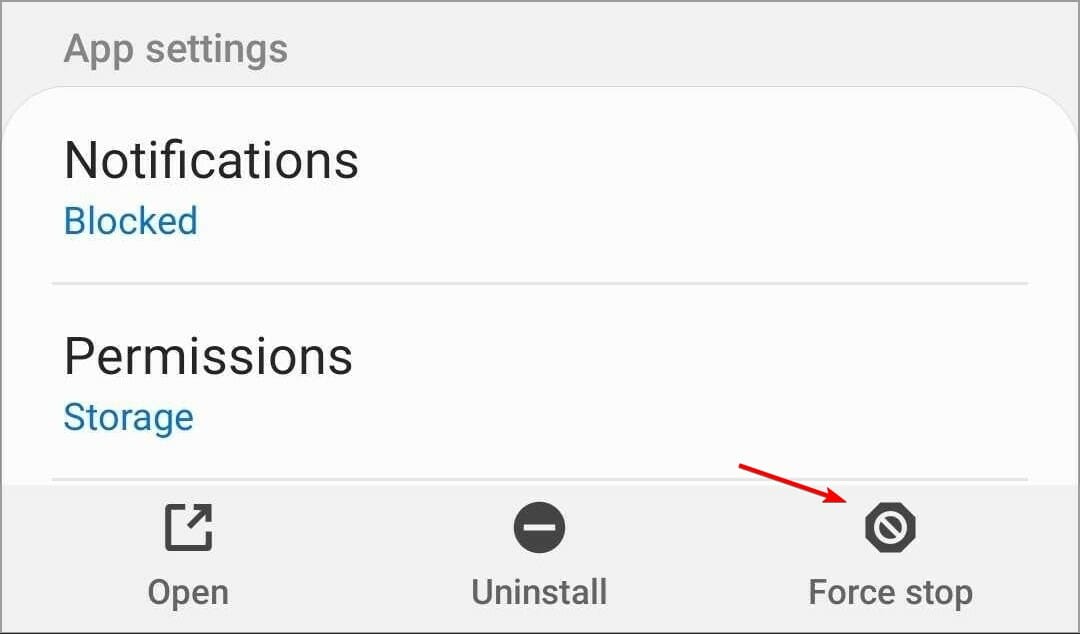
- Select CinePlus and choose Force stop.
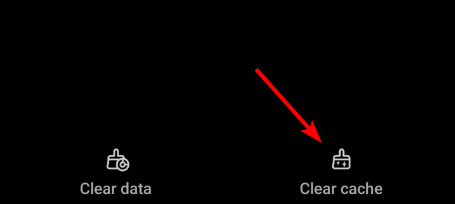
- Open Storage and select Clear cache.
- Restart your FireStick, Android box, phone, or tablet.
- Launch CinePlus again.
If that fails, check whether the app works on another device. Recent users reported the same crash across FireStick and Nvidia Shield, making a device-specific fault less likely.
How to fix CinePlus when there are no connection or data?
CinePlus needs access to its services and streaming sources. You can do the following to fix any connectivity issues related to CinePlus:
- Restart your router or switch to mobile data.
- Test another Wi-Fi network if possible.
- Disable any network filter or ad-blocking tool temporarily.
- Clear the CinePlus cache again.
- Try another title if only one movie shows no data.
If the entire library remains empty, wait and test later.
How to fix CinePlus app when videos won’t play?
Sometimes CinePlus opens normally but refuses to start a video. This can happen when a particular streaming source fails. In that case, try another available source before changing the entire app. CinePlus also relies on external video players, so check that the required player is installed and functioning.
If one source repeatedly gives a playback error, test another source. A single failed source does not necessarily mean CinePlus itself is broken.
How to fix CinePlus app crashes?
Low storage can make apps unstable, especially on streaming devices with limited free space. Delete unused applications and restart the device. Then clear CinePlus cache before launching it again.
If your installation appears damaged, reinstall the current version from a source you trust. Avoid repeatedly installing random APK builds, especially when an existing installation already works.
Why CinePlus suddenly stops working?
- Corrupted app cache: Damaged temporary files can stop CinePlus from loading or playing content correctly.
- Unavailable streaming sources: A particular movie or show may have no working source available.
- Network problems: Weak Wi-Fi, unstable mobile data, or DNS issues can prevent CinePlus from connecting.
- Network filtering: Some networks may block access to certain CinePlus sources.
- Outdated app version: Older CinePlus builds may develop compatibility or playback problems.
- Limited device storage: Low free storage can cause crashes, slow loading, or other app errors.
- External player issues: An outdated or malfunctioning video player can prevent streams from starting.
- Server-side problems: If CinePlus fails across multiple devices at the same time, the issue may be affecting its services rather than your device.
- Temporary service disruption: Recent user reports suggest CinePlus has experienced periods where it stopped working before returning later.
- Installation problems: A damaged or incomplete APK installation can also cause repeated crashes or missing features.
All that said, CinePlus can fail in several different ways, so one fix will not cover every situation. Start with the connection, cache, app version, storage, and playback source before going deeper. If you’re having trouble with other streaming services, check our guides on what to do when StreamEast is not working, Crackle is not working, or HBO Now is not working.
FAQs related to CinePlus app issues
1. Is CinePlus down right now?
Recent users have reported intermittent outages and launch failures. However, reports also show the service returning afterward, so the problem may be temporary.
2. Why does CinePlus open and immediately close?
A corrupted cache, incompatible app build, device issue, or server-side failure can cause this behavior. Start with force-stopping the app and clearing its cache.
3. Why does CinePlus show no data?
The problem may involve the network, DNS, cache, or unavailable sources. Test another connection and another title before reinstalling anything.
4. Why does CinePlus say to install a video player?
Some streams require an external player. If the player is outdated or conflicting with another installed player, playback can fail.

Read our disclosure page to find out how can you help Windows Report sustain the editorial team. Read more



Improve this guide



User forum
0 messages