
Microsoft Is Putting Copilot Right in Front of Outlook Classic Users


 2 min. read
  Published on
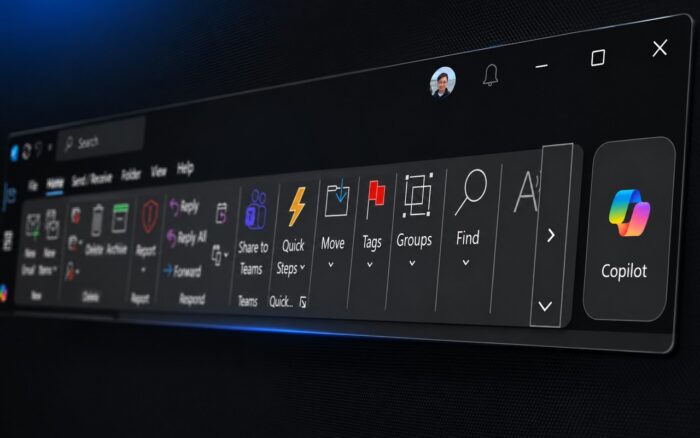
Copilot in Outlook Classic is getting a more prominent position as Microsoft moves the assistant directly into the app’s ribbon. Microsoft is also preparing a new “Explain this” feature that can clarify selected text inside emails.
Copilot is moving to the Outlook Classic ribbon
Microsoft is moving the Copilot button to the Outlook Classic ribbon, according to Message Center advisory MC1441784.
The new placement should make Copilot easier to find while bringing Outlook Classic closer to New Outlook and other Microsoft 365 apps.
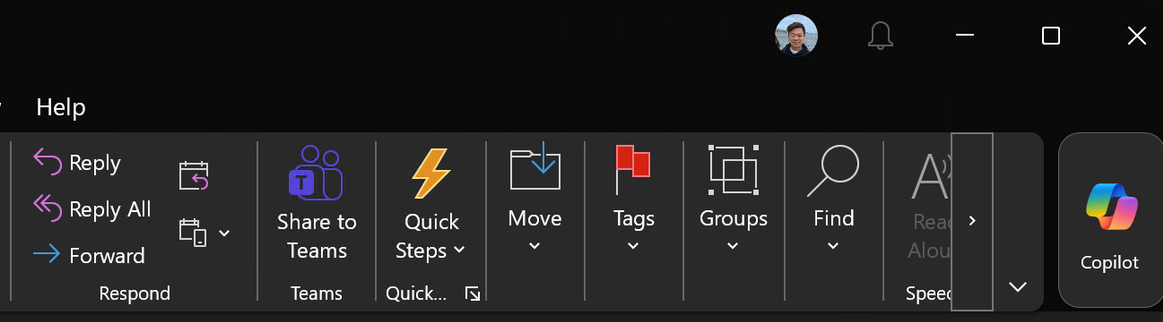
Microsoft is not removing the existing Copilot side pane. Users will still be able to open it, and Copilot will retain contextual awareness of their inbox.
Rollout starts in September
Microsoft plans to begin rolling out the new Copilot ribbon button to Outlook Classic commercial users in September 2026.
GCC, GCC-High, and Department of Defense customers will start receiving the change in October.
Microsoft will enable the feature by default for eligible users with a Microsoft 365 Copilot license.
Outlook Classic is also getting “Explain this”
Microsoft is separately adding a new “Explain this” Copilot feature to Outlook Classic, according to Message Center advisory MC1311978.
Users will be able to highlight a specific portion of text and select “Explain this.” Copilot will then generate an explanation or additional insights based only on the selected text.
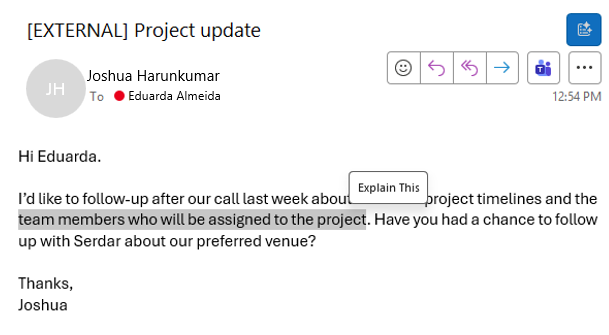
This narrower context could help users understand unfamiliar terminology, complicated sentences, or other parts of an email without asking Copilot to analyze the entire message.
“Explain this” arrives in October
Microsoft expects to begin rolling out “Explain this” to eligible Outlook Classic users in October 2026.
The company will enable the feature by default for customers with a Microsoft 365 Copilot license.
Microsoft is making other changes related to writing assistance in its productivity apps. The company will also turn off text predictions by default in Outlook.
In other Outlook news, Microsoft has delayed the retirement of the Outlook Usage Report, while New Outlook is getting a classic theme.
Via Neowin

Read our disclosure page to find out how can you help Windows Report sustain the editorial team. Read more



Improve this guide



User forum
0 messages