
Microsoft Turns Off Text Predictions by Default in Word and Outlook


 2 min. read
  Published on
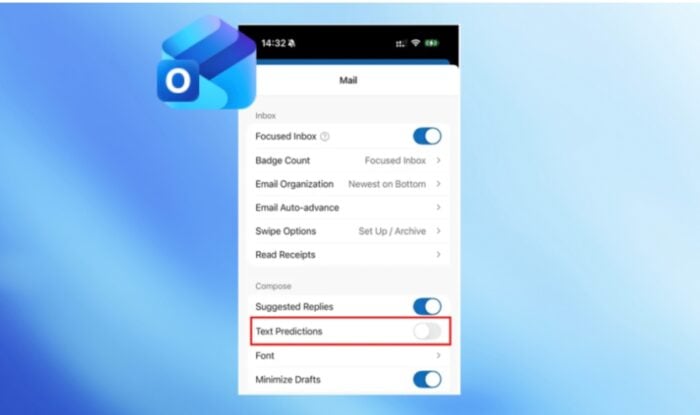
Microsoft is changing how text predictions work across Word and Outlook. The company has turned off predictive text suggestions will by default since yesterday for both the apps.
Text predictions in Word and Outlook are now optional
Microsoft says text predictions will remain available, but users must enable them manually. The change affects Word on Windows, web, Android, and iOS. It also covers classic Outlook on Windows and Outlook for Mac. Some Outlook mobile experiences already had predictions disabled by default, so those versions will not change.
This gives users a cleaner writing experience without automatic word and phrase suggestions appearing while they type. Microsoft says the feature remains useful for people who want faster document and email writing.
Users can still switch the feature back on through Settings. In Word, this appears under the text predictions setting, while Outlook users can access the relevant toggle through their settings.
If you’re wondering which versions or builds are affected across different platforms, here’s a list you can check:
- Word for Windows: Version 2609 (Build 20430.20000) or later.
- Classic Outlook for Windows: Version 2608 (Build 20329.20000) or later.
- Outlook for Mac: Version 16.113 (26080119) or later.
- Word for Android: Build 16.0.20326.20000 or later.
- Word for iOS: Version 2.112 (Build 26080127) or later.
Microsoft says rollout timing will appear through the Microsoft 365 admin center and release notes. Will Microsoft eventually make more intelligent writing assistance opt-in across Microsoft 365? Well, that’s something only time will tell.
What do you think about this change? Let us know in the comments below.

Read our disclosure page to find out how can you help Windows Report sustain the editorial team. Read more



Improve this guide


User forum
0 messages