
Windows 11 Experimental Build Finally Gives Magnifier Independent Zoom on Every Monitor


 4 min. read
  Published on
Microsoft recently released Windows 11 Insider Experimental Preview Build 26340.9354. The update already brings improved cross-device resume, but Microsoft has also added accessibility, audio, setup, and system improvements.
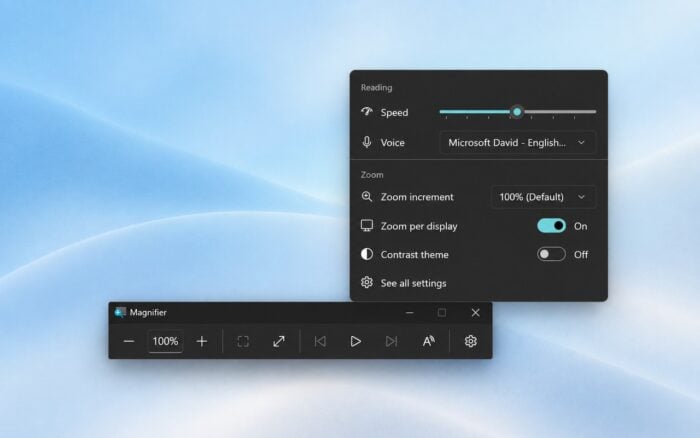
Magnifier can now zoom each monitor independently
Magnifier can now treat connected displays separately when users configure Windows 11 in Extend mode.
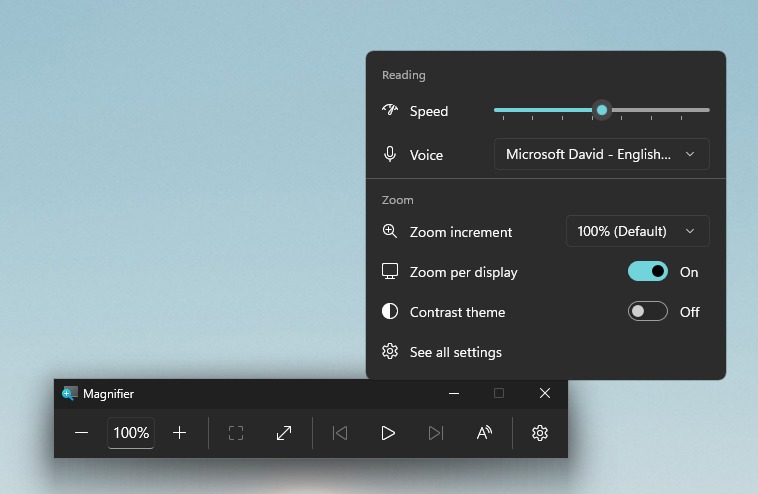
Each monitor can have its own zoom percentage instead of sharing one magnification level across the entire desktop.
Microsoft enables per-monitor zoom by default. Users who prefer the previous behavior can disable it and return to a single magnified view spanning multiple displays.

Magnifier also gains viewport locking. Users can lock the magnified view to one display, keeping content on that monitor fixed while working on another screen.
Microsoft also provides a keyboard shortcut for enabling the feature.
Sound settings gain more Control Panel features
Microsoft has expanded the Sound section of the Windows 11 Settings app with several controls that previously required other interfaces.
Volume sliders can now display live audio activity, making it easier to see which devices or applications are producing sound.
Supported hardware can also expose hardware acceleration controls directly inside Settings.
Users can now configure exclusive audio mode without opening Control Panel. Windows 11 also adds controls for adaptive communication sound levels, which can automatically reduce other audio when calls or other communication activity starts.
The communication default-device option will remain visible even when Windows cannot currently use it.
The All sound devices page now lets users change default devices, filter input and output hardware, and choose whether Windows displays disabled, disconnected, or unplugged devices.
Input and output device property pages can also show audio jack information when supported by the hardware.
Windows 11 adds support for more African writing systems
Microsoft has expanded its Ebrima font with support for Garay and Beria Erfe.
Garay entered the Unicode Standard with Unicode 16.0, while Beria Erfe arrived with Unicode 17.0.
Microsoft has also refined Adlam glyph designs to improve their consistency with current Unicode standards.
Microsoft temporarily removes modernized Print Management
The redesigned Print Management experience has temporarily disappeared from Windows Insider Preview builds.
Existing Print Management tools will remain available, so users can continue managing printers normally.
Notification Center keeps dismissed tips
Windows 11 can now save notification tips inside Notification Center after users dismiss them or after they time out.
This change gives users another opportunity to find and review a tip instead of losing it when the original notification disappears.
Microsoft fixes taskbar, cursor, and Admin Protection issues
Experimental Build 26340.9354 includes several fixes affecting everyday Windows 11 behavior.
Microsoft fixed an issue that prevented taskbar app previews from correctly reacting when users switched between dark and light modes.
The company also addressed a bug that could make the mouse cursor move in the wrong direction on portrait-oriented displays.
Another fix targets Admin Protection. Some Insiders previously encountered an issue where the User Account Control dialog failed to appear when Admin Protection was enabled.
Assisted Setup arrives at the end of OOBE
Microsoft is also testing a new optional Assisted Setup experience at the end of the Windows 11 out-of-box experience.
Users do not have to complete Assisted Setup and can skip it to go directly to the Windows desktop.
Microsoft fixes SYSTEM SERVICE EXCEPTION crashes
The build addresses a reliability issue that caused some Windows Insiders to encounter a SYSTEM SERVICE EXCEPTION crash when launching or closing certain applications.
Microsoft has not indicated that the problem affected all applications or all systems running the Experimental Preview build.
Two customization bugs remain
Microsoft still lists several known issues in Build 26340.9354.
Mouse cursor customization may not work correctly for some Insiders.
Windows 11 can also fail to retain desktop background customization after a reboot, forcing affected users to configure their wallpaper again.
Regular Windows users are receiving updates as well. Microsoft has released its September 2026 Windows 11 Patch Tuesday updates alongside Windows 10 KB5122878.

Read our disclosure page to find out how can you help Windows Report sustain the editorial team. Read more



Improve this guide



User forum
0 messages