
Windows 11 Gets a New Microsoft 365 Renewal Prompt You Might Not Have Asked For


 2 min. read
  Published on
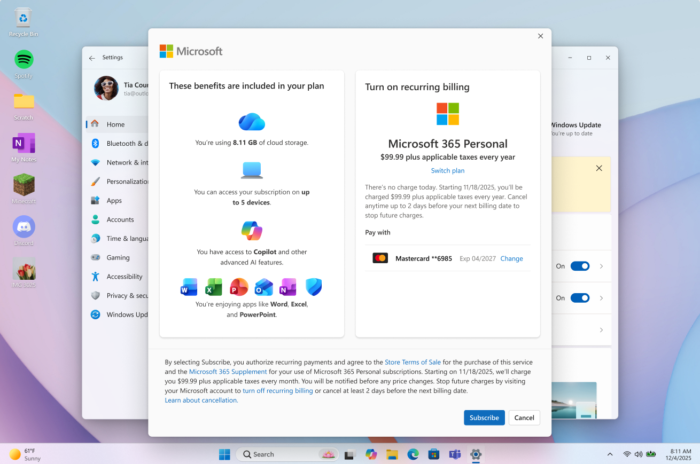
Microsoft is giving Windows 11 another Microsoft 365 subscription prompt, making it easier for subscribers to switch automatic billing back on. The new option appears directly inside Windows, removing the need to open a separate webpage. However, it also gives Microsoft another place to remind users about their paid subscriptions.
Microsoft 365 auto-renewal comes to Windows 11 settings
The new experience targets Microsoft 365 subscribers who have disabled recurring billing. Instead of navigating Microsoft’s website, users can select Turn on recurring billing or Set up recurring billing directly in Windows.
Microsoft is adding these shortcuts to the Settings Home page, the Accounts page, and the Start menu. The change makes subscription management more convenient for users who want their Microsoft 365 plans to renew automatically. That said, the feature only helps users enable recurring billing.
Windows 11 could get more subscription reminders
The feature is part of Windows 11 Insider Experimental Preview Build 26340.9767, released on last Friday. Microsoft is rolling it out gradually, so not every Insider will see the option immediately. The same build introduces several other changes, including an internet speed test in Quick Settings, connected-phone controls, and improved File Explorer loading indicators. Microsoft has also expanded Narrator’s math-reading language support and updated the Widgets picker.
When will the new Microsoft 365 prompt reach everyone?
For now, the recurring billing shortcut remains an experimental feature rather than a confirmed release for all Windows 11 users. Microsoft has not announced a general availability date, and experimental features can change before reaching the stable version. Users who deliberately disabled automatic billing may also see the new placement as another subscription reminder inside Windows.

Read our disclosure page to find out how can you help Windows Report sustain the editorial team. Read more



Improve this guide


User forum
0 messages