
Microsoft Gives Windows 11 a New Recovery Option That Reinstalls the OS From the Cloud


 2 min. read
  Published on
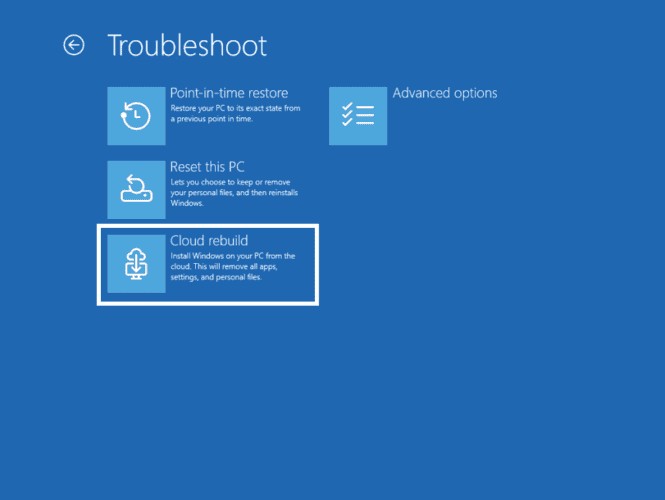
Windows 11 is getting a new recovery option that could make fixing a broken PC considerably easier. Microsoft has introduced Cloud rebuild with KB5127936, allowing users to reinstall Windows using files downloaded through Windows Update. The feature can also help recover devices that fail to start.
Windows 11 Cloud rebuild can recover PCs that refuse to boot
Cloud rebuild reinstalls Windows 11 using a Windows image and device drivers downloaded from Windows Update. Unlike traditional recovery methods, it does not require a USB drive or custom installation image.
To start the process, open Settings, navigate to System, and select Recovery. Choose Rebuild PC to restart into the Windows Recovery Environment and begin the process. Things work differently if Windows cannot start. After repeated boot failures, the PC can enter the Windows Recovery Environment automatically. From there, select Troubleshoot, Recovery and uninstall, and Cloud rebuild.
You will need an Ethernet or Wi-Fi connection to download the required files. Before proceeding, Windows displays the target build, edition, and language. You must also review the data loss warning before starting the rebuild.
Cloud rebuild adds data sanitization and remote management
One of the more important additions is the option to erase data before reinstalling Windows. Users can choose to remove their files or securely sanitize storage using the hardware’s erase capability. However, Microsoft warns that sanitization is irreversible. Make sure you have backed up important files before choosing this option.
The feature also targets managed business devices. IT administrators can configure and initiate Cloud rebuild remotely through the Recovery Configuration Service Provider. They can use the currently installed Windows build or specify a target build.
Windows 11 recovery gets another useful option
Cloud rebuild gives users another way to reinstall Windows when traditional recovery becomes difficult. It also removes the need to prepare installation media beforehand. The feature is included in Windows 11 KB5127936. However, users should review the available recovery options carefully, especially when choosing to erase their data.

Read our disclosure page to find out how can you help Windows Report sustain the editorial team. Read more



Improve this guide



User forum
0 messages