
How to Log In to Voya Financial on PC and Mobile


 4 min. read
 Published on

Voya allows you to access your retirement savings, 401(k) plans, employee benefits, and other financial accounts online. You can log in to Voya via the website or mobile app using your username and password.
How do I log in to my Voya account?
1. Use a web browser
Voya Financial provides a central login page where individuals can access multiple accounts, including retirement plans, health savings accounts, and other financial services.
Follow these steps to sign in to your Voya account:
- Open your preferred web browser.
- Visit the official Voya login page.
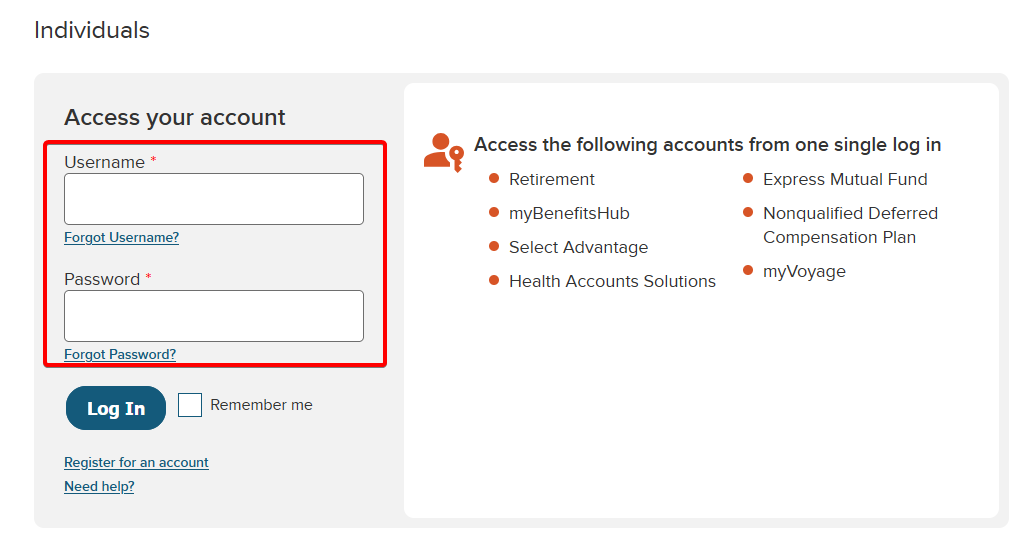
- Find the Access your account section.
- Enter your Voya username in the Username field.
- Type your password in the Password field.
- Complete any additional identity verification if Voya requests it.
- Click Log In to access your account.
2. Use the mobile app
Voya also offers a mobile app that lets you access your retirement savings and other supported financial accounts from your smartphone.
To sign in through the Voya mobile app:
- Open the Apple App Store or Google Play Store.
- Search for the official Voya mobile app.
- Download and install the app.
- Open the app and select the login option.
- Enter your Voya username and password.
- Complete any requested security verification.
- Access your account dashboard.
Depending on your device and account settings, you may also be able to use biometric authentication for faster access.
You can learn more about the app and its features on Voya’s mobile app page.
How to Fix Voya Login Problems
If Voya login is not working, try these solutions to resolve common sign-in issues:
- Check your login credentials – Make sure you enter the correct username and password. Check for typing errors and confirm that Caps Lock is off.
- Reset your password – Click Forgot Password? on the login page and follow the instructions to recover your account.
- Clear your browser cache and cookies – Remove outdated browser data, restart your browser, and try logging in again.
- Try another browser or device – Use an updated version of Chrome, Firefox, Edge, or Safari, or sign in from another device.
- Check your verification method – Confirm that you can access your registered email or phone number. Check your spam folder if you do not receive a verification code.
Once you register for online access, you can sign in to Voya using your credentials and complete any required security checks. If you manage other financial accounts, you can also learn how to log in to your Federal Student Aid account, access Capital One online banking, or fix Huntington app login problems.
Frequently Asked Questions
What is the official Voya login website?
The official Voya account login page is https://www.voya.com/accounts. You can use it to access supported retirement, health savings, and other financial accounts.
Can I access my Voya 401(k) account online?
Yes. If you participate in an employer-sponsored 401(k) plan managed by Voya, you can typically access your account online. Available features depend on your employer’s retirement plan.
What should I do if I forgot my Voya login password?
Select Forgot Password? on the Voya login page and follow the identity verification instructions. You can then reset your password and try signing in again.
Can I access my Voya account from my phone?
Yes. Voya offers a mobile app for Android and iPhone users. You can use it to view supported accounts, check balances, and manage available retirement plan features.
Why can’t I log in to my Voya account?
Incorrect credentials, outdated browser data, security verification issues, or temporary website problems can prevent you from signing in. Try resetting your password, updating your browser, or contacting Voya customer support.

Read our disclosure page to find out how can you help Windows Report sustain the editorial team. Read more


Improve this guide
User forum
0 messages