
Pinterest Widget Not Working? 6 Easy Ways to Fix It


 4 min. read
 Published on

If your Pinterest widget is not working, showing blank images, or failing to update, you can try several fixes. The problem can occur after an app or system update, but you can often restore the widget without losing your saved Pins.
What can I do if the Pinterest widget is not working?
1. Remove and add the Pinterest widget again
Removing and recreating the widget can resolve temporary loading and configuration problems.
- Press and hold the Pinterest widget on your home screen.
- Select Remove Widget.
- Restart your iPhone or Android device.
- Press and hold an empty area on your home screen.
- Open the widget menu and search for Pinterest.
- Select your preferred widget and add it to your home screen.
On iPhone, press and hold the new widget, select Edit Widget, and choose the Pinterest board you want to display, if the option appears.
2. Update the Pinterest app
An outdated Pinterest app may cause widgets to stop displaying images or updating correctly.
- Open the App Store on iPhone or Google Play Store on Android.
- Search for Pinterest.
- Tap Update if a newer version is available.
- Open Pinterest and check whether you are logged in.
- Return to your home screen and check the widget.
3. Enable Background App Refresh on iPhone
Background App Refresh may help Pinterest keep its widget content updated.
- Open Settings on your iPhone.
- Go to General > Background App Refresh.
- Enable Background App Refresh.
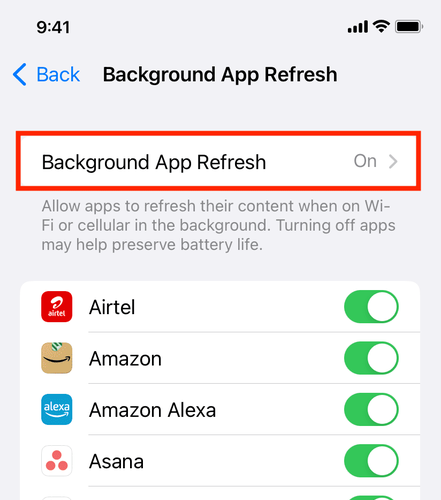
- Find Pinterest and turn on its toggle.
- Return to your home screen and check whether the widget updates.
Also check whether Low Power Mode is active, as it can prevent background refresh.
4. Fix the missing Edit Widget option
Some iPhone users report that the Pinterest widget no longer displays the Edit Widget option, preventing them from selecting a board.
Try these steps:
- Remove the existing Pinterest widget.
- Open Pinterest and confirm that your boards load correctly.
- Add a new Pinterest Boards widget, if available.
- Press and hold the widget and look for Edit Widget.
- If the option remains missing, update Pinterest and iOS.
If the option still does not appear, the problem may involve a Pinterest widget bug rather than an incorrect iPhone setting.
5. Clear the Pinterest cache on Android
Corrupted cached data can interfere with Pinterest and its widgets.
- Open Settings > Apps > Pinterest.
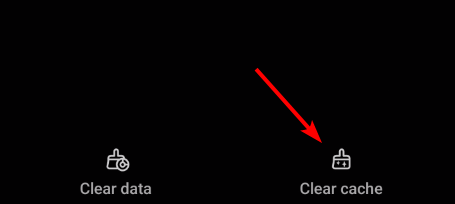
- Select Storage & cache.
- Tap Clear cache.
- Restart Pinterest.
- Check whether the widget works.
Avoid selecting Clear storage unless necessary, as this resets local app data and requires you to sign in again.
6. Reinstall Pinterest
If the widget remains blank, frozen, or unavailable, reinstalling Pinterest may help.
- Remove the Pinterest widget from your home screen.
- Uninstall the Pinterest app.
- Restart your phone.
- Reinstall Pinterest from the App Store or Google Play Store.
- Sign in and add the widget again.
Reinstalling Pinterest normally preserves your saved Pins and boards, but you may lose locally stored drafts.
If your Pinterest widget is not working, start by removing and adding it again, updating Pinterest, and enabling background refresh. If the widget still fails or the Edit Widget option is missing, Pinterest may need to release a fix.
If you’re experiencing other issues, you can also check how to fix Pinterest in Chrome, resolve a Pinterest validation error, or troubleshoot a Pinterest browser button that isn’t working.
FAQs
Why is my Pinterest widget blank?
The widget may fail to load because of an outdated Pinterest app, disabled background refresh, connectivity problems, or a software bug. Try reopening Pinterest, updating the app, and recreating the widget.
Why can’t I edit my Pinterest widget on iPhone?
A missing Edit Widget option may result from a Pinterest app bug or a change in widget functionality. Update Pinterest, remove the widget, and add it again.
Why isn’t my Pinterest widget showing my boards on Android?
The available Pinterest widget features differ between Android and iOS. Some board-selection features may only appear on iPhone.
Does deleting the Pinterest widget remove my saved Pins?
No. Removing the widget does not delete your saved Pins or Pinterest boards.

Read our disclosure page to find out how can you help Windows Report sustain the editorial team. Read more


Improve this guide
User forum
0 messages