
Chrome is getting an easier way to delete multiple AI Skills at once
Google is adding a Skills checkbox to Chrome’s Delete browsing data dialog, letting users delete saved Skills based on a selected time range.


 2 min. read
  Published on
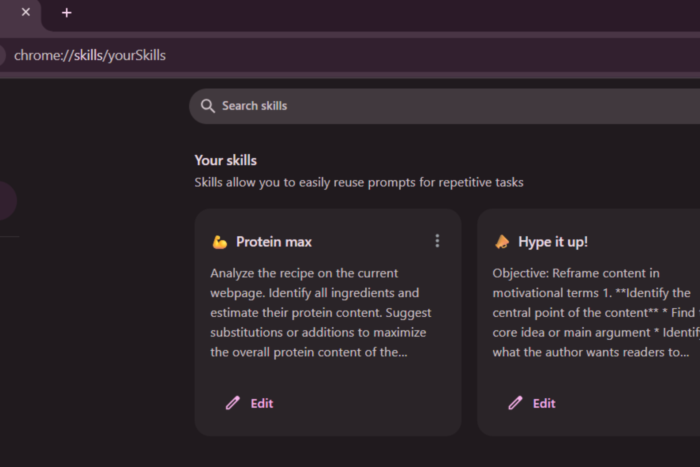
Chrome already lets you manage and delete individual Skills. Google is now working on an easier way to clear several Skills at once by adding a Skills checkbox to the Delete browsing data dialog.
Skills are saved AI prompts that you create in Chrome and can reuse for particular tasks. They give you a way to save instructions you may want to use again instead of writing the same prompt from scratch. Chrome can use these Skills with its AI features, including Gemini in Chrome.
You can already disable Skills in Chrome
Chrome already gives you an option to disable Skills altogether. You can find it under Settings > AI in Chrome. Disabling Skills prevents them from appearing in Gemini in Chrome, but it doesn’t delete the Skills you have already created.
If you want to remove your Skills, Chrome currently provides a dedicated page at chrome://skills/browse, where you can manage and delete them individually.
Chrome is making it easier to delete saved Skills
According to a commit first spotted by Windows Report, Google is now working on adding a Skills checkbox to Chrome’s Delete browsing data dialog. The checkbox isn’t selected by default and will appear alongside the other types of data that Chrome lets you clear.
Once the change is available, you won’t have to visit the Skills page and delete your Skills one by one. Instead, open Delete browsing data, select the Skills checkbox, choose a time range, and click Delete data. If you select All time, Chrome can delete all eligible user-created Skills at once.
The selected time range matters because Chrome will delete your Skills based on when they were last updated. For example, choosing a shorter time range will only remove Skills that were modified during that period.
The Skills option may also appear in the Delete browsing data dialog even if you haven’t created or used any Skills, similar to other data types Chrome allows users to clear. The checkbox is shown when the Skills feature is enabled for the Chrome profile.
According to the change, the new option specifically targets user-created Skills. First-party and enterprise-provided Skills aren’t treated as the user’s data and won’t be removed. If Skills sync is enabled, the deletion can also be propagated through sync to the user’s account and other devices.


Read our disclosure page to find out how can you help Windows Report sustain the editorial team. Read more



Improve this guide




User forum
0 messages