
Chrome UI Refresh 2026 starts in Settings with new themed colors on Windows 11
Early Chrome UI refresh changes hit Settings and the AI in Chrome page in Canary.


 2 min. read
  Published on

Chrome Canary now applies stronger themed colors across the Settings page and renames the browser’s “AI innovations” section to “AI in Chrome.” These changes show up in recent Canary builds on Windows 11 and look like the first visible pieces of Chrome’s latest UI changes, which we refer to here as Chrome’s 2026 UI refresh.
Chromium changes internally refer to this project as “GlowUp.” Recent commits linked to GlowUp mention themed colors, refreshed WebUI styling, updated icons, and work on internal pages, including Settings, Bookmarks, and History. Google has not announced a public name for this set of visual updates, but for clarity, we call it “Chrome UI Refresh 2026” in this article.
The biggest visual change appears in chrome://settings. Compared to Chrome Beta, Canary now spreads the selected browser theme color across more of the Settings interface instead of relying mainly on neutral gray surfaces and blue accents.

The top toolbar carries a deeper tint, while the search field, sidebar highlight, buttons, and some toggles now match the active browser color more closely. Chrome Beta still keeps several parts of the page closer to Chrome’s default color styling, so the difference is easy to spot side by side.

Chrome Canary does not change the Settings layout itself; the update focuses on how colors appear across the page. A Chromium change called “[GlowUp] Use themed colors in Settings” lines up with the visual differences now visible in Canary.
The color work appears alongside another change called “[GlowUp] Update AI settings page title.” In current Canary builds, Chrome now labels the AI hub in Settings as “AI in Chrome” instead of “AI innovations,” while keeping tools like “Help me write” under the same page.
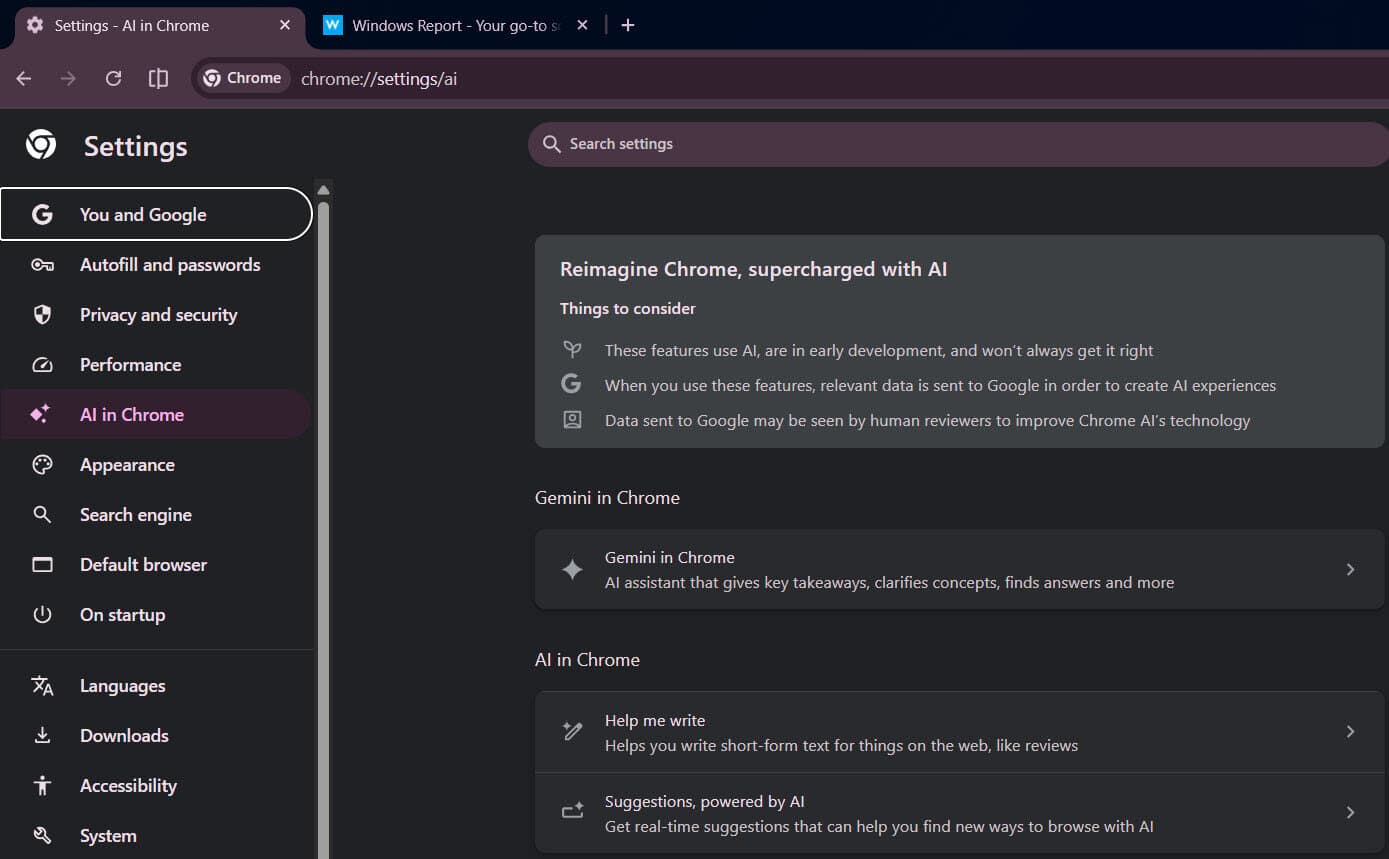
Internal wording says this section groups settings related to AI features in Chrome, which makes the label clearer and helps the page feel like a normal part of the browser instead of a separate experiment.
Google has also started testing a “Suggestions, powered by AI” toggle in this section,which offers real‑time browsing suggestions based on open tabs.


Read our disclosure page to find out how can you help Windows Report sustain the editorial team. Read more



Improve this guide

User forum
0 messages