
How to disable LinkedIn integration on Teams and Microsoft 365


 2 min. read
  Updated on


World-class 24/7 support with 82% for a 2 years plan and 2 months free
70% of our readers choose Private Internet Access
70% of our readers choose ExpressVPN

Amazing connection speed with 61% off and 4 months free for the 2-years plan.

Best security protocols with 83% off and 2 months free for a 2-year plan.
This Teams guide will show you how to enable and disable LinkedIn integration in Teams and Microsoft 365. This feature quietly rolled out in March 2022. When the feature is rolled out to your organization, it is enabled by default.
If enabled, LinkedIn integration allows users to connect their Microsoft account to their LinkedIn account so they can connect with LinkedIn profile connections in Teams and other Microsoft apps like Outlook.
Unfortunately, the LinkedIn tabs in Outlook and Teams cannot be disabled. However, one enterprising redditor found a way for administrators to disable it.
Microsoft Azure AD (Active Directory) administrators can disable the ability for users to be able to connect their Microsoft and LinkedIn profiles.
Disable LinkedIn integration
Please note: If you don’t have administrator privileges, you will not be able to disable LinkedIn integration on Teams and Microsoft 365! If you need extra help, there is a YouTube video explaining what to do.
If you are an administrator, here’s what you need to do to disable LinkedIn integration from Teams and Microsoft Office 365.
1. Log into the Azure AD admin center with an account that’s a global administrator for your organization.
2. Select Users.
3. On the Users page, select User settings.
4. Under LinkedIn account connections, allow users to connect their accounts to access their LinkedIn connections within some Microsoft apps.
4a. Choose Yes to enable the LinkedIn integration service for all users in your organization.
4b. Choose Selected group to enable the service for only a group of selected users in your organization.
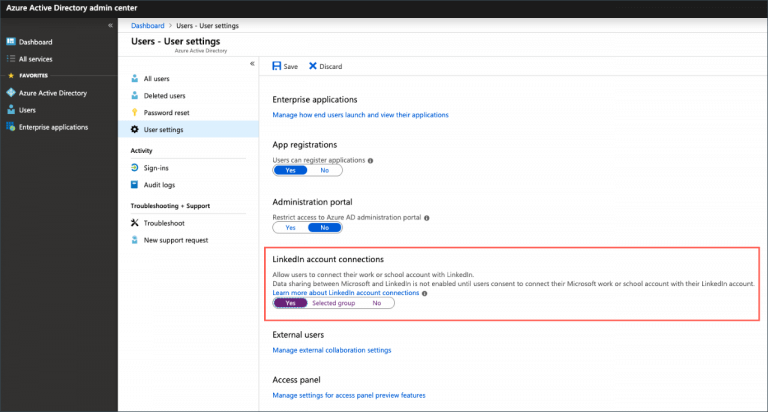
4c. Choose No to withdraw consent from all users in your organization.
5. Click Save to save your settings when finished.
You can see what data is collected between Microsoft and LinkedIn accounts and profiles when the feature is enabled.
To learn more about LinkedIn, you can check out this dedicated guide to LinkedIn Games and stay informed.
Do you like the LinkedIn integration on Teams and other Microsoft apps? Let us know in the comments!


Read our disclosure page to find out how can you help Windows Report sustain the editorial team. Read more



Improve this guide




User forum
0 messages