
How to Log In to Denticon: Step-by-Step Guide


 3 min. read
  Published on

Denticon is used by dental practices to manage scheduling, patient records, billing, and reporting. You must have a username and password provided by your dental organization to log in.
How do I log in to Denticon?
1. Use the Denticon Login page
If you are signing in for the first time or just need a quick refresher, follow these exact steps to access your account.
- Open Google Chrome or Microsoft Edge.
- Go to the Planet DDS website.
- Click Denticon Login in the top menu.
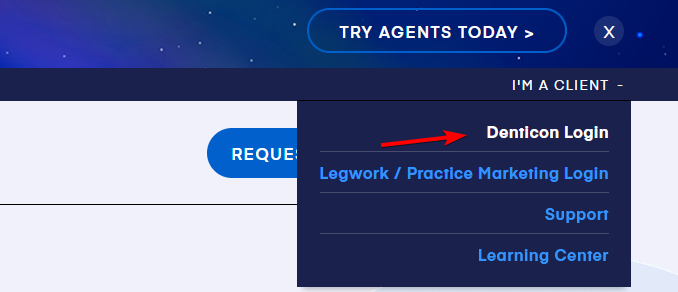
- Enter your username.
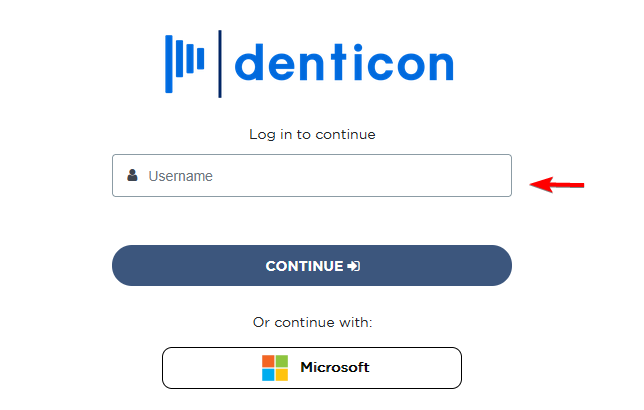
- Click Continue.
- Enter your password on the next screen.
- Complete the login process to access your dashboard.
Denticon uses a two-step login system. You enter your username first and your password on the next screen.
2. Use Microsoft SSO to log in
Microsoft login only works if your dental office has enabled single sign-on. If your office has not enabled it, this option will fail.
- Open the Denticon login page.
- Click the Microsoft sign-in option.
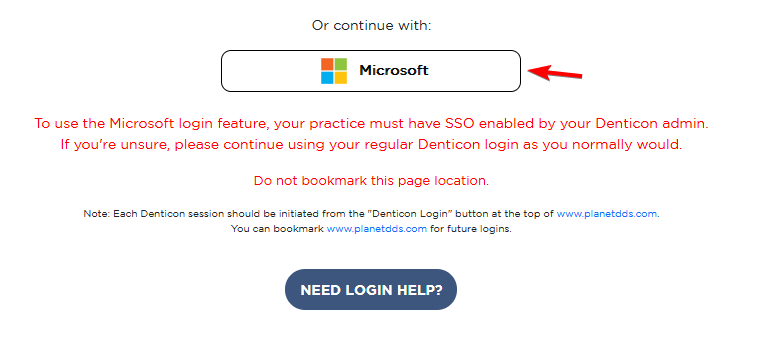
- Select your work Microsoft account.
- Complete any verification prompts, including multi-factor authentication.
- Wait for Denticon to redirect you to your account.
If Microsoft sign-in fails, use your regular Denticon username and password instead.
Denticon login security tips
Follow these steps to keep your account secure.
- Always use the official Planet DDS login page.
- Never share your password with coworkers.
- Avoid saving credentials on shared computers.
- Log out after each session.
- Verify the website address before entering your credentials.
- Report suspicious login activity immediately.
- Use Microsoft SSO only if your office has approved it.
This is not our only login guide. You can also read our Facebook login guide and our step-by-step guide explaining how to log in to ChatGPT.
FAQs
What is the official Denticon login process?
Go to the Planet DDS website, click Denticon Login, enter your username, click Continue, and then enter your password to sign in.
Can patients use Denticon login?
No. Denticon is designed for dental staff. Patients should use their clinic’s patient portal or contact the dental office.
Why does Microsoft login not work?
Your office may not have enabled Microsoft SSO. Try your Denticon username and password or ask your administrator for help.
Can Denticon Support tell me my username?
No. Only your office administrator can find it under Setup > Security > Users.
Which browsers support Denticon?
Use the latest version of Google Chrome or Microsoft Edge for the best performance.
Why should I avoid bookmarking the login page?
The login page can change. Bookmark the Planet DDS homepage and always start the login process from there.

Read our disclosure page to find out how can you help Windows Report sustain the editorial team. Read more



Improve this guide




User forum
0 messages