
KB5067115 Brings Ask Copilot in Windows 11 Taskbar with Instant AI Search
A faster way to find apps, files, and answers


 2 min. read
  Published on

Microsoft is making Copilot a core part of Windows 11, not just a sidebar experiment. With the latest Insider Preview Build 26220.7051 (Dev and Beta Channels) under KB5067115, the company has introduced a new “Ask Copilot” shortcut right inside the taskbar, bringing AI to your fingertips for everyday use.
Once enabled, Ask Copilot lets you search for apps, files, settings, or even chat directly with Copilot using voice or text. Think of it as the evolution of Windows Search, but smarter.
When you start typing, results instantly adapt, pulling from your device and Copilot suggestions in one unified view. Microsoft explicitly says that the feature is opt-in. Microsoft notes that the feature “complements the familiar Windows Search experience.” This way, you can “continue using Search as you always have from Start while trying out this new experience,” the company added.
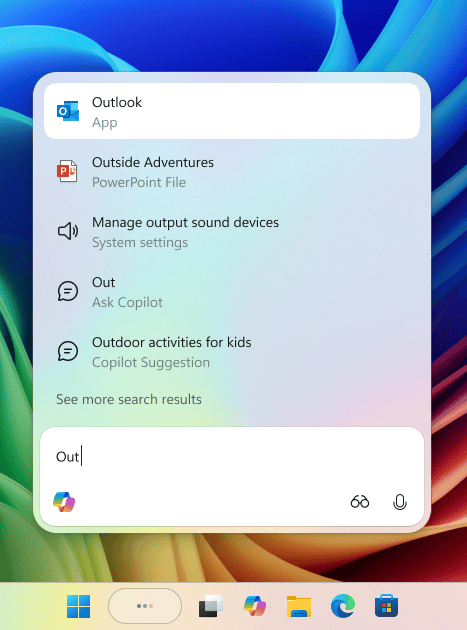
You can head to Settings > Personalization > Taskbar > Ask Copilot to enable it. You can also set Copilot to auto-launch at sign-in from the Copilot app settings. More importantly, Ask Copilot runs on existing Windows APIs, meaning it doesn’t access your private files unless you ask it to.
The company notes, “Ask Copilot uses existing Windows APIs to return apps, files, and settings—just like Windows Search—and does not grant Copilot access to your personal content. For more details, you can learn about privacy and control options for Microsoft Copilot here.”
Not to forget, this update comes alongside the new Full Screen Experience for more handhelds and Shared Audio Preview.

Read our disclosure page to find out how can you help Windows Report sustain the editorial team. Read more



Improve this guide



User forum
0 messages