
Microsoft Expands Full Screen Experience (FSE) to More Handhelds with Windows 11 KB5067115
Xbox-style gaming UI now rolling out beyond ROG Ally


 2 min. read
  Published on

Microsoft has released Windows 11 Insider Preview update KB5067115, which bumps system on version 25H2 to Build 26220.7051. And this one expands the Full Screen Experience (FSE) to more handheld gaming PCs.
Following its debut on the ASUS ROG Xbox Ally and ROG Ally X, the new preview now extends to MSI Claw models. Microsoft says that additional OEMs expected to follow in the coming months.
For the uninitiated, the Full Screen Experience (FSE) is a console-style interface built around the Xbox PC app. It’s designed for clean, distraction-free navigation on portable gaming devices. Once enabled, users get smoother task switching, improved performance, and reduced background activity. In short, it’s quite handy for handheld play.
Microsoft says this setup “keeps gameplay responsive and uninterrupted,” effectively turning Windows handhelds into mini-Xbox consoles.
How to enable Full Screen Experience
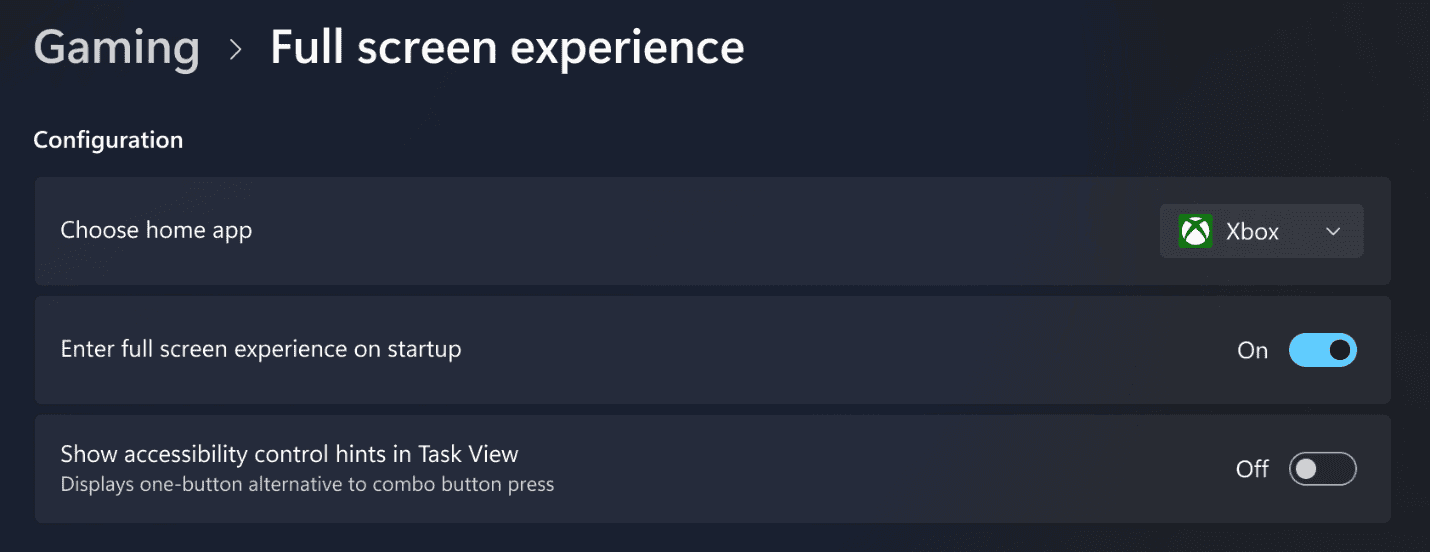
- Go to Settings > Gaming > Full screen experience.
- Select Xbox as your home app.
- You can then launch FSE from Task View or the Game Bar.
- To streamline startup, set your device to boot directly into FSE.
The update also comes alongside other notable improvements in KB5067115, including Ask Copilot integration in the Windows taskbar. With Microsoft expanding FSE support, Windows 11 handheld gaming is evolving from a niche experience into a full-fledged, console-like platform.

Read our disclosure page to find out how can you help Windows Report sustain the editorial team. Read more



Improve this guide

User forum
0 messages