
KB5120998 Finally Lets You Kick Bing Out of Windows 11 Search


 2 min. read
  Published on
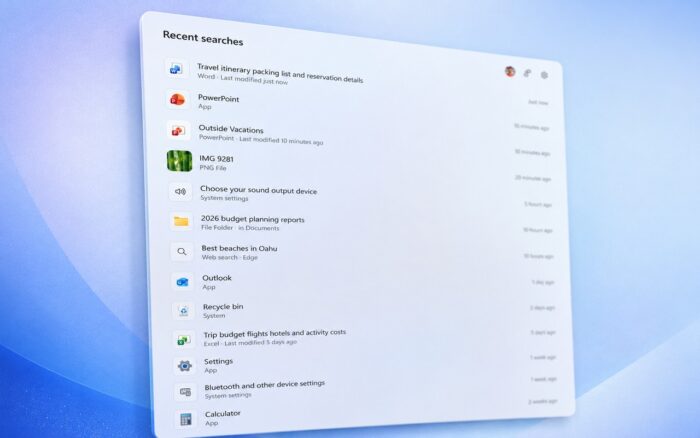
Windows 11 Search is getting a major redesign with the optional August 2026 update, giving users more control over Bing results and Microsoft Store suggestions.
Microsoft introduced the changes with KB5120998. The new Search experience removes several Bing-powered elements, including the image of the day, trivia, trending searches, and suggested apps.
Microsoft is gradually releasing the feature through Controlled Feature Rollout, so installing KB5120998 does not guarantee immediate access.
You can force-enable the new Windows 11 Search
According to Windows Latest, users can activate the redesigned Search early with ViVeTool.
Download and extract ViVeTool, open Command Prompt as administrator, navigate to the ViVeTool folder, and run:
vivetool /enable /id:62353331,62762248Restart Windows after running the command.
If some Search options remain unavailable, enable the complete feature bundle with:
vivetool /enable /id:61161244,61754985,62353331,62762248Users can replace enable with disable to reverse the changes. These feature IDs may stop working once Microsoft enables the features permanently.
Windows 11 lets you disable Bing without losing Store results
Windows 11 now includes a Show suggested search results section under Settings > Privacy & security > Search.
Microsoft provides separate toggles for Web Searches and Microsoft Store results. Users can disable Bing-powered web results while keeping Store suggestions, or turn both options off for a fully local Search experience.
Turning off Web Searches can also make Windows Search feel faster because it no longer waits for online results. If Windows cannot find a local match and both online options remain disabled, Search can simply return no result.
This is not the only change in KB5120998. The update also improves Windows Security and adds a new progress UI, alongside other Windows 11 improvements.

Read our disclosure page to find out how can you help Windows Report sustain the editorial team. Read more



Improve this guide


User forum
0 messages